November 22, 2026Ceren Kaya Akgün
AI Job Search Agent: Employers, Not Job Boards
Build an AI job search agent that reads employers' own job lists, drops stale postings with a free date rule and stops at a review page. Import the free card.
It is Sunday evening and your browser has fourteen tabs open: two job boards, a newsletter, three saved searches and a spreadsheet you stopped updating on Wednesday. Half the postings say "posted 2 days ago". You have no way to tell which of them an employer would still answer.
An AI job search agent can do the reading for you. It looks at open postings, scores them against what you want and drafts a short note for each good one. What decides whether it helps is where the postings come from.
Many guides start from a job board. This one starts from the employer: the agent reads the public job list each employer publishes, drops old postings with a free date rule before any model reads them, drafts only from a fact sheet you wrote, and stops at a review page. You press apply.
The short version
- An AI job search agent is a workflow that reads open postings, scores them against what you want and drafts a note for each good one. It does not have to apply for you, and the one in this guide cannot.
- Start from the employer, not the job board. Greenhouse, Lever and Ashby each document a public list of an employer's open jobs, with the date the employer published each one. No login, no scraping.
- A free rule on that date removes stale job postings before a model reads anything. On three public job lists we read on 22 November 2026, 390 of 900 postings (43.3%) had been up longer than 60 days.
- The agent drafts only from a numbered fact sheet and stops at a review page where you edit and accept. We ran the card on Heym 0.0.166 with a placeholder model, so its numbers describe the date rule and the review step, not how any model writes.
Everything below is checked against the pages we cite or counted from our own run, and the card is free to import.
What Heym is: Heym is a source-available, self-hosted AI agent platform with a visual canvas for multi-agent pipelines, RAG and MCP. Everything this post says about Heym comes from its shipped source and documentation at version 0.0.166, released on 21 November 2026, and from dated runs on 22 November 2026, not from a roadmap.
Table of Contents
- What Is an AI Job Search Agent?
- Can AI Apply to Jobs for Me?
- Where the Jobs Should Come From
- Stale Job Postings: A Free Rule Before the Model Reads Anything
- How to Build an AI Job Search Agent Without Code
- The AI Job Search Agent Template
- What the Run Showed
- Will AI Make Things Up in My Cover Letter?
- Where Your CV Goes
- What to Keep for Yourself
- What Does an AI Job Search Agent Cost?
- Where to Start
- Frequently Asked Questions
- Sources
What Is an AI Job Search Agent?
An AI job search agent is a workflow that reads open job postings for you, scores each one against what you are looking for and drafts a short note for the ones worth a message. It works from a list you give it, it can run on a schedule, and it stops before anything leaves your hands.
A job alert tells you that a posting exists. An AI agent for job search reads it. That difference is the point: an alert leaves you with forty tabs, and an agent leaves you with a short list and a reason for each line. If you want to automate your job search without handing over the send button, this guide is for you. It is written for job seekers who do not write code.
| Job | What it does | Who does it in this guide |
|---|---|---|
| Look | Reads the open postings of the employers you follow | A code step, no model |
| Narrow | Drops postings that are old, in the wrong place or the wrong title | The same code step, no model |
| Score and draft | Scores each posting against your fact sheet and writes a short note | The agent |
| Decide and apply | Reads the shortlist, edits it and presses apply | You |
Two terms get a plain meaning here. A posting is one open job on an employer's list. A fact sheet is a short numbered list of things that are true about you, one per line. Both come back below.
This guide is not a list of products to buy, a way to send hundreds of applications a day, or advice on interviews. It is a way to hand the reading to an agent and keep the decisions.
Can AI Apply to Jobs for Me?
It can, and the better question is whether it should. Products that submit applications for you exist, and a workflow like the one below could be extended to do it. The agent in this guide stops at a review page on purpose. Three outside sources explain why.
Employers notice. In a survey of 600 US hiring managers by TopResume, reported by the US Chamber of Commerce's CO publication in August 2025, nearly 20% said they would reject a candidate who used an AI generated resume or cover letter, and 33.5% said they can spot one within about 20 seconds.
Volume has a cost. The BBC reported on 14 October 2026 that the Institute of Student Employers surveyed 155 of the UK's biggest graduate employers. 92% had met or suspected AI misconduct in selection, up from 85% a year earlier, most often a live assistant in video interviews or online assessments.
Its joint chief executive, Stephen Isherwood, said AI assisted "spray and pray" applications are "driving up the competition and pressure on students". EDF closed its graduate scheme early after 12,000 applications, 10% more than the year before, and its head of early careers recruitment said AI almost certainly contributed.
The facts have to be yours. Priya Rathod, workplace trends editor at Indeed, told Business Insider in April 2026 that AI sometimes exaggerates qualifications and hallucinates job responsibilities. Bentley University lists exaggerated skills among the risks of using AI in a job search. An agent that submits on its own submits those mistakes too.
Is It OK to Use AI to Apply for Jobs?
Mostly yes, as help. In the TopResume survey, 52% of hiring managers said AI is acceptable for proofreading or support in drafting documents, as long as the final product is the person's own words. The BBC reports that graduate employers are becoming more accepting of AI at some stages, most commonly for cover letters and CVs. The line sits at the live moment: 57% of the managers said answer generating apps should never be used in an interview.
So the rule of thumb is short. Let the agent read and draft. Check every claim. Answer interviews and assessments yourself.
An AI Job Search Agent Without Auto Apply
The agent in this guide has no tool that submits an application, sends a message or saves a row. It can read text, write text and ask you for a review, and that is all. That is a design choice, and the review page is where you stay in charge.
Where the Jobs Should Come From
An AI job search agent should read the employer's own public job list first, because that list carries the date the employer published each posting.
Of the 52 pages we read on 22 November 2026 from search results about job search agents, 11 scrape a job board or drive a browser, 2 mention that a site's rules may not allow it, and 1 names an official feed, only as a place to plug in later. One newsletter says plainly that "scraping LinkedIn is against their terms of service". None of the 52 documents the public job lists described below.
Employers already publish what an agent needs. Greenhouse, Lever and Ashby are three applicant tracking systems, the software many employers use to run hiring. Each documents a public list of an employer's open jobs, made so a company can build its own careers page.
Greenhouse calls its version the Job Board API and describes it as "a simple JSON representation of your company's offices, departments, and published jobs". JSON is a plain text list format that programs read, and the card reads it for you. Lever says its Postings API "is designed to help you create a job site". Ashby says that if you host your own careers page, you can use its list to populate it.
| System | Public list address | Date field |
|---|---|---|
| Greenhouse | boards-api.greenhouse.io/v1/boards/TOKEN/jobs | first_published |
| Lever | api.lever.co/v0/postings/COMPANY?mode=json | createdAt |
| Ashby | api.ashbyhq.com/posting-api/job-board/NAME | publishedAt |
The token is the last part of the employer's careers page link: boards.greenhouse.io/TOKEN, jobs.lever.co/TOKEN or jobs.ashbyhq.com/TOKEN. You paste the careers page link into a watchlist and the card works out the rest. Greenhouse's documentation says that only submitting an application needs a key, so reading the list does not.
The date matters, and the employer publishes it on purpose. Google's job posting guidance asks employers for datePosted, which it defines as "the original date that employer posted the job", and says one way to take a posting down is to make sure validThrough is populated and in the past. So the employer's own page already states when a job went up and when it should come down, and an agent can read that instead of guessing from a job board.
A date is not a verdict. unlisted.careers, which reads employers' own boards, found that a few systems reset the date when a posting is refreshed. In its window Greenhouse and Lever never moved a date, and Ashby moved 5.0% of them. Treat the date as the employer's own, and treat an old one as a reason to look twice, not as proof.
Not every employer uses these three. The same report counts a dozen more systems, Workday and SmartRecruiters among them. The card reads the three that document a public list. For an employer on another system, open its careers page yourself.
Because the agent only asks for the lists employers publish for this purpose, it does not log in, click or load pages the way a person does. Check the terms of any other site before you add it to a watchlist, and if you extend the card to read a page, our post on reading a page once instead of on every run covers the design.
Stale Job Postings: A Free Rule Before the Model Reads Anything
A stale job posting is an open posting that has been up for a long time. It is not proof of anything: some roles stay open all year because an employer hires in volume. It does tell the agent which postings are less likely to be answered, and checking it costs nothing. One developer guide calls stale listings "the most damaging failure, because it is invisible", and puts no number next to it.
unlisted.careers counted the age of open postings on employers' own careers sites in September 2026, using the employer's publish date. Of about 638,000 dated postings, 178,418 (28.0%) had been open more than 90 days, and the median age of an open posting, the middle value, was 35 days. By system, the share over 90 days ran from 18.5% on Workday to 48.4% on Lever, with Ashby at 34.5% and Greenhouse at 32.1%. In Germany it was 31.4%, and 4.3% of postings stated a salary.
We counted the same way on a small scale. The three public job lists in the card's sample watchlist held 900 postings on 22 November 2026: 777 on Greenhouse, 91 on Lever and 32 on Ashby. 390 (43.3%) had been up longer than 60 days, 225 (25.0%) longer than 90, and the median age was about 54 days. Three lists are not a sample of the market. They show the shape of what the rule removes.
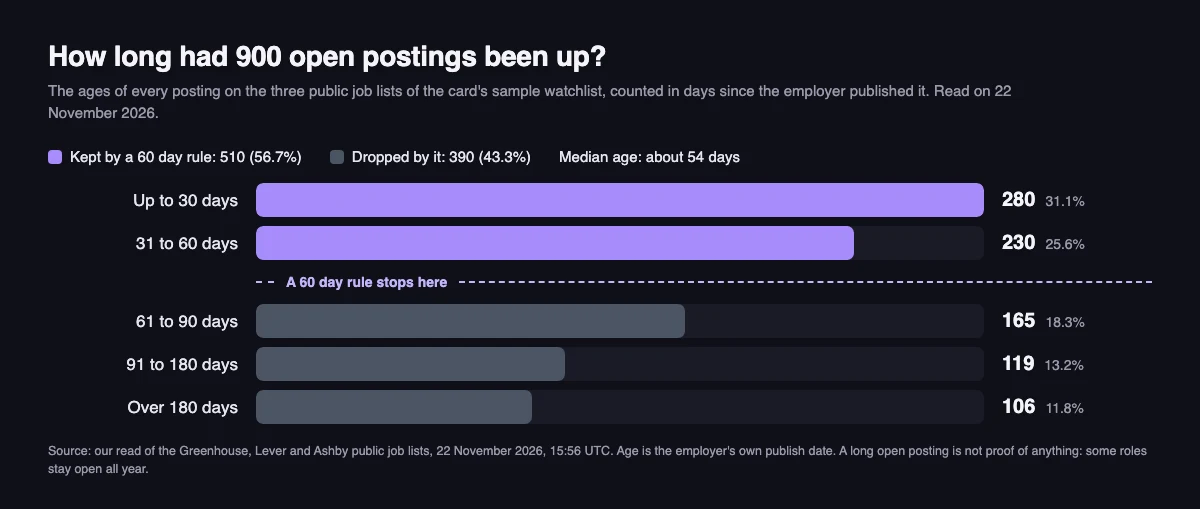
The rule in the card is a number you choose, and 60 days is the default. Calculated from the age bands in the unlisted.careers report, about 37% of dated open postings are older than 60 days. On our three lists a 60 day rule dropped 43.3%.
The rule is free in the sense that matters. It runs as plain code before the agent reads a word, so the model never sees a posting it would have scored low and you never pay for reading it. Always-On Agents makes the same point for any trigger: listening is free, thinking is not.
People call the extreme case ghost jobs, postings with no one hiring behind them. The statistics pages disagree: 19 of the 20 results we saw for a search on ghost jobs statistics in 2026 are pages about ghost jobs, and the figures they quote run from one in seven to nearly half, counting postings on some pages, employers on others and job seekers on others.
An age rule cannot say whether a posting is a ghost job. It says how long the employer has had it up, and lets you choose how long you are willing to wait.
How Do I Know a Job Posting Is Real?
Check it on the employer's own careers page or job list. If a posting you found on a board is not on the employer's list, or the list shows a much older publish date than the board did, ask the employer before you apply. unlisted.careers offers a check that tells you whether a posting is still open on the employer's own board.
That is also why the agent in this guide reads employers' lists: a posting the employer does not list never reaches it.
How to Build an AI Job Search Agent Without Code
This section shows how to build an AI job search agent in Heym with no code. The card has five nodes, and you only edit three text fields. If you want to build an AI agent for job search that you can read from top to bottom, this is a small one: a code step that reads, an agent that writes, a review page and an output.
Step 1: Import the Card
Download the file from the card below and drag it onto the Workflows tab, or watch the one minute video first.
Step 2: Fill In the Three Fields
The first node is an Input node with three fields.
| Field | What goes in it | The card's example |
|---|---|---|
| Watchlist | One careers page link per employer, one per line | A Greenhouse, a Lever and an Ashby link |
| Wants | Titles, places and the longest age in days | Titles: product designer, Places: Toronto, Canada, Remote, US, Max age in days: 60 |
| Fact sheet | One true fact per line | Ten lines about an invented product designer, Mara Lindqvist |
The fact sheet is the part to spend time on. Write roles with their dates, results with their numbers, tools, languages and your education. Write the gaps too. A line such as "Has not managed people" is useful, because it lets the agent write an honest gap instead of filling one. The person in the card and every number on her sheet are invented.
Three changes you will make most often:
| You want to | Change this |
|---|---|
| See fewer and newer postings | Lower Max age in days in the wants |
| See more roles | Add more titles, or leave Titles empty |
| Follow another employer | Add its careers page link to the watchlist, if it starts with one of the three addresses above |
Step 3: Let the Code Step Read and Narrow
The second node is a Code node, a short piece of Python that runs in a sandbox, a sealed container that is thrown away when the run ends. It reads each careers page link in your watchlist, works out which of the three systems it belongs to and requests that employer's public list. It keeps a posting only if it is newer than your limit, matches a title you named and sits in a place you named. It reads up to 12 employers and keeps the newest 8 postings.
It then builds one message for the agent: your wants, your numbered fact sheet, the kept postings with an excerpt of about 1,400 characters each, and a line of counts. This is the only step that can reach the internet, and it contacts three hosts: boards-api.greenhouse.io, api.lever.co and api.ashbyhq.com.
The Code node runs in a Docker sandbox, so Docker has to be reachable where Heym runs.
Step 4: Let the Agent Score and Draft
The third node is an Agent node with no tools of its own. It scores each posting from 0 to 100 against your wants and your fact sheet. For a posting at 60 or more it writes a three sentence note: what draws you to the role, one fact with its number, and one honest gap. Its instruction is short enough to read in full:
You help one job seeker read a short list of open postings. You can read and write text. You cannot apply, send or save anything, and you never say that you did.
The message you receive has four parts: WANTS (what the person is looking for), FACT SHEET (numbered lines, F1, F2 and so on), the postings that passed the date rule, and COUNTS.
Rules:
- The fact sheet is the only source for anything about the person. Use a fact only by its number. If a posting asks for something the fact sheet does not hold, write "not in the fact sheet" for that requirement. Never add a skill, tool, number, employer or title.
- Score each posting from 0 to 100 against WANTS and the fact sheet, and give the reason in one sentence that names the facts you used, for example "uses F3 and F4".
- For each posting that scores 60 or more, write a note of three sentences that the person can use as the start of a message: what draws them to the role, one fact with its number, and one honest gap.
- Only mention postings that are in the list. Copy each link exactly as given.
- When every posting is scored, call request_human_review once. Put the whole shortlist in the review text as Markdown: for each posting its title, company, link, the date it was published, the score, the reason and the note. After the review, return the shortlist the reviewer accepted or edited, and nothing else.
- If there are no postings, say so in one sentence and do not ask for a review.
Step 5: Read the Review Page
When every posting is scored, the agent calls request_human_review, the one tool Heym adds when review is on. Heym pauses the run and creates a one time review page at a link of the form /review/TOKEN, which you open without logging in. You can accept the shortlist, edit it or refuse it, and the link expires after 168 hours, as the human-in-the-loop reference describes.
To get the link by Slack or email instead of reading it in the Run panel, connect the agent's review output to a Slack or Send Email node. To see the review step on its own, import the HITL Support Reply Agent template. Our guides to human in the loop AI agents and a Slack approval workflow go deeper.
The AI Job Search Agent Template
Here is the AI job search agent template. It is the workflow that ran, with a sticky note on how to use it and a blank credential. Pick a credential and a model on the agent node and run it as it is: the sample watchlist holds three real public job lists, so it has something to read.
View template JSON
{
  "name": "Job search agent: follow employers, not job boards",
  "heym": true,
  "nodes": [
    {
      "id": "js_note",
      "type": "sticky",
      "position": {
        "x": 40,
        "y": -360
      },
      "data": {
        "label": "readMe",
        "stickyTitle": "How to use this",
        "stickyColor": "violet",
        "stickyWidth": 620,
        "stickyHeight": 380,
        "note": "Job search agent: follow employers, not job boards\n\nReads the public job lists of the employers you name, keeps the postings that are recent and match, scores them against your fact sheet and drafts a short note for each. It stops at a review page. It never applies for anything and sends nothing.\n\n1. Pick your credential and a model on the agent node.\n2. Run it as it is. The three fields hold an invented example: three careers page links, what the person wants, and a fact sheet.\n3. Replace the watchlist with your own careers page links (Greenhouse, Lever or Ashby), one per line. Keep a fact sheet of things that are true, one per line.\n4. When the run pauses, open the review link, read the shortlist, edit it and accept.\n\nThe person and the fact sheet are invented. Only the code step can reach the internet, and it only contacts three hosts: boards-api.greenhouse.io, api.lever.co and api.ashbyhq.com."
      }
    },
    {
      "id": "js_input",
      "type": "textInput",
      "position": {
        "x": 40,
        "y": 120
      },
      "data": {
        "label": "yourSearch",
        "inputFields": [
          {
            "key": "watchlist",
            "defaultValue": "https://boards.greenhouse.io/stripe\nhttps://jobs.lever.co/spotify\nhttps://jobs.ashbyhq.com/linear"
          },
          {
            "key": "wants",
            "defaultValue": "Titles: product designer\nPlaces: Toronto, Canada, Remote, US\nMax age in days: 60"
          },
          {
            "key": "facts",
            "defaultValue": "Mara Lindqvist, product designer, Toronto. This fact sheet is invented for the example.\nLanguages: English (fluent), French (B1).\n2022 to now: senior product designer at a regional bank. Led the redesign of the mobile onboarding flow with two researchers and four engineers.\nOnboarding completion rose from 52 percent to 61 percent after the redesign, measured by the bank's analytics team.\n2019 to 2022: product designer at a logistics start-up. Designed the driver app and a shipment tracking page.\nRan 14 usability tests with 6 participants each across both jobs.\nTools: Figma, FigJam, Maze, Notion. Reads front end code but does not write it.\nEducation: BA in communication design, 2018.\nHas not managed people. Has mentored two junior designers.\nNot in this experience: motion design, native iOS or Android design systems, a data science background."
          }
        ]
      }
    },
    {
      "id": "js_read",
      "type": "code",
      "position": {
        "x": 420,
        "y": 120
      },
      "data": {
        "label": "readTheLists",
        "codeSource": "import html\nimport json\nimport re\nimport urllib.request\nfrom datetime import datetime, timezone\n\n# Reads the public job lists that employers publish through three applicant tracking systems,\n# keeps the postings that pass a free rule (the employer's own publish date, the titles and the\n# places you named), and builds the message the agent reads. Nothing is sent anywhere and nothing\n# is applied for. Only these three hosts are ever requested.\n\nUA = \"Mozilla/5.0 (compatible; job-list-reader/1.0)\"\nMAX_BOARDS = 12\nMAX_KEPT = 8\nEXCERPT = 1400\n\nBOARDS = [\n    (\"greenhouse\", re.compile(r\"https?://(?:boards|job-boards)\\.greenhouse\\.io/([A-Za-z0-9_-]+)\")),\n    (\"lever\", re.compile(r\"https?://jobs\\.lever\\.co/([A-Za-z0-9_-]+)\")),\n    (\"ashby\", re.compile(r\"https?://jobs\\.ashbyhq\\.com/([A-Za-z0-9_.%-]+)\")),\n]\n\n\ndef get_json(url):\n    req = urllib.request.Request(url, headers={\"User-Agent\": UA, \"Accept\": \"application/json\"})\n    with urllib.request.urlopen(req, timeout=20) as resp:\n        return json.loads(resp.read().decode(\"utf-8\"))\n\n\ndef clean(text):\n    text = html.unescape(html.unescape(text or \"\"))\n    text = re.sub(r\"<[^>]+>\", \" \", text)\n    return re.sub(r\"\\s+\", \" \", text).strip()\n\n\ndef to_date(value):\n    if value in (None, \"\"):\n        return None\n    if isinstance(value, (int, float)):\n        return datetime.fromtimestamp(value / 1000, tz=timezone.utc)\n    return datetime.fromisoformat(str(value).replace(\"Z\", \"+00:00\"))\n\n\ndef read_board(kind, token):\n    rows = []\n    if kind == \"greenhouse\":\n        data = get_json(\"https://boards-api.greenhouse.io/v1/boards/%s/jobs\" % token)\n        for j in data.get(\"jobs\", []):\n            rows.append({\n                \"title\": j.get(\"title\", \"\"),\n                \"location\": (j.get(\"location\") or {}).get(\"name\", \"\"),\n                \"url\": j.get(\"absolute_url\", \"\"),\n                \"date\": to_date(j.get(\"first_published\") or j.get(\"updated_at\")),\n                \"text\": \"\",\n                \"detail\": \"https://boards-api.greenhouse.io/v1/boards/%s/jobs/%s\" % (token, j.get(\"id\")),\n            })\n    elif kind == \"lever\":\n        data = get_json(\"https://api.lever.co/v0/postings/%s?mode=json\" % token)\n        for j in data:\n            cats = j.get(\"categories\") or {}\n            where = cats.get(\"location\") or \"\"\n            if j.get(\"workplaceType\") == \"remote\":\n                where = (where + \" Remote\").strip()\n            rows.append({\n                \"title\": j.get(\"text\", \"\"),\n                \"location\": where,\n                \"url\": j.get(\"hostedUrl\", \"\"),\n                \"date\": to_date(j.get(\"createdAt\")),\n                \"text\": clean(j.get(\"descriptionPlain\") or j.get(\"description\")),\n                \"detail\": \"\",\n            })\n    else:\n        data = get_json(\"https://api.ashbyhq.com/posting-api/job-board/%s\" % token)\n        for j in data.get(\"jobs\", []):\n            if j.get(\"isListed\") is False:\n                continue\n            where = j.get(\"location\") or \"\"\n            if j.get(\"isRemote\"):\n                where = (where + \" Remote\").strip()\n            rows.append({\n                \"title\": j.get(\"title\", \"\"),\n                \"location\": where,\n                \"url\": j.get(\"jobUrl\", \"\"),\n                \"date\": to_date(j.get(\"publishedAt\")),\n                \"text\": clean(j.get(\"descriptionPlain\")),\n                \"detail\": \"\",\n            })\n    return rows\n\n\ndef has_any(words, text):\n    return any(re.search(r\"\\b\" + re.escape(w) + r\"\\b\", text) for w in words)\n\n\ndef parse_wants(raw):\n    wants = {\"titles\": [], \"places\": [], \"max_age\": 60}\n    for line in (raw or \"\").splitlines():\n        key, _, value = line.partition(\":\")\n        key = key.strip().lower()\n        if key == \"titles\":\n            wants[\"titles\"] = [x.strip().lower() for x in value.split(\",\") if x.strip()]\n        elif key == \"places\":\n            wants[\"places\"] = [x.strip().lower() for x in value.split(\",\") if x.strip()]\n        elif key.startswith(\"max age\"):\n            digits = re.sub(r\"[^0-9]\", \"\", value)\n            if digits:\n                wants[\"max_age\"] = int(digits)\n    return wants\n\n\ndef main(params):\n    now = datetime.now(timezone.utc)\n    wants = parse_wants(params.wants)\n    counts = {\"boards\": 0, \"read\": 0, \"no_date\": 0, \"too_old\": 0, \"other_title\": 0, \"other_place\": 0, \"duplicate\": 0, \"kept\": 0}\n    skipped, errors, kept, seen = [], [], [], set()\n\n    boards = []\n    for line in (params.watchlist or \"\").splitlines():\n        line = line.strip()\n        if not line:\n            continue\n        for kind, pattern in BOARDS:\n            m = pattern.match(line)\n            if m:\n                boards.append((kind, m.group(1)))\n                break\n        else:\n            skipped.append(line[:80])\n    boards = boards[:MAX_BOARDS]\n\n    for kind, token in boards:\n        try:\n            rows = read_board(kind, token)\n        except Exception as exc:\n            errors.append(\"%s/%s: %s\" % (kind, token, type(exc).__name__))\n            continue\n        counts[\"boards\"] += 1\n        for r in rows:\n            counts[\"read\"] += 1\n            if r[\"date\"] is None:\n                counts[\"no_date\"] += 1\n                continue\n            age = (now - r[\"date\"]).days\n            if age > wants[\"max_age\"]:\n                counts[\"too_old\"] += 1\n                continue\n            title = r[\"title\"].lower()\n            if wants[\"titles\"] and not has_any(wants[\"titles\"], title):\n                counts[\"other_title\"] += 1\n                continue\n            place = r[\"location\"].lower()\n            if wants[\"places\"] and not has_any(wants[\"places\"], place):\n                counts[\"other_place\"] += 1\n                continue\n            key = (token, title, place)\n            if key in seen:\n                counts[\"duplicate\"] += 1\n                continue\n            seen.add(key)\n            r.update({\"company\": token, \"kind\": kind, \"age\": age})\n            kept.append(r)\n\n    kept.sort(key=lambda r: r[\"age\"])\n    kept = kept[:MAX_KEPT]\n    counts[\"kept\"] = len(kept)\n\n    for r in kept:\n        if not r[\"text\"] and r[\"detail\"]:\n            try:\n                r[\"text\"] = clean(get_json(r[\"detail\"]).get(\"content\"))\n            except Exception:\n                r[\"text\"] = \"\"\n\n    facts = [x.strip() for x in (params.facts or \"\").splitlines() if x.strip()]\n    lines = [\"WANTS\", (params.wants or \"\").strip(), \"\", \"FACT SHEET\"]\n    lines += [\"F%d: %s\" % (i + 1, f) for i, f in enumerate(facts)]\n    lines += [\"\", \"POSTINGS THAT PASSED THE DATE RULE (newest first)\"]\n    if not kept:\n        lines.append(\"None. Say so and stop.\")\n    for i, r in enumerate(kept, 1):\n        lines.append(\"[%d] %s | %s | %s | published %s, %d days ago | %s\" % (\n            i, r[\"title\"], r[\"company\"], r[\"location\"] or \"no place listed\",\n            r[\"date\"].strftime(\"%Y-%m-%d\"), r[\"age\"], r[\"url\"]))\n        lines.append((r[\"text\"] or \"No description in the list.\")[:EXCERPT])\n        lines.append(\"\")\n    lines.append(\"COUNTS: %d boards read, %d postings, %d older than %d days, %d other titles, %d other places, %d duplicates, %d kept\" % (\n        counts[\"boards\"], counts[\"read\"], counts[\"too_old\"], wants[\"max_age\"], counts[\"other_title\"], counts[\"other_place\"], counts[\"duplicate\"], counts[\"kept\"]))\n    return {\"message\": \"\\n\".join(lines), \"counts\": counts, \"skipped_lines\": skipped, \"board_errors\": errors}\n",
        "codeParameters": "{\n  \"watchlist\": \"$yourSearch.body.watchlist\",\n  \"wants\": \"$yourSearch.body.wants\",\n  \"facts\": \"$yourSearch.body.facts\"\n}",
        "codeRequirements": "",
        "codeAllowNetwork": true
      }
    },
    {
      "id": "js_agent",
      "type": "agent",
      "position": {
        "x": 800,
        "y": 120
      },
      "data": {
        "label": "scoreAndDraft",
        "credentialId": "",
        "model": "glm-5.5",
        "temperature": 0.3,
        "systemInstruction": "You help one job seeker read a short list of open postings. You can read and write text. You cannot apply, send or save anything, and you never say that you did.\n\nThe message you receive has four parts: WANTS (what the person is looking for), FACT SHEET (numbered lines, F1, F2 and so on), the postings that passed the date rule, and COUNTS.\n\nRules:\n1. The fact sheet is the only source for anything about the person. Use a fact only by its number. If a posting asks for something the fact sheet does not hold, write \"not in the fact sheet\" for that requirement. Never add a skill, tool, number, employer or title.\n2. Score each posting from 0 to 100 against WANTS and the fact sheet, and give the reason in one sentence that names the facts you used, for example \"uses F3 and F4\".\n3. For each posting that scores 60 or more, write a note of three sentences that the person can use as the start of a message: what draws them to the role, one fact with its number, and one honest gap.\n4. Only mention postings that are in the list. Copy each link exactly as given.\n5. When every posting is scored, call request_human_review once. Put the whole shortlist in the review text as Markdown: for each posting its title, company, link, the date it was published, the score, the reason and the note. After the review, return the shortlist the reviewer accepted or edited, and nothing else.\n6. If there are no postings, say so in one sentence and do not ask for a review.",
        "userMessage": "$readTheLists.result.message",
        "outputType": "text",
        "tools": [],
        "mcpConnections": [],
        "skills": [],
        "toolTimeoutSeconds": 30,
        "maxToolIterations": 4,
        "isReasoningModel": false,
        "persistentMemoryEnabled": false,
        "memoryShares": [],
        "hitlEnabled": true,
        "hitlSummary": "Ask for human review once, with the whole shortlist, before the final answer. Nothing in this workflow applies for a job, sends a message or saves a row."
      }
    },
    {
      "id": "js_out",
      "type": "output",
      "position": {
        "x": 1180,
        "y": 120
      },
      "data": {
        "label": "Shortlist",
        "outputSchema": [
          {
            "key": "shortlist",
            "value": "$scoreAndDraft.text"
          }
        ]
      }
    }
  ],
  "edges": [
    {
      "id": "js_e1",
      "source": "js_input",
      "target": "js_read"
    },
    {
      "id": "js_e2",
      "source": "js_read",
      "target": "js_agent"
    },
    {
      "id": "js_e3",
      "source": "js_agent",
      "target": "js_out"
    }
  ]
}To run it on a schedule, start from a Cron node and keep the three fields in a Set node. Always-On Agents covers when to wake an agent and what a wake costs.
What the Run Showed
We ran the card on a scratch Heym 0.0.166 on 22 November 2026 and followed it from the first request to the review page. A placeholder model that returns fixed text stood in for a real one, so none of this says anything about how a model writes. It shows the date rule and the review step.
| Step | What happened |
|---|---|
| Read the lists | The three public lists answered and 900 postings were read in 3.8 seconds |
| Date rule | 390 were older than 60 days, 504 had other titles, 2 were in other places, 0 were duplicates and 4 were kept |
| Agent | One call with the kept postings and the fact sheet: 7,321 characters of postings and facts and 2,510 of instructions |
| Review page | It opened without a login. Accept continued the run, edit replaced the shortlist with the edited text, and refuse returned an empty shortlist |
| Output | The final shortlist, as approved or edited |
What the run does not show is how well a real model scores or writes. We did not test that, and the review page exists for exactly that reason.
Will AI Make Things Up in My Cover Letter?
It can. Priya Rathod, workplace trends editor at Indeed, told Business Insider in April 2026 that "AI sometimes exaggerates qualifications and hallucinates job responsibilities", and Bentley University lists exaggerated skills among its six risks. When we asked an AI answer engine a similar question on 22 November 2026, it answered that this is unlikely if you start from a draft.
The card's instruction does three things about it. The fact sheet is the only source for anything about you. Each claim in a note has to point to a fact by its number, such as F3. A requirement the fact sheet does not hold is written as "not in the fact sheet", which turns a hole in your CV into a visible gap instead of an invented skill.
We did not measure how often a model breaks a rule like this, and we do not claim that it never does. The review page is where you check. Read each note and look for a claim without a number next to it. If you want a second pass over text before it leaves your hands, our post on how to avoid AI slop has a check before send template.
Where Your CV Goes
The text of your fact sheet and the postings go to the model provider you choose, because the model has to read them. When you run Heym yourself, the workflow, its run history and your credentials stay on your own server. Choose the provider and the region you are comfortable with.
Keep your address, phone number and ID numbers out of the fact sheet. The agent does not need them to score a posting, and a short sheet of true facts is easier to check. Our guide to an AI second brain makes the same point about notes.
What to Keep for Yourself
- The send button. You apply on the employer's own page, after you have read the note.
- The first message to a person. The agent's note is a start. A message that goes to a human at the company should sound like you.
- The salary conversation. The lists show a pay range only when the employer publishes one. Ask when it matters.
- Interviews and assessments. In the survey the BBC reported, a live assistant in video interviews and online assessments was the most common AI misconduct employers met. Keep the agent out of the room.
The same split runs through our post on an AI chief of staff with limits: let the agent read and draft, and keep anything that speaks for you.
What Does an AI Job Search Agent Cost?
Is an AI job search agent free? The card is free to import. The model calls are billed by the provider you choose. The default run sends the agent 9,831 characters, which is 7,321 of postings and facts plus 2,510 of instructions, or roughly 2,500 tokens at four characters to a token, and it reads at most eight postings.
Multiply that by your provider's price for input and output, then by the number of runs. AI Agent Cost Optimization shows how to read the cost of a run and what moves it.
Where to Start
Before you build an AI agent for job search, pick five employers you would like to hear from and paste their careers page links into the watchlist. Write ten true facts about yourself, including one gap. Run the card, read the review page and apply yourself to the postings that earn it. That is how to build an AI job search agent that you stay in charge of.
If you also want to automate your job search every morning, the next step is a schedule, and the always-on post above explains the trade. An AI job search agent without auto apply still does the reading for you. You keep the decisions.
For more jobs an agent can take on, see our list of AI agent use cases.
Frequently Asked Questions
What is an AI job search agent?
An AI job search agent is a workflow that reads open job postings for you, scores each one against what you want and drafts a short note for the ones worth a message. A good one reads from employers' own job lists, drops old postings with a plain date rule and stops at a review page, so you press apply.
How do I build an AI job search agent without code?
Import the card in this guide into Heym, pick a credential and a model, and run it as it is. Then paste your own careers page links, what you want and a numbered fact sheet into its three fields. When the run pauses, open the review link, edit the shortlist and accept it.
Can AI apply to jobs for me?
It can, and the better question is whether it should. In a survey of 155 large UK graduate employers, 92% had met or suspected AI misconduct in selection. The agent in this guide has no tool that submits an application: it reads, scores and drafts, and you press apply on the employer's page.
Is it ok to use AI to apply for jobs?
Mostly, as help. In a survey of 600 US hiring managers, 52% said AI is acceptable for proofreading or support in drafting, and nearly 20% said they would reject a candidate who used an AI generated resume or letter. Use it to read and draft, check every claim, and answer interviews yourself.
Where does an AI job search agent get its jobs?
From a list you give it. The agent in this guide reads each employer's own public job list on Greenhouse, Lever or Ashby, which document a list for building careers pages. It does not log in to a job board or scrape one, and it uses the employer's own publish date.
How do I find an employer's job list?
Open the employer's careers page. If the link starts with boards.greenhouse.io, jobs.lever.co or jobs.ashbyhq.com, paste that careers page link into the watchlist, one per line. The card works out the address of the public list from it. The card reads these three systems.
What are stale job postings?
Stale job postings are open postings that have been up for a long time. unlisted.careers counted 28.0% of about 638,000 dated postings on employers' own career sites as open more than 90 days in September 2026, with a median age of 35 days. A long open posting is not proof of anything: some roles stay open all year.
What are ghost jobs?
Ghost jobs are postings with no one hiring behind them. The figures quoted for them run from one in seven to nearly half, and some count postings, some employers and some job seekers, so read the definition first. An age rule cannot prove a ghost job. It only drops postings that have been open longer than you want to wait.
How do I know a job posting is real?
Look for it on the employer's own careers page or job list. A posting that is on a board but not on the employer's list is worth a question before you apply, and so is one whose publish date on the employer's list is much older than the board shows. An age rule cannot prove a posting is fake; it shows how long the employer has had it up.
Will the agent make things up in my cover letter?
It can. Priya Rathod, workplace trends editor at Indeed, told Business Insider that AI sometimes exaggerates qualifications and hallucinates job responsibilities. The card tells the agent to use only numbered facts from your fact sheet and to write gaps as gaps, and the review page is where you check each claim. We did not measure how often a model breaks the rule.
Is an AI job search agent free?
The card is free to import. The model calls are billed by the provider you choose. The default run sends the agent about 2,500 tokens and reads at most eight postings, so multiply that by your provider's price and your number of runs. Our cost guide shows how to read the cost of a run in Heym.
Is my CV safe in an AI job search agent?
The text of your fact sheet goes to the model provider you choose, because the model has to read it. When you run Heym yourself, the workflow, its run history and your credentials stay on your own server. Leave your address, phone number and ID numbers out of the fact sheet; the agent does not need them to score a posting.
Sources
- unlisted.careers, Ghost jobs report, September 2026, read on 22 November 2026: 178,418 postings open more than 90 days (28.0% of the dated postings), a median age of 35 days, shares by system and by country, and the age bands behind the 37% we calculated. The same site, how a posting date can move, read the same day.
- Greenhouse, Job Board API; Lever, Postings API; Ashby, Public Job Posting API, read on 22 November 2026. We also requested each public list without a key on that day, and each answered 200.
- Google Search Central, Job posting structured data, the
datePostedandvalidThroughproperties and how to remove a posting, read on 22 November 2026. - BBC News, Daniel Thomas and Oliver Smith, "I applied for 200 jobs": how "spray and pray" AI job applications can backfire, 14 October 2026.
- US Chamber of Commerce CO, Erica Sweeney, How hiring managers are grappling with AI job applications, 4 August 2025, reporting a TopResume survey of 600 US hiring managers.
- Business Insider, Madison Hoff, 6 mistakes job seekers should avoid when using AI for résumés, cover letters, and networking, 11 April 2026.
- Bentley University, Kristen Walsh, Using AI in Your Job Search: Helpful or Hurtful?, 22 May 2025.
- jobspipe.dev, Build an AI job search agent that actually finds jobs, 22 July 2026: the failure modes of job agents. The newsletter on scraping and site rules: Build your own AI job hunting agent, 22 June 2026.
- Heym 0.0.166. Documentation: Input node, Code node, Agent node, Human-in-the-loop.
- Our reading of 52 pages on 22 November 2026: the pages on 13 Firecrawl search result lists and one Brave list for job search agent queries that a plain fetch could read; 41 more pages (Reddit, YouTube, LinkedIn, Quora, Facebook and Medium) and 8 refused pages were not read. We counted pages that describe scraping a job board or driving a browser (Apify, Playwright, an HTML parser step, a scraper), pages that mention terms of service, robots.txt or an account ban, pages that name an official API or feed, and pages that name the public job lists of Greenhouse, Lever or Ashby, and we read every match. For ghost job figures we read the titles and snippets of the 20 Brave results for a search on ghost jobs statistics in 2026, and 19 of them are pages about ghost jobs.
- Our runs of 22 November 2026: the code step of the card against the three public job lists in its sample watchlist, and the whole card on a scratch Heym 0.0.166 with a placeholder model that returns fixed text, through accept, edit and refuse on the review page. No real model was called. The scripts and the stored results are in our research folder.
Steps at a glance
- Import the card. Download the file from the card and drag it onto the Workflows tab in Heym.
- Pick a model. Open the agent node, choose a credential and a model, and save.
- Run it as it is. The three fields hold an invented example: three careers page links, what the person wants and a fact sheet.
- Add your own careers page links. Paste the careers page link of each employer you want to follow, one per line. Employers on Greenhouse, Lever and Ashby are read.
- Write your fact sheet. One true fact per line: roles with dates, results with numbers, tools, languages, and what is not in your experience.
- Read the review page. Open the review link when the run pauses, edit the shortlist and accept. Then apply on the employer's page yourself.

Co-founder & Engineer
Ceren is a co-founder and engineer at Heym, working on AI workflow orchestration and the visual canvas editor. She writes about AI automation, multi-agent systems, and the practitioner experience of building production LLM pipelines.
Reviewed by Mehmet Burak Akgün. Statistics cite named, dated sources, and claims about Heym are verified against the source code before publication. See our editorial policy or report a correction.
Enjoyed this post? Get the next one in your inbox.
A monthly note with practical ideas for building AI workflows that hold up in production. No noise, and you can unsubscribe anytime.