October 24, 2026Mehmet Burak Akgün
How to Avoid AI Slop: We Audited 224 Templates
How to avoid AI slop when an agent does the sending: we audited 224 templates to see where model text goes. Import the check, then run the Monday test.
In April 2025 a Cursor user emailed the support desk and got a confident answer from an agent called Sam. Cursor, it said, was "designed to work with one device per subscription as a core security feature." There was no such policy. Sam was a bot, and its answer reached the customer as written. Users began cancelling, and three hours later a Cursor representative wrote on Reddit: "We have no such policy."
That message is AI slop, text that looks finished and is not, with a sender attached. How to avoid AI slop when a machine is the one sending comes down to one change: put a reader between the model and the send step, and make that reader something other than the model. A rule, a score from a decision model or a person will do. The same model grading its own homework will not.
To see where that reader belongs, we mapped where model text goes. On 24 October 2026 we ran a script over all 224 templates in the Heym gallery and followed each model's text to wherever it ends up. In 92 templates it lands in front of a person, by email, Slack, Discord or Telegram. In 33 of those 92 it goes straight through.
In 55 of the 92, the only step that looks at the text is a branch on a marker the model wrote itself. In 4, a human steps in. Seven templates write to a recipient taken from the run, such as a lead's address, and all seven send straight through. A rule or a score on the draft is the reader this post adds.
This post is for the person whose name is on what an automation sends: ops, marketing, sales, support and HR leads, and the founders who set these things up. You do not need to read code. It covers what AI slop is when a machine is the sender, the count, three public cases from 2025, five kinds of check, a three-question test for Monday and a check you can import.
The count covers the templates in the Heym gallery. What it shows applies to any automation that sends, whatever it runs on. This post is not advice for people who receive slop, and it does not compare products.
The short version:
- AI slop at work now has a sender you can configure. Workslop, AI generated work that looks good but lacks substance, used to need a careless colleague. AI agent slop, the same text sent by an automation, needs a template with no reader in it
- We mapped a gallery of 224 templates. 168 have a model, 92 put its text in front of a person, and 33 of those send it straight through
- Seven templates write to a recipient taken from the run, and all seven send straight through. Four of them write to people outside the company
- The most common reader is the model's own word. In 55 templates a branch looks for a marker such as LEGAL_REVIEW that the prompt told the model to write
- A detector and a check are different tools. A detector estimates who wrote the text. A check decides whether it is fit to send
- Start with strangers and money. Hold the message, send the reasons to a person and read a sample every week
- You can import a check that holds unfit drafts. We ran it on eight drafts in the Code node's sandbox before publishing it
What Heym is: Heym is a source-available, self-hosted AI agent platform with a visual canvas for multi-agent pipelines, RAG and MCP. The counts in this post come from the template gallery in our own source on 24 October 2026, and the check was run in the sandbox of Heym's Code node, an isolated container with the network off, on the published 0.0.137 image.
Table of Contents
- What Is AI Slop When a Machine Is the Sender?
- AI Slop Examples: Three Senders Whose Audience Found the Error
- Where the Text Goes: What We Counted in 224 Templates
- How to Avoid AI Slop When an Agent Sends the Text: Five Kinds of Check
- The Monday Test: Three Questions for Any Automation That Sends
- Add a Check Before Send in Heym
- Track AI Output Quality After You Ship
- Where This Leaves You
- Frequently Asked Questions
- Sources
What Is AI Slop When a Machine Is the Sender?
AI slop is AI generated content that looks finished and is not: it is generic, padded or wrong, and someone else has to deal with it. The usual ai slop meaning comes from the open web, where it describes images, videos and posts made in bulk. English Wikipedia's article on it was read 84,076 times by people in September 2026, according to Wikimedia's pageview data.
At work the same thing has its own name. BetterUp Labs and the Stanford Social Media Lab call it workslop and define it as "AI-generated content that looks good, but lacks substance." In their September 2025 survey of 1,150 full-time U.S. desk workers, 40% had received some in the last month. CNBC reported an average of one hour and 56 minutes spent on each case, and respondents estimated that 15% of the content they receive qualifies.
BetterUp puts the cost at $186 per employee per month. The researchers laid the term out in the Harvard Business Review on 22 September 2025.
Researchers at Melbourne Business School reached a similar picture from another direction. In a representative survey of 32,352 workers in 47 countries, more than a quarter said AI had increased their workload, pressure and time on mundane tasks, and 61% avoided revealing when they had used AI (The Conversation).
Workslop Needs a Colleague. AI Agent Slop Does Not
Workslop, as BetterUp measured it, passes from one person to another. Someone pastes an AI draft into an email and presses send. AI agent slop is AI slop with the person removed: an agent drafts the text, a send step delivers it, and nothing in between asks whether it is fit to send.
AI slop at work used to need someone to be careless. Now it needs a template with no reader in it, and a scheduled template runs at nine every weekday morning whether anyone is looking or not.
The reach changes too. A colleague sends one careless message at a time. An automation sends to every row of a sheet.
AI Slop Examples: Three Senders Whose Audience Found the Error
Three public cases from 2025 share one feature. The text was produced, nothing caught the error before it went out, and the audience found it.
An agent invented a policy (April 2025). Cursor's support agent, Sam, told a customer that the product allowed one device per subscription. No such policy existed and several users publicly announced cancellations. Cursor's co-creator Michael Truell then wrote on Hacker News that AI support replies are now clearly labeled and that AI-assisted responses are the first filter for email support (Ars Technica).
A report went to a client (October 2025). Deloitte Australia agreed to refund part of the A$440,000 it was paid for a government report after admitting it used generative AI to help produce it. The review for the Department of Employment and Workplace Relations contained nonexistent references and citations, which an academic flagged and the Australian Financial Review reported (The Guardian).
A supplement went to print (May 2025). A summer reading section licensed to the Chicago Sun-Times listed 15 books, and the paper's CEO wrote that 10 of the titles and descriptions "were false, or invented out of whole cloth." The freelancer behind it "used an AI agent and sent his stories in without checking his work," and the circulation team that packaged the section "did not submit the pages for review to anyone on our editorial team" (Chicago Sun-Times).
What the three share is a missing check before the text went out, and the audience did the checking. Each error is the kind a reader or a simple rule is built to catch: a policy that is not on the policy page, a citation that does not resolve, a book that does not exist.
Those are the cases other people published. The rest of this post follows where an automation's text goes before it reaches a person.
Where the Text Goes: What We Counted in 224 Templates
The question is simple: when a model writes the text, what reads it before a person does? We wrote a script to answer it, because the answer is easy to get wrong by feel.
How We Counted
The Heym gallery on heym.run is 224 templates: 210 written by our team, 12 beginner starters and 2 community submissions. Each is a small diagram of steps. For every step that uses a model, the script follows the model's text through the diagram to where it ends up: a person (email, Slack, Discord or Telegram), a system such as a sheet or a ticket, or back to whoever started the run.
Then it asks what stands in between: nothing, a branch that reads a value the model wrote, a human review step, a score from a decision model, or a rule that judges the draft. It uses no model and no network, so the count is the same every time it runs.
The script treats helper agents as sitting where their orchestrator sits. A simpler recount with no path analysis gives 31. Four templates explain the difference: three where the only check sits on a different branch, which the simpler count treats as checked, and one orchestrator whose helper agents it cannot follow. The path analysis stands.
| Step | Templates |
|---|---|
| In the gallery | 224 |
| Contain a model | 168 |
| Model text reaches a person | 92 |
| Goes straight through | 33 |
| A branch reads a value the model wrote | 55 |
| A human review step | 4 |
The last three rows add up to the 92.
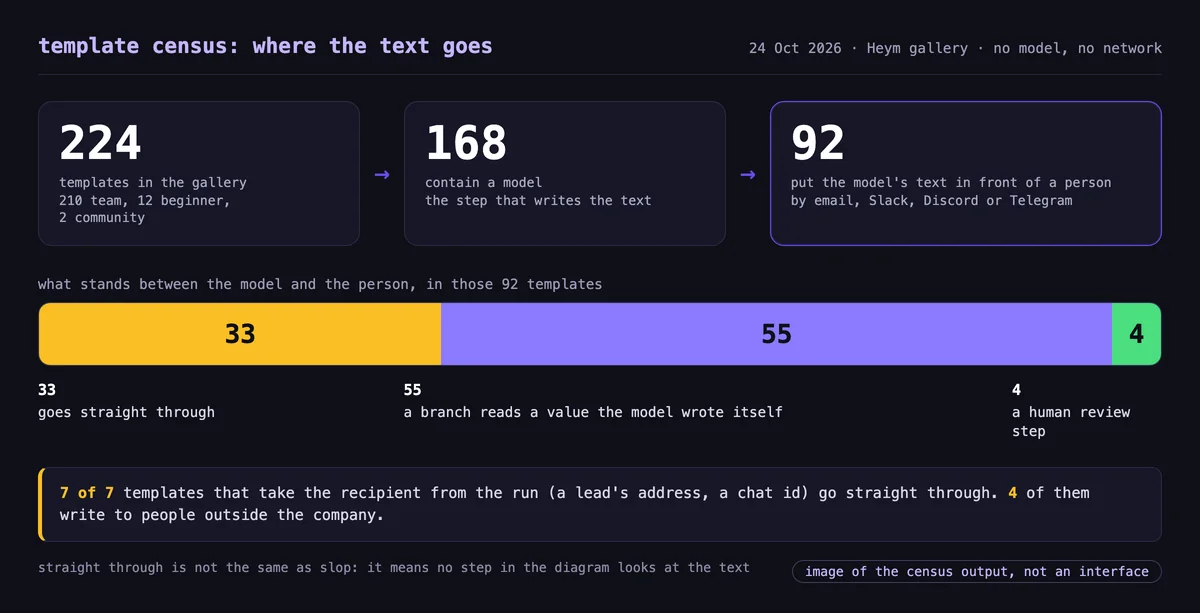
All 92 are templates our team wrote. The 12 beginner starters have no model, and the 2 community submissions do not send to a person.
Of the 33, 26 write only to a fixed channel or address, usually a team's own channel or inbox. That is a reasonable design, and we do not call it slop. The risk sits in the next group.
The Seven That Write to Whoever the Run Points At
Seven templates take the recipient from the run itself: an address in a sheet, a chat id from an incoming message. In all seven the text goes straight through. Four write to people outside the company:
- telegram-faq-auto-reply answers a customer's Telegram message with a model and sends it.
- cold-email-ai-outreach reads a sheet of leads every weekday at 09:00 and emails each row a personalized note.
- linkedin-sales-outreach does the same at 08:00 for leads with LinkedIn job-change signals. As shipped, both read a range of 49 rows, so up to 49 emails per run.
- speed-to-lead-autoresponder emails an inbound lead a drafted reply. Its only branch guards a different path, an alert to sales about hot leads.
The other three reply to someone inside: an asker in Slack, a personal Telegram assistant and a new hire's work email.
That is the Cursor shape: a model writes, a send step delivers and the recipient is someone the author never met. Templates are starting points, and we expect people to change them. The count shows what the starting point does, not what any team runs.
The 55 That Check a Value the Model Wrote
In 55 templates a branch looks at the text before a person does, so it looks like a check. Look at what it looks for. In 43 it searches for a marker word that the prompt told the model to write, such as LEGAL_REVIEW, TEACHER_REVIEW or PUBLISH_UPDATE. In 11 it reads a label, status or score the model produced. In one it looks for the word urgent in an email subject or summary.
These branches route work well. A contract marked LEGAL_REVIEW goes to the legal channel. They do not judge the draft, though, and the model alone decides whether its text is fit to send.
outage-customer-update-agent has a step named PublishGate that opens when the model writes PUBLISH_UPDATE. Its email goes to a communications inbox marked ready for review, so a person is the reader there, but the gate itself is the model's word.
The 4 With a Person
Four templates stop for a human. In hitl-support-reply-agent the agent drafts a reply, pauses and sends the draft to a review link where a person can approve it, edit it or refuse it. The video in the Heym section below shows it running.
A score from a decision model appears in the Decision Model AI Text Humanizer. It rewrites AI-assisted text in up to five rounds, keeps the best-scoring version and hands the result back to whoever called it. It sits at the end of a run, not in front of a send step, which is where the check below goes.
By Team: Where AI Slop in Marketing and Sales Shows Up
Teams meet AI slop differently. AI slop in marketing is copy that could belong to any brand. In sales it is an outreach note that could go to anyone.
| Gallery category | Reach a person | Straight through | Branch on a model value | Human |
|---|---|---|---|---|
| Sales | 11 | 5 | 6 | 0 |
| Marketing | 7 | 4 | 3 | 0 |
| Support | 6 | 2 | 3 | 1 |
| HR | 5 | 3 | 1 | 1 |
| Productivity | 4 | 4 | 0 | 0 |
| Legal | 5 | 0 | 5 | 0 |
In sales and marketing, 9 of the 18 templates that reach a person send straight through. Legal, Energy and Logistics templates all route on a value the model wrote, so none of them is in the 33.
What the Count Does Not Show
- It reads the diagram and the references between steps. A rule written inside a prompt is invisible to it. The speed-to-lead template tells its model "Do not invent product claims, pricing, or commitments," which asks the model to check itself.
- Agents can act through tools, MCP connections and skills that the diagram does not show. 33 agents in 29 templates have them, and the count does not follow them.
- A fixed Slack channel is often a review channel by design, so the person reading is the check. Some of the 33 are exactly that.
- "Straight through" is not the same as "it is slop." It means no step in the diagram looks at the text.
- These are templates as shipped, with placeholder addresses such as you@example.com. A team that adopts one is expected to change it.
How to Avoid AI Slop When an Agent Sends the Text: Five Kinds of Check
The fix is a reader that is not the model. There are five kinds, from cheapest to slowest, and most automations need two of them.
| Check | Catches | Misses | Cost | In Heym |
|---|---|---|---|---|
| A rule on the text | placeholders left in, numbers or promises that are not in your facts, a wrong length, AI writing tells | a false claim built from allowed words, tone | close to nothing | Code node and Condition node |
| A score from a decision model | off topic, contradicts the facts, wrong tone, with a probability you can set a threshold on | needs a threshold you have tested, can be wrong | a few tokens per question | Decision node |
| A second model reading the draft | gaps the first model missed | shares blind spots when it has the same instructions | one more model call | Agent or LLM node plus a condition |
| A person | what matters to your business, context no rule has | time and delay | minutes of someone's day | agent human review |
| A sample you read later | drift over weeks, a prompt change that made things worse | the first bad message | about an hour a week | Evals tab and traces |
Pick by destination, not by taste. A stranger's inbox cannot be recalled, so it earns a person or a rule on the facts before the send. A team channel can take a score and a weekly sample. Our post on human in the loop AI agents covers which actions deserve a person, and LLM guardrails places output checks as one layer of four.
An AI slop detector is a tool that estimates how likely it is that a machine wrote a piece of text, which says nothing about whether the text is fit to send. An AI slop checker is a step that asks whether a draft is fit to send: are the numbers in your facts, are the promises yours, is anything left blank.
The ai slop meaning is about quality, not authorship, so a guess about who wrote a message does not decide whether it should go out.
| AI slop detector | AI slop checker | |
|---|---|---|
| Question it answers | Did a machine write this? | Is this fit to send? |
| What it returns | usually a probability | a verdict and the reasons |
| What it can do about a message | nothing until a step acts on it | hold it in front of the send step |
Email is the place to start. 28 of the 92 templates that reach a person do it by email, and 11 of the 33 that go straight through are among them. AI generated emails to strangers cannot be recalled, and they go out under your name.
The Monday Test: Three Questions for Any Automation That Sends
Run this on one automation before Monday ends. It takes ten minutes and needs no code. Most advice on AI slop at work tells recipients to push back. This test works on the sender.
- Where does the text go? Write down every place an automation sends words: replies to customers, AI generated emails to leads, chat messages, tickets, reports, posts. Include the channels your team reads, because reading is not checking.
- What reads it before the person does? For each place, write one of five answers: nothing, the model's own marker, a rule, a score or a person. A marker the prompt told the model to write counts as the model.
- What would one bad message cost, compared with one hold? A hold costs a person a glance. A bad message to a stranger can cost a customer. Where a bad message costs more than a hold, put a check in front.
Pull one real sent message for each place. A single real message from your own system is worth more than ten ai slop examples from other companies, because it tells you what your facts and your prompt actually produce.
| Where the text goes | Put in front of it |
|---|---|
| A stranger: a customer, a lead, a patient | a rule on the facts, then a person for anything with a promise or a price |
| Money or a commitment | a person, tied to the exact message |
| Your team's channel | a rule and a weekly sample |
| A sheet, a table or a ticket | a rule on the fields and a weekly sample |
| The person who started the run | a rule, and a reader who knows the draft is a draft |
Add a Check Before Send in Heym
Here is the rule check as a workflow you can import. A model drafts a reply from the facts you give it. The check, an ai slop checker that runs before every send, holds any draft that is unfit. Only clean drafts reach the send point.
The diagram has four steps and two exits. A model drafts the reply, a Code step reads the draft against your facts and lists what is wrong, and a Condition step sends a clean draft one way and everything else the other.
The file below is the same workflow, ready to import. Its brief holds a sample customer message and the facts a reply may use. Replace both with your own and connect your send step after ReadyToSend.
View template JSON
{
  "heym": true,
  "nodes": [
    {
      "id": "cbs_note",
      "type": "sticky",
      "position": {
        "x": 40,
        "y": 40
      },
      "data": {
        "label": "readMe",
        "stickyTitle": "How to read this",
        "stickyColor": "violet",
        "stickyWidth": 420,
        "stickyHeight": 300,
        "note": "Draft writes a reply from the facts you give it.\n\nCheck is a Code node with Allow network off. It holds any draft that has a number the facts do not contain, a commitment the facts do not make, a placeholder left in, an assistant-style opening, a wrong length, or two or more AI writing tells.\n\nGate sends a clean draft to ReadyToSend and everything else to HoldForAPerson, with the reasons.\n\nPut your Send node after ReadyToSend and a person after HoldForAPerson. Rules cannot judge whether a claim is true, so add an approval for anything that matters."
      }
    },
    {
      "id": "cbs_brief",
      "type": "textInput",
      "position": {
        "x": 40,
        "y": 400
      },
      "data": {
        "label": "brief",
        "inputFields": [
          {
            "key": "request",
            "defaultValue": "Hi, we are a 40-person ops team. What does the Team plan cost, and can we get a demo this week?"
          },
          {
            "key": "facts",
            "defaultValue": "Acme Cloud Team plan: up to 40 users, $400 per month, billed monthly. Demo call slots: Thursday 10:00 or Friday 14:00."
          }
        ]
      }
    },
    {
      "id": "cbs_draft",
      "type": "llm",
      "position": {
        "x": 400,
        "y": 400
      },
      "data": {
        "label": "Draft",
        "credentialId": "",
        "model": "gpt-5.5",
        "temperature": 0.3,
        "systemInstruction": "You write the reply to a customer message. Use only the facts provided. Do not invent prices, dates, discounts or promises. Return only the reply text, with no preamble.",
        "userMessage": "Customer message:\n$brief.body.request\n\nFacts you may use:\n$brief.body.facts",
        "outputType": "text"
      }
    },
    {
      "id": "cbs_check",
      "type": "code",
      "position": {
        "x": 760,
        "y": 400
      },
      "data": {
        "label": "Check",
        "codeSource": "import re\n\nTELLS = [\n    \"delve\", \"delving\", \"in today's fast-paced\", \"i hope this email finds you well\", \"game-changer\",\n    \"game changer\", \"seamless\", \"leverage\", \"unlock\", \"cutting-edge\", \"elevate your\", \"revolutionize\",\n    \"navigate the complexities\", \"at the end of the day\", \"tapestry\",\n]\nCOMMITMENTS = [\n    \"guarantee\", \"promise\", \"refund\", \"free of charge\", \"no charge\", \"discount\", \"100%\",\n    \"within 24 hours\", \"within 48 hours\", \"lifetime\",\n]\nPLACEHOLDER = re.compile(\n    r\"(\\[[A-Za-z][A-Za-z _/-]{1,30}\\]|\\{\\{[^}]*\\}\\}|<[A-Z][A-Z_ ]{2,30}>|lorem ipsum|\\bTODO\\b|\\bTBD\\b)\",\n    re.I,\n)\nPREAMBLE = re.compile(r\"^\\s*(sure|certainly|of course|absolutely|here(?:'s| is| are)|as an ai)\\b\", re.I)\nNUMBER = re.compile(r\"\\d[\\d,.]*\")\n\n\ndef has(phrase, text):\n    return re.search(r\"(?<!\\w)\" + re.escape(phrase) + r\"(?:s|d|ed|ing)?(?!\\w)\", text) is not None\n\n\ndef digits(text):\n    return {n.strip(\",.\").replace(\",\", \"\") for n in NUMBER.findall(text) if n.strip(\",.\")}\n\n\ndef main(params):\n    draft = (params.draft or \"\").strip()\n    facts = params.facts or \"\"\n    lower, facts_lower = draft.lower(), facts.lower()\n    words = len(draft.split())\n    reasons = []\n    if words < 12 or words > 180:\n        reasons.append(\"length: %d words, expected 12 to 180\" % words)\n    found = PLACEHOLDER.search(draft)\n    if found:\n        reasons.append(\"placeholder left in the text: \" + found.group(0))\n    if PREAMBLE.match(draft):\n        reasons.append(\"starts like an assistant reply, not like the message\")\n    unsupported = sorted(digits(draft) - digits(facts))\n    if unsupported:\n        reasons.append(\"numbers not in the facts: \" + \", \".join(unsupported))\n    claims = [c for c in COMMITMENTS if has(c, lower) and not has(c, facts_lower)]\n    if claims:\n        reasons.append(\"commitments not in the facts: \" + \", \".join(claims))\n    tells = [t for t in TELLS if has(t, lower)]\n    if chr(0x2014) in draft or chr(0x2013) in draft:\n        tells.append(\"dash\")\n    if len(tells) >= 2:\n        reasons.append(\"AI writing tells: \" + \", \".join(tells))\n    return {\"verdict\": \"hold\" if reasons else \"send\", \"reasons\": reasons, \"tells\": tells, \"words\": words}\n",
        "codeRequirements": "",
        "codeParameters": "{\n  \"draft\": \"$Draft.text\",\n  \"facts\": \"$brief.body.facts\"\n}",
        "codeAllowNetwork": false
      }
    },
    {
      "id": "cbs_gate",
      "type": "condition",
      "position": {
        "x": 1120,
        "y": 400
      },
      "data": {
        "label": "Gate",
        "condition": "$Check.result.verdict == \"send\""
      }
    },
    {
      "id": "cbs_ok",
      "type": "output",
      "position": {
        "x": 1480,
        "y": 300
      },
      "data": {
        "label": "ReadyToSend",
        "outputSchema": [
          {
            "key": "reply",
            "value": "$Draft.text"
          },
          {
            "key": "checks",
            "value": "$Check.result"
          }
        ]
      }
    },
    {
      "id": "cbs_hold",
      "type": "output",
      "position": {
        "x": 1480,
        "y": 520
      },
      "data": {
        "label": "HoldForAPerson",
        "outputSchema": [
          {
            "key": "draft",
            "value": "$Draft.text"
          },
          {
            "key": "reasons",
            "value": "$Check.result.reasons"
          }
        ]
      }
    }
  ],
  "edges": [
    {
      "id": "cbs_e1",
      "source": "cbs_brief",
      "target": "cbs_draft"
    },
    {
      "id": "cbs_e2",
      "source": "cbs_draft",
      "target": "cbs_check"
    },
    {
      "id": "cbs_e3",
      "source": "cbs_check",
      "target": "cbs_gate"
    },
    {
      "id": "cbs_e4",
      "source": "cbs_gate",
      "target": "cbs_ok",
      "sourceHandle": "true"
    },
    {
      "id": "cbs_e5",
      "source": "cbs_gate",
      "target": "cbs_hold",
      "sourceHandle": "false"
    }
  ]
}The check holds a draft when it contains:
- a number that your facts do not contain
- a promise your facts do not make, such as a guarantee, a refund, a discount or a deadline
- a placeholder left in, such as [Name]
- an opening that sounds like an assistant and not like the message
- a length under 12 or over 180 words
- two or more AI writing tells
We ran the check on eight drafts inside the Code node's sandbox, with the network off, on the published 0.0.137 image on 24 October 2026. The model step was not run. The check was, and all eight came back as expected.
| Draft | Verdict | Why |
|---|---|---|
| Built from the facts | send | nothing to hold |
| The same draft with $350 instead of $400 | hold | a number that is not in the facts |
| "Hi [Name]" left in the greeting | hold | a placeholder |
| A guarantee of a refund within 48 hours | hold | a number and promises the facts do not contain |
| Four AI writing tells and a dash | hold | AI writing tells |
| "Sure, here's the reply you asked for:" at the start | hold | an assistant opening |
| A six word reply | hold | length |
| The good draft plus one AI writing tell | send | one tell is not enough on its own |
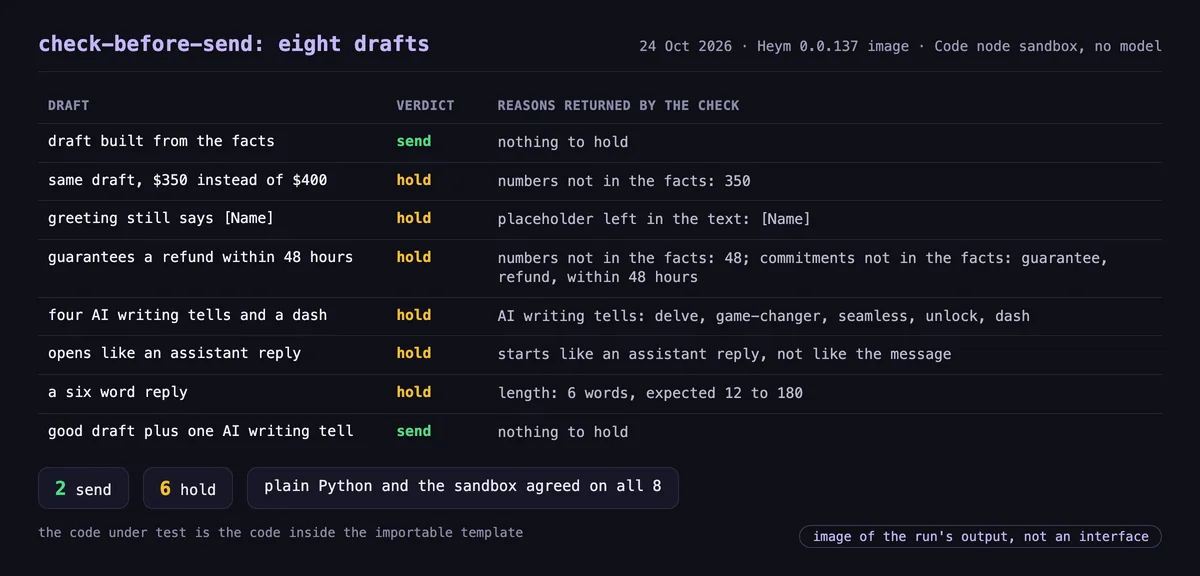
A hold costs one person a glance. A miss costs a message you cannot take back, so the check is strict about numbers and promises and lenient about style: one tell passes, two do not.
The check cannot know whether a claim built from allowed words is true. That is the job of the next step, a person, for anything that reaches a stranger or moves money. Heym's agent node has human review built in: the run pauses, a one-time review link opens, and the reviewer can approve, edit and continue, or refuse. This support-reply template shows it.
If you want a score instead of rules, the Decision node asks a decision model typed questions about the draft and returns probabilities you can branch on. Our post on decision models explains how they differ from a language model, and the customer support agent guide shows a send-facing workflow end to end.
Track AI Output Quality After You Ship
A check is not a one time job. Three habits keep ai output quality visible after launch.
- Read a sample. Read about twenty sent messages a week, chosen at random and not the ones people complained about.
- Count the holds and the reasons. A hold rate near zero or near half is a signal to look at the check or the facts, not a number to be proud of.
- Rerun a small suite when anything changes. The Evals tab runs test cases against your workflow and can score with an independent judge instead of the model that wrote the answer.
Our posts on how to evaluate an agent and on whether to trust a judge's score cover the method. The governance post covers who owns the answer when a message goes wrong.
Where This Leaves You
How to avoid AI slop, when an agent sends the text, is a question about the diagram more than about the model: what stands between the model and the person. In the gallery, 33 templates send straight through and 55 rely on the model's own word. A count like that tells you more than a promise that the model is careful.
Sam did not need a better model. It needed a reader. This week, pick one automation that writes to a stranger, run the three questions, put a check in front of it and write the date next to the answer. If you run Heym, import the check above and wire your send step after ReadyToSend. If you run something else, the five kinds of check apply the same way.
Frequently Asked Questions
What is AI slop?
AI slop is AI generated content that looks finished and is not: it is generic, padded or wrong, and someone else has to deal with it. At work it is called workslop. When an agent does the sending, the same text can reach a customer or colleague with nobody reading it first. In the template map, 33 do exactly that.
How to avoid AI slop when an AI agent sends the text?
Put a reader between the model and the send step, and make it something other than the model: a rule on the text, a score from a decision model or a person. Start with messages that reach strangers or move money. Hold anything the check refuses and send the reasons to a person.
How do I stop AI slop in the emails and reports an AI agent sends automatically?
Put a check between the model and the send step. Turning off Gmail's Smart Reply or Smart Compose only changes what you type yourself, and it does nothing for an automation that sends on its own. Use a rule on your facts, a score or a person, and hold anything the check refuses.
What is workslop, and how is it different from AI agent slop?
Workslop is the term BetterUp Labs and the Stanford Social Media Lab use for AI-generated content that looks good but lacks substance, passed between colleagues. In their September 2025 survey, 40% of 1,150 U.S. desk workers had received it in a month. AI agent slop is the same text sent by an automation, with no colleague in the middle.
Is an AI slop checker the same as an AI slop detector?
No. An AI slop detector estimates whether a machine wrote the text. An AI slop checker asks whether the text is fit to send: are the numbers in your facts, are the promises yours, is anything left blank. The first gives a probability. The second can hold a message when it sits in front of the send step.
Can an AI model check its own output?
It can catch some problems, but it shares the blind spots of the model that wrote the text. In 55 of the 92 templates that reach a person the only reader is the model's own marker. For anything that matters, use a different kind of check: a rule, a score from another model or a person.
Which AI generated emails need a person to read them first?
Any message to someone outside the company, and anything that moves money or makes a promise. In the template map, four templates write to people outside the company and send straight through: a Telegram support reply, two cold outreach flows and an inbound lead autoresponder.
What does the template audit show?
On 24 October 2026, 168 of the 224 gallery templates contained a model. In 92, its text reached a person. In 33 it went straight through, in 55 a branch read a marker the model wrote, and in 4 a human reviews. A rule or a score on the draft is the reader this post adds.
Does a rule based check catch false claims?
Only some. The check in this post holds drafts with numbers, promises or placeholders that your facts do not contain, which catches an invented price. It cannot know whether a claim built from allowed words is true. Add a person or a score for anything where one wrong message costs more than a hold.
How do I track AI output quality after launch?
Read a sample of what was actually sent every week, count how many drafts the check held and why, and run a small evaluation suite when you change a prompt or a model. A hold rate near zero or near half is a signal to look at the check or the facts.
Sources
All sources were read on 24 October 2026.
- BetterUp Labs, Workslop: The Hidden Cost of AI-Generated Busywork, survey of 1,150 full-time U.S. desk workers, conducted in September 2025 with the Stanford Social Media Lab.
- CNBC, AI-generated 'workslop' is destroying productivity and teams, researchers say, 23 September 2025.
- Harvard Business Review, AI-Generated "Workslop" Is Destroying Productivity, 22 September 2025.
- The Conversation, Nicole Gillespie and Steven Lockey, AI 'workslop' is creating unnecessary extra work. Here's how we can stop it, 16 October 2025.
- Ars Technica, Benj Edwards, Company apologizes after AI support agent invents policy that causes user uproar, 17 April 2025.
- Hacker News, Comment by Cursor's co-creator on the support bot incident, 16 April 2025.
- The Guardian, Deloitte to pay money back to Albanese government after using AI in $440,000 report, 6 October 2025.
- Chicago Sun-Times, Lessons (and an apology) from the Sun-Times CEO on that AI-generated book list, 29 May 2025.
- Wikipedia, AI slop, read 24 October 2026.
- Wikimedia REST API, Pageviews of AI slop on English Wikipedia, September 2026, 84,076 views by people.
Steps at a glance
- List every place an automation sends text. Write down each place your automations send words: customer email, chat replies, tickets, reports and posts. Include the channels your team reads, because reading is not checking.
- Name what reads the text first. For each place, write one of five answers: nothing, the model's own marker, a rule, a score or a person. A marker the prompt told the model to write counts as the model.
- Rank the places by what one bad message costs. Mark the places where one wrong message reaches a stranger or moves money. Those get a check first, because a message to a stranger cannot be recalled.
- Put a rule check in front of the send step. Import a check that holds drafts with numbers or promises your facts do not contain, placeholders, an assistant-style opening, a wrong length or several AI writing tells. Route everything it holds to a person.
- Put a person in front of strangers and money. Turn on human review for the agent that writes to strangers, so a person can approve, edit or refuse the draft before anything is sent.
- Read a sample every week. Read about twenty sent messages chosen at random, count how many drafts the check held and why, and rerun a small evaluation whenever you change a prompt or a model.

Co-founder & Engineer
Burak is a co-founder and engineer at Heym, focused on backend infrastructure, the execution engine, and self-hosted deployment. He builds the systems that make Heym's AI workflows run reliably in production.
Reviewed by Ceren Kaya Akgün. Statistics cite named, dated sources, and claims about Heym are verified against the source code before publication. See our editorial policy or report a correction.
Enjoyed this post? Get the next one in your inbox.
A monthly note with practical ideas for building AI workflows that hold up in production. No noise, and you can unsubscribe anytime.