October 3, 2026Mehmet Burak Akgün
Always-On Agents: Listening Is Free, Thinking Is Not
Always-on agents do not run all the time. See the three wake-up policies, what an idle agent costs each month, and a template that gates the model first. →
On 29 September OpenAI launched Dots and called them always-on agents that "can work towards your goals 24/7" on "their own cloud computer". The same week we counted how the agents in our own template gallery wake up. Of 196 templates, 128 start when someone sends a request, 46 start on a clock, and 19 trigger instances start on an event. Not one of them keeps a model running.
That is the point of this article. Always-on agents start without a fresh prompt, keep state between starts, and have a leash. They do not need to run all the time. A June 2026 survey from four researchers on arXiv puts it the same way: "The defining property is persistence, not literal continuous execution." The part that sets your bill is the first one, what starts the agent. I call it the wake-up policy.
I work on the execution engine that does the waking in Heym, the self-hosted AI workflow platform we build: the scheduler, the mailbox pollers, the webhook endpoints. This article is about that layer of always-on agents. What wakes an agent, what a wake costs when nothing happened, and the gate, a cheap check that keeps the model asleep until something did.
It is written for developers and operators who run, or plan to run, always-on AI agents with nobody at the keyboard, and who want a number before the bill arrives. It is not a comparison of products. You get the three wake-up policies, one agent costed under each, what our own templates do, and a template you can import.
- Always-on agents are persistent, not continuous. The arXiv survey defines them by durable state kept across runs. An agent that wakes once a day or on a trigger still counts.
- The wake-up policy sets the bill. Same inbox, same model, same 2,800-token agent: $122.69 a month with a five-minute heartbeat on a cold cache, $30.76 on a warm one, $2.14 with an event trigger and a gate.
- Most of the work is deciding not to think. In our gallery, 6 of the 10 templates that wake at least hourly never call a model. They check, compare, and only then notify.
- A gate costs almost nothing. A decision model such as Jev is priced at $0.042 per million input tokens, so a 300-token decision costs about a thousandth of a cent.
- The leash is three controls. Human review for actions, an Execution count alert for runaway wakes, and a Disable node for triggers that should stop themselves.
Table of Contents
- What Is an Always-On Agent?
- The Wake-Up Policy: Heartbeat vs Cron vs Event
- Always-On Agent Architecture: Listen, Gate, Think, Ask
- Always-On Agent Cost: What Nothing Happening Costs
- How to Build an Always-On Agent in Heym
- The Leash: Approvals, Alerts and a Stop Condition
- State and Hosting: What Keeps Always-On Agents Running
- What to Do This Week
- Frequently Asked Questions
What Is an Always-On Agent?
An always-on agent is an AI agent that starts without a fresh prompt from a person and carries state from one run to the next. It has to be woken by something, remember what happened last time, and be stoppable.
Type always on AI agent into a search box this week and you mostly get launch coverage. Look for a definition and the first result is a survey that runs past 70,000 words. This is the short version, in three parts.
- The wake-up policy decides what starts the agent: a timer, a clock or an event.
- State is what the agent remembers between starts, from a task list to a knowledge graph.
- The leash is what it may do alone, what it must ask a person first, and what stops it.
The survey's authors, Tianyu Ding, Aditya Nannapaneni, Bingfan Liu and Ling Zhang, test always-on agents for state. An agent qualifies when it keeps an identity that survives a restart, owns durable state, and uses that state for later action. Their definition is explicit that frequency is not the test, which is why a once-a-day agent qualifies. The other two parts, the wake-up policy and the leash, are the ones a builder has to choose on purpose.
Always-On Agent vs a Normal AI Agent
A normal agent starts when you ask and forgets when it finishes. An always-on agent starts itself and keeps what it learned. The difference is who presses start and what survives the run, not the size of the model.
The older name for part of this is ambient agents. LangChain's January 2025 post defines them as agents that "listen to an event stream and act on it accordingly", and proposes three ways to involve a person: notify, question and review. Proactive agents and background agents describe the same pattern from other directions. The vocabulary is young: LangChain named ambient agents in January 2025, the arXiv survey fixed a definition on 29 June 2026, and Dots put the label on a product on 29 September.
What the Dots Launch Changes
The launch put the label in front of a mass audience. The coverage I read describes agents that "learn from feedback over time", tasks you assign, "proactive research" through read-only connections between tasks, access to "over 4,000 apps", and "custom rules around when they can act on their own or require approval from you". CBS News reports they are available in ChatGPT for Pro and Business Premium users in "eligible markets".
That is state, a wake condition and a leash in consumer packaging. Searches for an always on AI agent mix two things: a product you rent and a pattern you build. This article covers the pattern, and whatever always-on agents you run yourself face the same two questions underneath. What wakes the agent, and what does a wake cost when nothing happened?
The Wake-Up Policy: Heartbeat vs Cron vs Event
A wake-up policy is the rule that decides when an agent gets to think: a heartbeat, where a timer wakes it to look around, a schedule, where a clock starts a defined job, or an event, where something that happened starts it. Most real always-on agents mix them. The table shows what each costs when nothing has happened.
| Policy | What wakes the agent | Cost when nothing happened | How it fails | Right when |
|---|---|---|---|---|
| Heartbeat | A timer wakes the agent, which looks around and decides what matters | One or more model calls every tick | The bill grows with the cadence, and the agent invents work | Nothing outside can say something changed, and the judgment is the job |
| Schedule | A clock starts a defined job | One run per tick if the job calls a model, nothing if it starts with a plain check | Runs when nothing is ready, and a slow run overlaps the next | A report or digest is due at a certain time |
| Event | Something happened: a mail, a message, a webhook, a queue item | Nothing until the event, because the listener is plain code | An event storm, or a reply that triggers itself | The outside world can tell you |
Heartbeat vs Cron: Who Decides at the Tick
A cron job runs the task you wrote. A heartbeat asks an agent what to do. That is the whole difference in heartbeat vs cron, and it moves the cost. A cron job that begins with a plain check can run every minute for free, while a heartbeat pays for a model call to find out the same thing.
One published teardown of an open-source personal agent prices a heartbeat every 30 minutes on a premium model at $5 a day, "$150/month to do nothing" (InsiderLLM, updated 4 May 2026). Its fix is to send heartbeats to a small local model. Thirty minutes is 48 wakes a day and 1,440 a month.
A separate modelled study of a 30-person rollout, built on Anthropic list prices of 17 August 2026, found that wakes with nothing to do were between 74 and 97 percent of the monthly bill on a default 30-minute heartbeat, depending on how heavily people used their agents (Cognio Labs).
In Heym a heartbeat is a Cron node followed by an agent. The scheduler evaluates every active Cron node once a minute. Nothing in that loop touches a model unless the workflow you drew does.
Event-Driven AI Agents and the 13 Entry Points
Event-driven AI agents wait for the world to speak. Heym has 13 entry points: 7 push (the API endpoint, MCP, the chat portal, file intake, and the Slack, Discord and Telegram webhooks), 4 pull (Cron, IMAP, WebSocket and RabbitMQ) and 2 internal (the board and the editor). They are the AI agent triggers a workflow can start from, and our triggers reference lists each one. The post on self-hosted AI agents explains which of them need a public address.
The IMAP trigger shows why events are cheap. Heym polls the mailbox on the interval you set, five minutes in the template below, and that poll is plain code. The first poll records a baseline and does not replay old mail. Every later poll starts one run per message newer than the saved cursor, so nothing reaches a model until a message exists.
Is a Heartbeat Required?
No. One summary of design advice for always-on agents calls the heartbeat part of "the irreducible core", beside the agent loop and the memory layer (SysDesAi, 1 April 2026, summarizing a Dev.to article). The arXiv survey's definition does not need one: an agent that "wakes on an external trigger" still counts, as long as it keeps durable state. A heartbeat is one wake-up policy among three, and the one that costs a model call at every tick.
When a Heartbeat Is the Right Policy
A heartbeat earns its place when nothing outside can tell you something changed and the judgment is the work. Watching twenty sources and deciding which one matters is that case. Keep it cheap: a small model, a prefix that never changes, and a plain check that answers "did anything change?" before the agent starts.
Always-On Agent Architecture: Listen, Gate, Think, Ask
The always-on agent architecture we use has four stages, and each stage costs more than the one before it. Work should leave the loop as early as it can.
Listen: A Trigger Is Not a Model
In always-on agents, listening is free in tokens because the listener is code. Most AI agent triggers are plain code that waits. A webhook endpoint answers an HTTP request, an IMAP poller compares a mailbox cursor, and a WebSocket trigger keeps an outbound connection open and starts a run on the socket events you select. None of them needs a language model to decide that something arrived.
The expensive habit is the opposite one: wake an agent on a timer and let the model do the checking. That is a heartbeat, and for a job with a free signal available it spends tokens to learn what the signal would have said.
Filter, Then Gate
Put a plain condition first. In a Condition node a filter can drop bulk mail, an unchanged content hash or a status code that did not move. It is exact and costs nothing, and anything it removes never reaches a model.
A gate is a cheap check that scores each event before the agent runs, and it lets through only the events that matter enough to spend model tokens on. In Heym the gate is a Decision node: it asks a decision model such as Jev or Laya typed questions about the event and returns probabilities instead of text.
There are three question types: noul returns the probability that a condition holds, choice picks one of your options, and score rates the event on an ordered rubric. Our post on System One models covers the wire format.
Jev is priced at $0.042 per million input tokens, with output free. A support ticket with its questions runs about 300 tokens, which makes one decision about a thousandth of a cent. Laya is the open Apache-2.0 sibling that runs on your own hardware at about 33 ms for a single question.
Branch on the probability, not on a label. A noul answer near 0.5 means the model finds yes and no about equally likely, and reading that as a mild yes is the most common early mistake. The template below passes at 0.7.
Think, Then Ask
The agent runs only on events that passed. If its answer has side effects, such as sending a reply, spending money or changing a record, it asks first. Turning on human review adds a request_human_review tool to the agent. The run pauses as pending, a review link goes to Slack or email, and the reviewer chooses Accept, Edit & Continue or Refuse.
Review links expire after 168 hours if nobody responds, and the token locks once a decision is submitted. Our posts on human in the loop AI agents and AI agent spending limits go deeper on what to approve and why one approval should never cover ten similar actions.
Always-On Agent Cost: What Nothing Happening Costs
Always-on agent cost has four variables. How many times the agent wakes, how many model calls each wake needs, how many tokens each call carries before it reads anything, and the price per token. The wake-up policy sets the first one. The monthly cost is wakes times calls per wake times prefix tokens times the input price, plus output tokens times the output price.
A five-minute heartbeat is 8,640 wakes a month. Every 15 minutes is 2,880, every 30 minutes 1,440, hourly 720 and daily 30. An event trigger wakes once per event, so 20 emails a day is 600. Idle cost is the part of the bill that comes from wakes with nothing to do, and a heartbeat pays it on every tick whether or not anything happened.
The Prefix: Tokens Before the Agent Reads Anything
Every call carries a fixed prefix: the system prompt, the tool definitions and any memory summary. We measured two things on 3 October 2026, with the o200k_base tokenizer. Across the 124 agent nodes in our template gallery, the system prompt has a median of 64 tokens and a 90th percentile of 435. And our own public MCP server at heym.run/mcp lists six tools in 702 tokens, 117 per tool on average.
An agent with a 435-token prompt and 20 tools of that size carries about 2,800 tokens before it reads a word of the event. Open one trace of your own agent in Traces and read the System step and the tools: that is your prefix.
One Inbox, Five Policies
Take one agent watching one inbox, on gpt-6.1-sol at OpenAI's published Standard prices, read on 3 October 2026: $2.00 per million input tokens, $0.10 cached and $10.00 output. Each wake needs two calls, one to look and one to read the result, and a 300-token answer.
| Wake-up policy | Wakes a month | Agent runs | Monthly cost |
|---|---|---|---|
| Heartbeat every 5 minutes, prefix changes each run (cold cache) | 8,640 | 8,640 | $122.69 |
| Heartbeat every 5 minutes, stable prefix (warm cache) | 8,640 | 8,640 | $30.76 |
| Cron every hour | 720 | 720 | $10.22 |
| Event trigger, no gate (20 emails a day) | 600 | 600 | $8.52 |
| Event trigger plus gate (25% reach the agent) | 600 | 150 | $2.14 |
These are calculated figures, not a bill. They count the fixed prefix and a short answer only, and leave out the mail's own tokens and the replies it drafts. The gate row includes 600 decisions at 300 tokens each, which add up to $0.0076 for the month. Swap in gpt-6-astra and every cold row costs five times as much.
In this model, a five-minute heartbeat on a cold cache costs 57 times more than an event trigger with a decision gate, $122.69 against $2.14 a month. With a warm cache the gap is 14 times. Same inbox, same model, same agent. Only the wake-up policy changed.
Why the Cache Does Not Save an Idle Agent
A warm cache helps a five-minute heartbeat a great deal. OpenAI's guide says a cached prefix "remains eligible for reuse for 30 minutes after its most recent write or reuse" on GPT-5.6 and later, with a minimum of 1,024 tokens. Two things break it: a prefix that changes, such as a timestamp in the system prompt, and a gap longer than 30 minutes. That is why the hourly row is cold.
A January 2026 evaluation of agent sessions with 10,000-token system prompts on OpenAI, Anthropic and Google found that caching cut API cost by 41 to 80 percent, and that putting dynamic content at the end of the system prompt gave the most consistent benefit.
If your model reasons before it answers, the 300 output tokens in the table are the number to raise, because output is the expensive side of the price list. Our posts on LLM routing and AI agent cost optimization cover the same arithmetic from the model-switching side.
What Our Own Gallery Shows
The 196 templates start in three main ways, with four having no trigger node and one having two: 128 from an HTTP or manual input, 46 from a Cron node, and 19 trigger instances from Slack, Telegram, Discord, IMAP, WebSocket, file upload and Heym events. Of the 46 Cron templates, 24 run about daily, 8 rarely, 4 a few times a day, 6 about hourly and 4 every few minutes.
Ten templates wake at least hourly. Six never call a model: they check, compare, and only then notify. AI Agent Trace SLO Burn Alert wakes every 10 minutes, 4,320 times a month, and Self-stopping Status Monitor every 15. That is listening done right.
Four call an agent or an LLM on every tick with no gate in front: RAG Knowledge Base Poisoning Sentinel at 2,880 wakes a month, Playwright Visual AI Monitor at 1,440, and Google Sheets AI Enricher and Inventory Allocation Conflict Agent at 720 each.
Their prompts weigh 26 to 143 tokens, so the fixed part of every wake is small. The table above shows what the same schedule costs on an agent that carries tools and memory. For each of the four, the first question is what would tell you nothing changed without asking a model: a content hash, a status code, a row count. If the answer exists, a Condition node in front of the model is the whole fix.
This counts the template gallery, not customer workflows. Here "model" means an agent or LLM node reachable from the trigger, and "gate" means a Condition, Switch or Decision node before it.
How to Build an Always-On Agent in Heym
How to build an always-on agent comes down to wiring the four stages in order, and the template below does it for a mailbox. It listens with an IMAP trigger, filters bulk mail with a plain condition, scores what is left with a Decision node, and drafts replies only for mail that passes. A person approves from a review link in Slack.
What Heym is: Heym is a source-available, self-hosted AI workflow automation platform with a visual canvas for multi-agent pipelines, RAG and MCP. Everything this article says about Heym comes from the shipped source and documentation, not from a roadmap.
- Choose the listener. The IMAP trigger polls every 5 minutes. Pick the interval from how long a message can wait, not from habit.
- Filter the obvious. One Condition node drops mail from no-reply addresses and anything with an unsubscribe line. No tokens.
- Gate on probability. The Decision node asks whether the mail needs a reply from a person and how urgent it is. The gate passes at 0.7.
- Draft, then ask. The agent writes a reply and calls for human review. The review link and a summary go to Slack. Nothing is sent.
- Add the leash. Create an Execution count alert and a cost alert in the Alerts tab. The amber note on the canvas says which.
View template JSON
{
  "heym": true,
  "nodes": [
    {
      "id": "aoi_setup_note",
      "type": "sticky",
      "position": {
        "x": 40,
        "y": -230
      },
      "data": {
        "label": "SetupNote",
        "stickyTitle": "Always listening, not always thinking",
        "stickyColor": "sky",
        "stickyWidth": 400,
        "stickyHeight": 300,
        "note": "### Before you run\n- Select an IMAP credential on Inbox and keep the 5 minute poll interval.\n- Select a Decision Model credential on ReplyDecision (jev-latest, or a model your endpoint supports).\n- Select an LLM credential on DraftReplyAgent and a Slack credential on NotifyReviewSlack.\n- Send yourself two test emails: a question that needs an answer, and a newsletter.\n\nThe listener is plain code. The filter and the gate cost almost nothing. Only mail that passes both reaches the agent, and the agent can only draft: a person approves from the review link."
      }
    },
    {
      "id": "aoi_leash_note",
      "type": "sticky",
      "position": {
        "x": 1040,
        "y": -230
      },
      "data": {
        "label": "LeashNote",
        "stickyTitle": "The leash lives in Alerts",
        "stickyColor": "amber",
        "stickyWidth": 360,
        "stickyHeight": 200,
        "note": "### Add the leash\nCreate two alerts in the Alerts tab:\n- Execution count on this workflow, so a loop shows up as a count.\n- Token or USD cost over one day.\n\nBoth notify through nodes you already have."
      }
    },
    {
      "id": "aoi_inbox",
      "type": "imapTrigger",
      "position": {
        "x": 60,
        "y": 250
      },
      "data": {
        "label": "Inbox",
        "credentialId": "",
        "pollIntervalMinutes": 5
      }
    },
    {
      "id": "aoi_filter",
      "type": "condition",
      "position": {
        "x": 380,
        "y": 250
      },
      "data": {
        "label": "BulkMailFilter",
        "condition": "$Inbox.email.fromAddresses[0].email.lower().contains(\"noreply\") or $Inbox.email.fromAddresses[0].email.lower().contains(\"no-reply\") or $Inbox.email.text.lower().contains(\"unsubscribe\")"
      }
    },
    {
      "id": "aoi_skipped",
      "type": "output",
      "position": {
        "x": 700,
        "y": 60
      },
      "data": {
        "label": "SkippedBulkMail",
        "message": "Skipped: bulk or automated mail from $Inbox.email.from"
      }
    },
    {
      "id": "aoi_decision",
      "type": "decision",
      "position": {
        "x": 700,
        "y": 320
      },
      "data": {
        "label": "ReplyDecision",
        "credentialId": "",
        "model": "jev-latest",
        "state": "Subject: $Inbox.email.subject\nFrom: $Inbox.email.from\n\n$Inbox.email.text",
        "questions": [
          {
            "id": "needs_reply",
            "type": "noul",
            "instructions": "Does this email ask the mailbox owner a question or for a decision that needs an answer from a person? Judge what the sender wants, not whether the text contains a question mark.",
            "criteriaTrue": "The sender asks for an answer, a decision, a document or a meeting, and is waiting on the owner.",
            "criteriaFalse": "The email is a notice, a newsletter, a receipt, a thank you or any message that needs no reply."
          },
          {
            "id": "urgency",
            "type": "score",
            "instructions": "How soon does the sender need a reply? Use stated dates and blocked work. Do not infer urgency from tone alone.",
            "levels": [
              "No time pressure. No date is mentioned and nothing breaks if the reply waits a week.",
              "A reply is expected within a few days, with no hard deadline.",
              "A deadline within a day or two is stated, or someone is blocked until the owner answers.",
              "Something is broken or a customer is at risk right now."
            ]
          }
        ],
        "customBodyEnabled": false,
        "customBody": "",
        "requestTimeoutSeconds": 60
      }
    },
    {
      "id": "aoi_gate",
      "type": "condition",
      "position": {
        "x": 1020,
        "y": 320
      },
      "data": {
        "label": "ReplyGate",
        "condition": "$ReplyDecision.answers.needs_reply.noul >= 0.7"
      }
    },
    {
      "id": "aoi_ignored",
      "type": "output",
      "position": {
        "x": 1340,
        "y": 520
      },
      "data": {
        "label": "IgnoredNoReplyNeeded",
        "message": "Ignored: probability of needing a reply was $ReplyDecision.answers.needs_reply.noul for $Inbox.email.subject"
      }
    },
    {
      "id": "aoi_agent",
      "type": "agent",
      "position": {
        "x": 1340,
        "y": 220
      },
      "data": {
        "label": "DraftReplyAgent",
        "model": "z-ai/glm-4.7",
        "temperature": 0.3,
        "systemInstruction": "You draft replies to email for the mailbox owner. Write a short, polite reply that answers what the sender asked. Never invent prices, dates or commitments. If the email needs information you do not have, say what is missing. Before you finalize any reply, call request_human_review with the draft, and send nothing yourself.",
        "userMessage": "From: $Inbox.email.from\nSubject: $Inbox.email.subject\n\n$Inbox.email.text\n\nUrgency from the gate (0 to 3): $ReplyDecision.answers.urgency.score",
        "outputType": "text",
        "tools": [],
        "mcpConnections": [],
        "skills": [],
        "toolTimeoutSeconds": 30,
        "maxToolIterations": 6,
        "credentialId": "",
        "isReasoningModel": false,
        "hitlEnabled": true,
        "hitlSummary": "Request human review before finalizing any reply. The reviewer approves, edits or refuses the draft, and nothing is sent without that decision."
      }
    },
    {
      "id": "aoi_ready",
      "type": "output",
      "position": {
        "x": 1700,
        "y": 120
      },
      "data": {
        "label": "DraftReady",
        "outputSchema": [
          {
            "key": "reply",
            "value": "$DraftReplyAgent.text"
          },
          {
            "key": "decision",
            "value": "$DraftReplyAgent.decision"
          },
          {
            "key": "summary",
            "value": "$DraftReplyAgent.summary"
          }
        ]
      }
    },
    {
      "id": "aoi_notify",
      "type": "slack",
      "position": {
        "x": 1700,
        "y": 360
      },
      "data": {
        "label": "NotifyReviewSlack",
        "credentialId": "",
        "channel": "#inbox-review",
        "message": "*Reply draft waiting for you*\nFrom: $Inbox.email.from\nSubject: $Inbox.email.subject\n\n$DraftReplyAgent.summary\n\nReview: $DraftReplyAgent.reviewUrl"
      }
    }
  ],
  "edges": [
    {
      "id": "e1",
      "source": "aoi_inbox",
      "target": "aoi_filter"
    },
    {
      "id": "e2",
      "source": "aoi_filter",
      "target": "aoi_skipped",
      "sourceHandle": "true"
    },
    {
      "id": "e3",
      "source": "aoi_filter",
      "target": "aoi_decision",
      "sourceHandle": "false"
    },
    {
      "id": "e4",
      "source": "aoi_decision",
      "target": "aoi_gate"
    },
    {
      "id": "e5",
      "source": "aoi_gate",
      "target": "aoi_agent",
      "sourceHandle": "true"
    },
    {
      "id": "e6",
      "source": "aoi_gate",
      "target": "aoi_ignored",
      "sourceHandle": "false"
    },
    {
      "id": "e7",
      "source": "aoi_agent",
      "target": "aoi_ready"
    },
    {
      "id": "e8",
      "source": "aoi_agent",
      "target": "aoi_notify",
      "sourceHandle": "hitl",
      "targetHandle": "input"
    }
  ]
}Importing a template takes about a minute, as our short video shows.
Here is exactly what we checked. We ran the filter condition and the gate condition through Heym's own expression evaluator on four sample emails (a newsletter, a no-reply receipt, a promotion from a person's address and a real question) and at four gate probabilities (0.82, 0.70, 0.69 and 0.31). The filter skipped the three bulk messages and kept the question, and the gate passed at 0.70 and held at 0.69.
The nodes that call outside services need your credentials, so the mailbox, decision model, LLM and Slack steps were not run here.
In a condition, match on the parsed sender list, fromAddresses[0].email, and keep the raw from header for message text. The template does exactly that.
Tune the threshold on real mail. Send a day of messages through with the gate branch only logging, compare its decisions with yours, then move the 0.7. For a second pattern, the IMAP Support Inbox Triage template shows the same listener without a gate, and Decision Model Support Triage shows a gate on its own.
The Leash: Approvals, Alerts and a Stop Condition
Always-on agents need limits that do not depend on anyone remembering to apply them. Three controls cover most of it.
Approvals
Human review is the leash for actions. Anything with a side effect waits for a person, and the reviewer sees the draft, a generated summary and three choices. The human-in-the-loop reference describes the flow, and the HITL Support Reply Agent template is a working example.
Alerts: Count and Cost
The Alerts tab watches a window, never a single event. An Execution count alert "catches a trigger gone wrong: a workflow that normally runs 20 times an hour suddenly running 2,000 times". The firing record includes a breakdown by trigger source, which is usually the answer to why it happened. A cost alert uses the same pricing table as Traces, so the alert and the cost page agree.
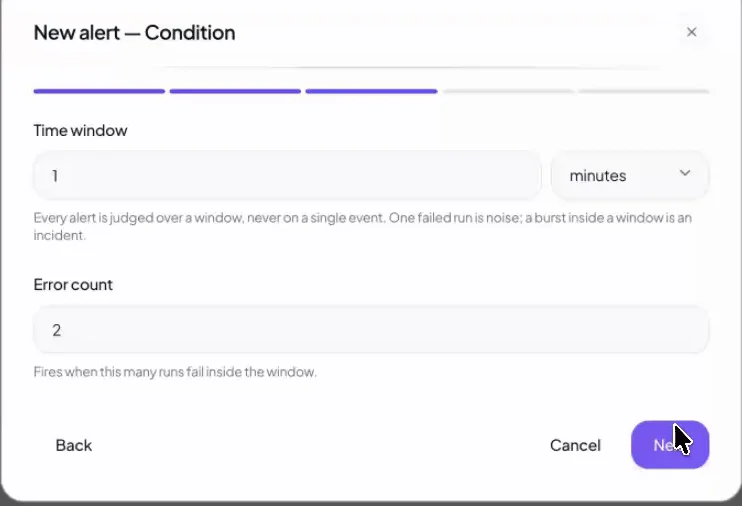
The Review step backtests an alert on the last 24 hours, so you see how often it would have fired before you save it.
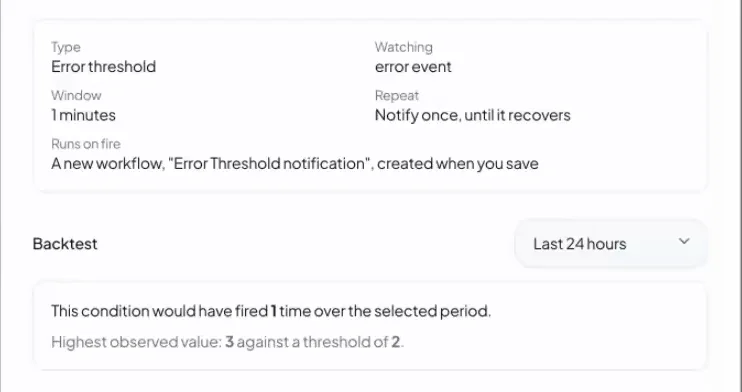
Alerts notify through nodes you already have, which means Slack, email or Telegram. An alert cannot notify the workflow it watches, because an Execution count alert would then count its own notifications. Our post on LLM cost alerts explains how to choose the window.
A Trigger That Turns Itself Off
Some jobs have a finish line: wait for a delivery, watch a status page until it turns green. A Disable node switches off another node, such as the Cron trigger, once a condition is met, and an Enable node turns it back on. Self-stopping Status Monitor does exactly this at 2,880 wakes a month until its condition is true, and then it stops.
State and Hosting: What Keeps Always-On Agents Running
State is the second part of the definition. An agent node can keep a per-node knowledge graph of entities and relationships, and when it is on, Heym injects a summary of the graph into the system prompt on each run. It is also part of your prefix, so measure it. Our post on AI agent memory covers the memory types and when each one fits.
Hosting is the layer under all three parts. Always-on agents need a host that comes back after a restart. In a cluster, Heym elects one leader to own cron, alert evaluation and crash recovery. If the main instance goes down, leadership moves to a worker within a few seconds and scheduled runs keep firing. If a worker dies mid-run, the leader re-runs the execution on a live instance.
For one machine the self-hosted AI agents guide covers what to expose and what to keep private, and enterprise AI agents covers the cluster. The AI agent runtime page describes the layer that does the waking, and background coding agents shows one always-on pattern with real model prices.
What to Do This Week
Always-on agents stay cheap when the wake-up policy is a design decision and the model is the last stage. Here is how to start.
- List what can tell you something changed. Every event you can name is a wake-up you get for free.
- Pick a wake-up policy per job. Event first, schedule when something is due, heartbeat only when nothing outside can speak.
- Put a plain filter before any model. A hash, a status code or a row count.
- Add a decision gate and set it on real data. Start at 0.7, run a day of events, then move it.
- Ask a person before any side effect. Draft, review, then act.
- Add an Execution count alert and a cost alert. Backtest both on the last 24 hours.
Always-on AI agents are turning into a standard feature of assistants, and the product names will keep changing. Prices will keep shifting: on OpenAI's page, gpt-6.1-sol lists input at one fifth of gpt-6-astra, $2.00 against $10.00 per million tokens. A cheaper model lowers the price of each wake and does nothing to the number of wakes.
The wake-up policy is the part that stays yours, because no platform can choose it for you. Event-driven AI agents are the cheapest way to choose it well: the listener stays awake and the model waits for something to happen.
Frequently Asked Questions
What is an always-on agent?
An always-on agent is an AI agent that starts without a fresh prompt from a person and carries state from one run to the next. It does not have to run continuously. It needs something that wakes it, memory that survives between runs, and a leash that limits what it may do alone.
Do always-on agents run 24/7?
No. A June 2026 arXiv survey defines them by persistence, not continuous execution: an agent that runs once a day or wakes on a trigger still counts if it keeps durable state. The listener can run all the time, while the model runs only when a wake-up policy says so.
What is the difference between an always-on agent and a normal AI agent?
A normal agent starts when you ask and forgets when it finishes. An always-on agent starts itself, from a schedule, an event or a timer, and keeps what it learned. The difference is who presses start and what survives the run, not the model or its size.
What is a wake-up policy?
A wake-up policy is the rule that decides when an agent gets to think. There are three: a heartbeat, where a timer wakes the agent to look around, a schedule, where a clock starts a defined job, and an event, where something that happened starts it. The choice sets the bill and most of the failure modes.
How much does an always-on agent cost per month?
It depends on the wake-up policy. For one 2,800-token agent on gpt-6.1-sol, a five-minute heartbeat costs $122.69 a month on a cold cache and $30.76 on a warm one. The same inbox watched by an event trigger with a decision gate costs $2.14. The tables in this article show every assumption.
Does prompt caching make an idle agent cheap?
It helps a frequent heartbeat and does little for a slow one. On OpenAI's GPT-5.6 and later, a cached prefix stays reusable for 30 minutes after its last use, so a five-minute heartbeat with a stable prefix reads at the cached price. An hourly cron, or a prefix that changes every run, pays full price.
How do I build an always-on agent without paying for idle model calls?
Wake it with an event instead of a timer, put a plain condition before any model, and add a decision model as a gate that scores each event. Only events that pass reach the agent. In Heym that is a trigger, a Condition node, a Decision node and an agent with human review.
How do I stop an always-on agent?
Use three controls. Human review pauses any action with side effects until a person decides. An Execution count alert catches a trigger that fires far more often than normal. A Disable node lets a workflow turn its own Cron trigger off when the job is done, and an Enable node turns it back on.
Can I run an always-on agent on my own server?
Yes. In a self-hosted Heym the schedulers, mailbox pollers and webhook endpoints run on your own infrastructure. In a cluster, one elected leader owns cron, alert evaluation and crash recovery, and leadership moves to another instance within a few seconds if the leader goes down.
Sources
- Tianyu Ding, Aditya Nannapaneni, Bingfan Liu and Ling Zhang, Always-On Agents: A Survey of Persistent Memory, State, and Governance in LLM Agents, arXiv, 29 June 2026. The definition and the three conditions.
- Ben Schoon, 9to5Google, OpenAI launches Dots, new always-on agents you can assign tasks to, 29 September 2026. Quoted phrases and availability.
- LangChain, Introducing ambient agents, 14 January 2025. The event-stream definition and the notify, question, review patterns.
- Mary Cunningham, CBS News, Sam Altman unveils "dots," OpenAI's new AI personal agent, updated 29 September 2026. Availability.
- Elias Lumer, Faheem Nizar, Akshaya Jangiti, Kevin Frank, Anmol Gulati, Mandar Phadate and Vamse Kumar Subbiah, Don't Break the Cache: An Evaluation of Prompt Caching for Long-Horizon Agentic Tasks, arXiv, 9 January 2026. The 41 to 80 percent cost reduction and the dynamic-content guidance.
- SysDesAi, Architecting Always-On AI Agents: Core Components for Existence, 1 April 2026. The heartbeat as "the irreducible core".
- OpenAI, API pricing, read 3 October 2026. gpt-6.1-sol Standard short-context prices used in the cost table.
- OpenAI, Prompt caching guide, 2026. The 30-minute reuse window and the 1,024-token minimum.
- InsiderLLM, Fix token waste: heartbeats on a premium model, updated 4 May 2026. The $5 a day figure for a 30-minute heartbeat on Opus.
- Cognio Labs, What an Always-On AI Agent Really Costs, modelled with Anthropic list prices of 17 August 2026. The 74 to 97 percent idle share on a 30-minute heartbeat.
- TypeSafe AI, Introducing System One Models and Jev, September 2026. Jev pricing.
- Convai Innovations, Laya model card, September 2026. Apache-2.0 weights and the single-question latency.
- Heym documentation: Triggers, IMAP Trigger, Human-in-the-Loop, Alerts tab, Decision node, Disable Node and Cluster, read 3 October 2026.
- Heym, v0.0.88 release notes (Alerts), 11 August 2026. Source of the alert wizard image.
- Heym template gallery, measured with
getAllTemplates()on 3 October 2026: 196 templates, trigger mix, cron cadence and gate status. The prompt token counts use theo200k_basetokenizer on the template system and user message text. - heym.run public MCP server,
tools/liston 3 October 2026: 6 tools, 702 tokens in OpenAI function-call JSON, 117 per tool on average.
Steps at a glance
- List what can tell you something changed. Write down the events your agent could start from: a new email, a Slack message, a webhook, a queue item, a file upload. Each one that exists is a wake-up you can get for free, because the listener is plain code and no model runs until the event arrives.
- Pick a wake-up policy per job. Use an event trigger when the outside world can tell you, a schedule when a report is due at a time, and a heartbeat only when nothing outside can say something changed and the judgment is the work. Keep one policy per job, not one per agent.
- Put a plain filter before any model. Add a Condition node that rules out the obvious without tokens: bulk mail, an unchanged hash, a status code that did not move. A filter is exact and free, so anything it removes never costs a model call.
- Add a decision gate and tune its threshold on real data. Add a Decision node that asks one question per event and returns a probability. Branch on the probability, not the label, start at 0.7, and run a day of real events before you move it. The gate costs about a thousandth of a cent per decision.
- Let the agent draft and a person approve side effects. Turn on human review for the agent, send the review link to Slack or email, and let the run wait as pending. The reviewer accepts, edits or refuses. Review links expire after 168 hours, so a forgotten request cannot act later.
- Add alerts and a stop condition. Create an Execution count alert and a cost alert in the Alerts tab, and give any trigger that has a finish line a Disable node so it turns itself off. Backtest each alert on the last 24 hours before you save it.

Co-founder & Engineer
Burak is a co-founder and engineer at Heym, focused on backend infrastructure, the execution engine, and self-hosted deployment. He builds the systems that make Heym's AI workflows run reliably in production.
Reviewed by Ceren Kaya Akgün. Statistics cite named, dated sources, and claims about Heym are verified against the source code before publication. See our editorial policy or report a correction.
Enjoyed this post? Get the next one in your inbox.
A monthly note with practical ideas for building AI workflows that hold up in production. No noise, and you can unsubscribe anytime.