November 3, 2026Mehmet Burak Akgün
AI Agents on Kubernetes: 7 Questions for Your IT Team
AI agents on Kubernetes without the jargon. Learn what Kubernetes native means, why the Docker socket worries IT, and the 7 questions to ask any vendor.
The first question an IT team asks about an AI agent platform is often not about the AI. It is: where does this run, and what can it touch?
For most organizations that run containers, the answer has to be Kubernetes. The 2025 annual survey of the Cloud Native Computing Foundation (CNCF), published on 20 January 2026, found that 82% of container users run Kubernetes in production, up from 66% in 2023. It also found that 66% of organizations hosting generative AI models use it for some or all of their inference.
AI agents on Kubernetes means one thing in this post: your agents, and the code they run, live on the cluster your IT team already operates, under the rules it already enforces. The short answer is yes, they can. Since 2 November 2026, all eight places where Heym runs code can do it as Kubernetes pods, with no Docker socket involved.
This post is for the people who have to say yes to a platform like that: IT and security leads, compliance and operations managers, and founders whose IT team already runs Kubernetes. You do not need to read code. Think of it as Kubernetes in plain English, with the evidence attached.
It covers what Kubernetes native means in building words, why an AI agent is a different kind of tenant, and the Docker socket problem. Then it shows what changed in Heym and what each pod gets. It ends with seven questions to ask any vendor, how a community member tested it on two real clusters, and what to confirm before you start.
It does not compare products. Eight of eight counts sandboxes, not every feature, and a section near the end says where the edges are.
Short on time? Jump to the seven questions and send them to your IT team.
The short version:
- Kubernetes is where IT already lives. The CNCF's 2025 survey found 82% of container users run it in production, and 66% of organizations hosting generative AI models use it for inference
- Native means asking the cluster, not bringing your own locks. A native platform requests a pod for each job and follows the cluster's roles and network rules
- The Docker socket is a master key. OWASP says exposing it "is equivalent to giving unrestricted root access to your host," and Sysdig's May 2026 case combined it with a service account token
- Eight of eight Heym sandboxes can run as pods since version 0.0.144 (2 November 2026): Agent Python tools, skills, the Code node, file analysis, Playwright, MCP stdio, Codex and OpenCode
- Each pod runs as a non-root user with every Linux capability dropped and no cluster token. Nothing comes in, offline pods have no way out, and networked pods reach public addresses only
- Heym's own account in the cluster is one role in one namespace. The base manifests are ten ordinary objects, with no operator, no custom resource and no cluster-wide role
- It was tested on real clusters. A community member ran it on OpenShift 4.22 and on Talos 1.14 with Cilium 1.20, and their notes shaped version 0.0.145
- Check four things first: Kubernetes 1.30 or newer, a network plugin that enforces NetworkPolicy, a kubelet PID limit and a volume
What Heym is: Heym is a source-available, self-hosted AI agent platform with a visual canvas for multi-agent pipelines, RAG and MCP. What this post says about Heym comes from its source, tests and documentation at version 0.0.145 on 3 November 2026, and from the public GitHub pages listed at the end. The pod settings shown here were generated by Heym's own pod builder from that source. They are not a capture from a live cluster.
Table of Contents
- AI Agents on Kubernetes: The Short Answer
- What Does Kubernetes Native Mean? A Building Analogy
- Why an AI Agent Is a Different Kind of Tenant
- The Docker Socket in One Picture
- What Changed: Eight of Eight Sandboxes Run as Pods
- What Each Pod Gets: The House Rules
- Seven Questions to Ask Any AI Agent Vendor About Kubernetes
- Tested on Two Real Clusters
- More Capacity With Workers
- What to Confirm Before You Start
- What "Eight of Eight" Does and Does Not Mean
- Try It on a Test Cluster
- Where This Leaves You
- Frequently Asked Questions
- Sources
AI Agents on Kubernetes: The Short Answer
Yes. AI agents can run on Kubernetes, and for most organizations that already run containers it is the obvious place to run them. What decides whether a platform fits is how it runs the code an agent writes or calls: as a throwaway pod that the cluster creates and polices, or through a Docker socket that hands the platform a master key to the machine.
The Kubernetes project says as much in its own words. Janet Kuo and Justin Santa Barbara, writing on the Kubernetes blog on 20 March 2026, say that "one platform stands out as the natural choice: Kubernetes." They add that an agent needs "a persistent identity and a secure scratchpad for writing and executing (often untrusted) code."
Two different things share the words AI agents on Kubernetes. One is agents that operate a cluster: assistants that read logs and suggest fixes. The other is self-hosted AI agents on Kubernetes, hosted on a cluster you run, and that is the subject here: where they run, what they can reach, and who can stop them.
A platform can host agents well or badly. The test is the sandbox, the sealed room where it runs code it did not write. How that room is built decides much of what your security team cares about.
What Does Kubernetes Native Mean? A Building Analogy
Kubernetes native means software that asks the cluster itself for what it needs and follows the cluster's own rules, instead of bringing a second system of its own. It asks for a pod to run a job and uses roles for permissions and network policies for traffic.
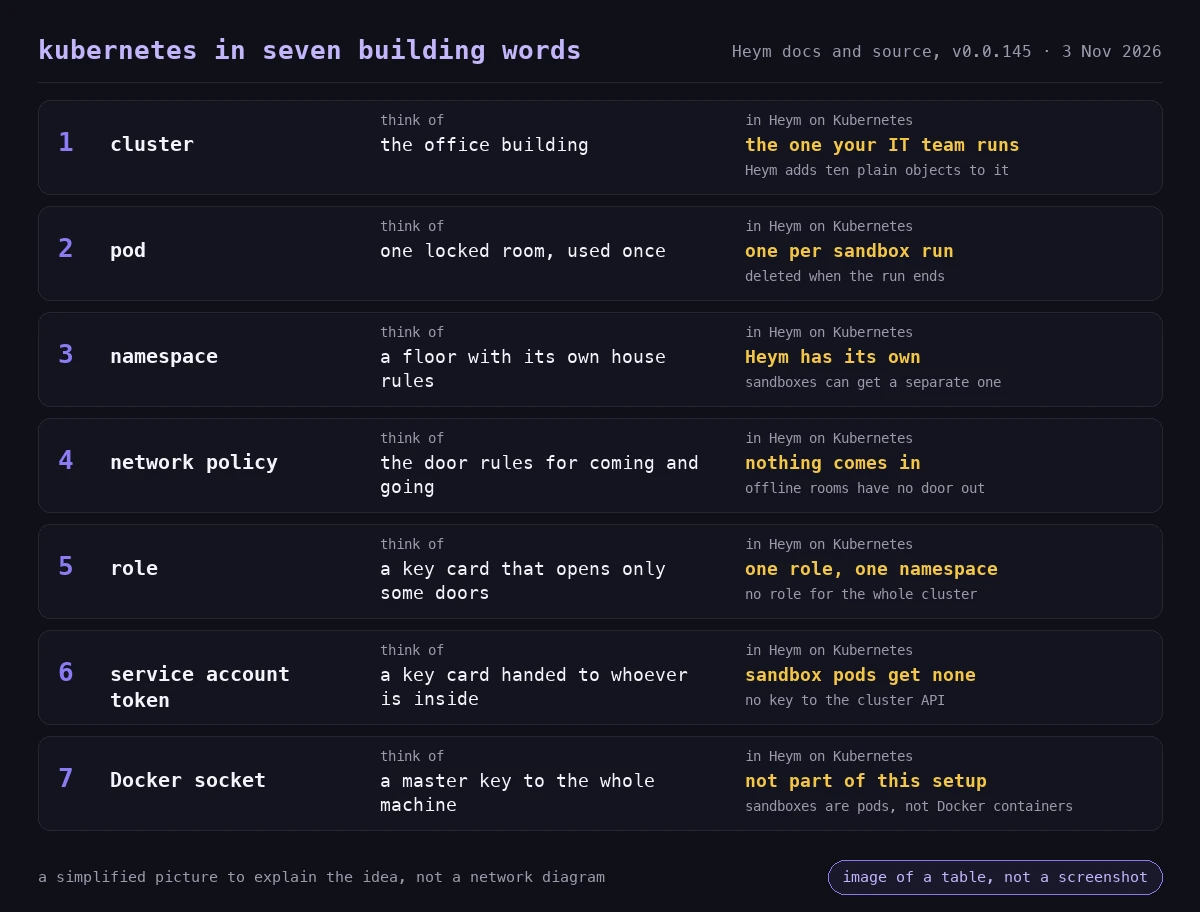
Kubernetes in plain English starts with an office building. Kubernetes is the building manager. The cluster is the building: the manager decides which room a job gets, hands out key cards and writes the door rules. A pod is one locked room for one job. A role is a key card that opens only certain doors. A network policy says who may walk in and who may walk out. A namespace is a floor with its own house rules.
Software that is not Kubernetes native brings its own locksmith. It asks for the master key to the machine, the Docker socket, so it can open rooms itself, and the building manager does not see what it starts. A Kubernetes native AI agent platform files a request with the manager, gets one room and follows the building's rules. The seven words in the picture are all you need for the rest of this post.
Kubernetes Native vs Cloud Native
Cloud native is the wider idea: software built to run well on cloud infrastructure. Kubernetes native is narrower: built for Kubernetes and using its own objects. A product can run on Kubernetes without being Kubernetes native, for example when it needs a Docker socket on the node to start its helpers.
Three questions work as a test for any product:
- Does it start its work by asking the Kubernetes API, or by reaching around it?
- Are its rules written as Kubernetes roles and network policies, or as settings of its own?
- Can your IT team see what it started with the tools they already use?
Why an AI Agent Is a Different Kind of Tenant
Most software on a cluster is code your own team wrote and reviewed. An agent platform also runs code that nobody on your team has read: what a model writes on the fly, a skill someone imported, a tool from another maker, a script from a template. The Kubernetes post calls it "often untrusted" code, and the word fits.
A sandbox is a sealed room where a platform runs code it did not write, built so the code can reach only what it was given. The questions for your IT team are how the room is built and who holds the keys to it.
A case from this year shows why. On 29 May 2026, Sysdig's Threat Research Team observed an attack by what it calls an agentic threat actor. Michael Clark, its Director of Threat Research, wrote on 4 June that this is "the first operator we have observed where an agent harness, not a human, performs container escape and Kubernetes credential replay."
The attacker started from a vulnerable notebook application and found a Docker socket mounted in its container. It used the socket to create privileged containers and break out onto the host, then replayed a Kubernetes service account token from the pod to dump the cluster's Secret store.
Sysdig's advice includes this line: "A socket mount is equivalent to granting the container host root." It also says to disable service account token automounting "where it is not required."
Two things made that chain work, a Docker socket and a service account token. They are the two things a sandbox for agent code should never hold. Our earlier post on the AI agent sandbox shows how to ask a sandbox what it can see, and the same check applies to a pod.
The Docker Socket in One Picture
The Docker socket is the file that takes orders for Docker, the tool many platforms use to start a throwaway container for a risky job. Whoever can write to that file can tell Docker to start any container on that machine, including privileged ones. Rule #1 of the Docker Security Cheat Sheet from the Open Worldwide Application Security Project (OWASP) is "Do not expose the Docker daemon socket (even to the containers)." It adds that giving someone access to it "is equivalent to giving unrestricted root access to your host."
There is a second, simpler problem. Many Kubernetes nodes have no Docker at all. Kubernetes removed its built-in Docker integration in release 1.24, and clusters now run runtimes such as containerd or CRI-O. Heym's documentation lists containerd-only nodes, Talos, Bottlerocket and OpenShift as places without a Docker daemon. A platform that starts its helpers through the Docker socket has nothing to connect to there.
Kubernetes has a way to do the same job without a master key: ask the cluster for a pod through its API. The table shows the difference.
| Docker socket | Kubernetes API with a narrow role | |
|---|---|---|
| What the platform holds | A master key to the whole machine | A role in one namespace |
| What it can start | Any container, including privileged ones | Pods, under the cluster's rules |
| Where it shows up | On that node's Docker daemon, outside the cluster's view | As pods, with labels and logs your tools already read |
The right-hand column is what Heym does on Kubernetes. On Docker, Heym keeps starting sandboxes as sibling containers through the Docker daemon, as before.
What Changed: Eight of Eight Sandboxes Run as Pods
Heym starts a sandbox every time it runs code it did not write. The release notes for version 0.0.144, published on 2 November 2026, say: "Heym now runs on Kubernetes without a Docker socket: every sandbox (Python tools, skills, the Code node, file analysis, Playwright, MCP stdio, Codex and OpenCode) can run as its own restricted pod, with example manifests in deploy/kubernetes/." Docker stays the default.
Here are the eight, in plain words:
| Where Heym runs code | In plain words | Network by default |
|---|---|---|
| Agent Python tools | Small programs an agent can call, such as a calculation | Offline by default |
| Skills | Abilities you attach to an agent, which can include code | Public addresses only |
| Code node | A workflow step where you write your own Python | Offline unless the node allows the network |
| File analysis | An agent opens a spreadsheet, PDF or image you uploaded | Offline |
| Playwright | A browser an agent drives to read or click through a website | Public addresses only |
| MCP stdio servers | Tools from other makers that run as a local program | Public addresses only |
| Codex | A coding agent that edits a project in its own workspace | Public addresses only |
| OpenCode | A second coding agent, same idea | Public addresses only |
That is eight of eight, or 100% of the places Heym starts a sandbox. The pull request that added it says every call site now goes through one component, the SandboxManager, which picks a backend once per process. With the default setting, Heym uses Docker when a daemon answers, then Kubernetes when it runs in a pod with a service account. Otherwise it refuses to start a sandbox instead of running the code unprotected.
We checked the sandbox layer on the version 0.0.145 tag on 3 November 2026. The 116 tests and 70 subtests passed in 2.6 seconds. They cover the pod builder, the Kubernetes client, the network check, the cleanup job, workspaces, the backend choice and Docker's unchanged flags. They use a mocked Kubernetes API, so they check the logic and not a live cluster. The repository also has a smoke script with 13 checks that runs on Docker and on Kubernetes, and a live test for a real cluster.
What the Last Two Releases Added
| Release | Date | What it brought to Kubernetes |
|---|---|---|
| 0.0.144 | 2 November 2026 | The Kubernetes backend for all eight sandboxes, with example manifests. Codex and OpenCode runs mount only their own workspace and home directory, on Docker too. |
| 0.0.145 | 3 November 2026 | An OpenShift overlay, a Cilium note and PID limit guidance. Your corporate CA bundle is carried read-only into every sandbox that receives it, on Docker and Kubernetes. One-shot sandboxes on Kubernetes start only after Heym has attached, so results and error messages stay separate. Agent Python tools no longer depend on how the image is laid out. Runs queued for a worker that goes away move to an instance that can take them. |
What Each Pod Gets: The House Rules
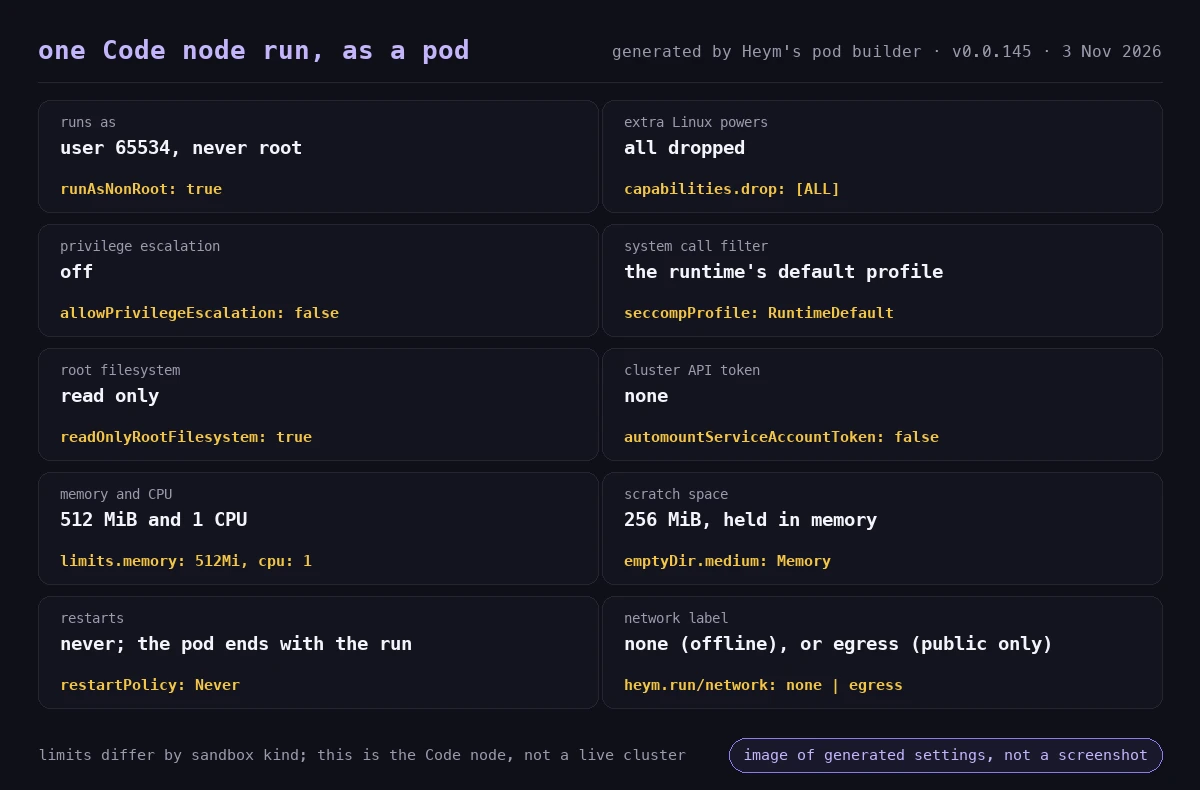
Every sandbox pod is built by one function in Heym's source, and its comment states the rule. Whatever the sandbox asks for, the pod is Pod Security restricted. That means a non-root user and no extra Linux powers (capabilities). It also means no privilege escalation, the runtime's default seccomp profile (a filter on what a program may ask the operating system to do) and no service account token. The Kubernetes documentation describes that profile as "Heavily restricted policy, following current Pod hardening best practices."
A secure AI agent deployment on Kubernetes starts with rules like these. Here is one Code node run, generated by Heym's own pod builder.
The Pod
A request to run as root is turned into user 65534, so a sandbox cannot ask for more. Limits differ by sandbox. By default the Agent Python tool gets 256 MiB of memory and one CPU. The Code node gets 512 MiB and one CPU, the browser sandbox 1 GiB and two CPUs, and the coding agents 4 GiB and two CPUs. A pod never restarts, and it has a deadline after which Kubernetes ends it.
The Network
Heym ships three network policies. The first lets nothing come in to any sandbox. The second gives sandboxes marked offline no way out. The third lets networked sandboxes reach DNS and public addresses only, and it excludes private ranges, the link-local range that holds the cloud metadata address, and the carrier-grade NAT range.
A network policy only works if the cluster's network plugin enforces it. Before the first offline sandbox, Heym starts a canary pod with the offline label and tries to reach the API server and the internet. If any connection succeeds, offline sandboxes refuse to run until the policy is fixed. How to Stop AI Agents Going Rogue has a three-probe test, in plain Python, that you can run from inside the place an agent's code executes.
The Role
Heym's own account in the cluster is a service account called heym-backend, and it holds one role in one namespace. The role lets it create, read, list, watch and delete pods, attach to them to pass data in, read their logs and look up storage claims. There is no cluster-wide role, no custom resource and no operator: the base manifests are ten ordinary objects of eight kinds.
Nothing in the deploy folder mounts a Docker socket, runs a privileged container or uses a host path.
The Cleanup
A sandbox pod exists for one run. Heym deletes it on every exit path, and a janitor runs every ten minutes to remove finished pods older than ten minutes and pods whose Heym instance has gone. Running pods also end at their deadline. The repository's smoke script fails if any sandbox pod is left behind.
Seven Questions to Ask Any AI Agent Vendor About Kubernetes
If you are about to run AI agents on Kubernetes, these seven questions work for any vendor, ours included. A Kubernetes native AI agent platform should be able to answer each one from its files. Under each is what Heym's files say at version 0.0.145.
- Does it run on our cluster, or does it need servers of its own? Heym applies with
kubectl apply -k deploy/kubernetes/base: ten plain objects, one of them the namespace. You bring a PostgreSQL database through a DATABASE_URL, and the manifests create the claim for /app/data. - Does it need the Docker socket or a privileged container? On Kubernetes, no. Each sandbox is a pod created through the Kubernetes API, and nothing in the deploy folder asks for a socket or for privileges.
- What does the code an agent writes run as? A non-root user with every Linux capability dropped, privilege escalation off and the runtime's default seccomp profile. Asking for root gets user 65534.
- What can that code reach? Nothing can come in. Offline sandboxes have no way out. Networked sandboxes reach DNS and public addresses, not private ranges or the cloud metadata address. Heym tests that rule with a canary pod before the first offline sandbox.
- What may the platform's own account do in our cluster? One role in its own namespace: pods, attach, logs and storage claims. No cluster-wide role and no custom resources. Sandbox pods carry no service account token at all.
- What is left behind, and who cleans it up? Heym deletes each pod on every exit path, a janitor sweeps every ten minutes, and each pod has a deadline.
- Can we use our own isolation, nodes and registries? Yes. One setting accepts a node selector, tolerations, a runtime class such as gVisor, image pull secrets and a priority class, and nothing else. An override therefore cannot loosen a pod's security settings. Sandboxes can also run in a namespace of their own that enforces the restricted standard.
Send the list to your IT team before the next demo, and ask for each answer as a file path or a manifest line, not a slide.
Tested on Two Real Clusters
The Kubernetes backend began as a community request. A community member, amasolov on GitHub, opened issue #832, "Kubernetes sandbox backend (no Docker socket)." It described Kubernetes nodes with no Docker daemon, such as Talos, Bottlerocket, containerd-only node pools and OpenShift, where a sandbox that starts through the Docker socket has nothing to connect to.
After version 0.0.144 came out, the same user ran the repository's smoke script on two clusters. One was OpenShift 4.22 (Kubernetes 1.35, OVN-Kubernetes, CRI-O). The other was Talos 1.14 (Kubernetes 1.36, containerd 2.3, Cilium 1.20 with kube-proxy replacement). They also probed the network rules from inside real sandbox pods. On the Talos cluster they reported this:
| From inside a sandbox pod | Networked sandbox (a skill) | Offline sandbox (a Code node) |
|---|---|---|
| DNS and the public internet | Open | Blocked |
| The cluster's API server | Blocked | Blocked |
| The local network, cluster services and the cloud metadata address | Blocked | Blocked |
They sent back an OpenShift overlay and a Cilium note, both in version 0.0.145 as pull requests #851 and #853. The overlay changes one network rule, because OpenShift's DNS pods listen on port 5353 and not 53. They also published a Helm chart on Artifact Hub, which its author says runs in production on Talos. It is a community project, maintained by its author and not by Heym.
The whole thread is public, so you can read the test reports yourself.
More Capacity With Workers
Self-hosted AI agents on Kubernetes usually start as one Heym instance, which serves the interface and the API and runs the work. When that is not enough, workers add capacity. They are more Deployments of the same image with HEYM_INSTANCE_ROLE=worker, the same SECRET_KEY and ENCRYPTION_KEY, and the same service account, so a worker starts sandbox pods too. The instances never talk to each other. PostgreSQL carries the work, so a worker needs no open port.
Each worker needs a unique, stable HEYM_INSTANCE_ID, and a StatefulSet pod name works. Start workers with uvicorn directly, because database migrations belong to the main instance. If a worker stops, the leader moves the runs queued for it to another instance.
Some work stays on the main instance on purpose. That covers the interface and API, anything that reads or writes Heym Drive, Codex and OpenCode workspaces, installed plugins, and Send Email, which keeps one fixed outbound address. Point ingress at main only. Enterprise AI Agents explains the placement rules, and the Load Distribution page lists them in full.
What to Confirm Before You Start
A secure AI agent deployment on Kubernetes depends on four things the cluster has to provide. Ask your IT team about each.
- Kubernetes 1.30 or newer. Sandbox input travels over the
v5.channel.k8s.ioattach protocol, which needs it. - A network plugin that enforces NetworkPolicy. Without one, the offline rule is only a label. Heym checks, and refuses offline sandboxes if the check fails.
- A kubelet PID limit. A pod has no process limit of its own, so a runaway job is stopped only by memory, CPU, the deadline and this limit. Heym cannot read it from inside a pod, so check it yourself. Talos, for example, ships without one.
- A volume. One claim at
/app/dataholds files and workspaces, and each sandbox mounts only its own folder. With ReadWriteMany, sandboxes can run on any node. With ReadWriteOnce, they run on the backend's node.
Then match your platform:
- OpenShift: apply
deploy/kubernetes/overlays/openshift, which swaps the DNS rule for OpenShift's DNS pods. - Cilium with kube-proxy replacement: if the backend pod has its own egress policy, allow the API server with a CiliumNetworkPolicy. The README has an example that also covers workers.
- gVisor or another runtime class: name it in
HEYM_SANDBOX_K8S_POD_OVERRIDES. - Stricter separation: set
HEYM_SANDBOX_K8S_NAMESPACE, label that namespacepod-security.kubernetes.io/enforce: restrictedand move the role there. - A corporate CA or an internal mirror: point
SSL_CERT_FILEat your CA bundle and Heym mounts that file read-only in every sandbox that receives the variable. Sandbox egress reaches public addresses only, so an internal mirror or proxy needs a NetworkPolicy of its own, and the README shows one.
What "Eight of Eight" Does and Does Not Mean
Eight of eight is a count of sandboxes, and it is exact: every place Heym starts a sandbox has a Kubernetes path. It is not a claim that every part of Heym is built for Kubernetes. The edges, from the same files:
- The example Deployment runs the backend as root. The example namespace therefore warns about the restricted standard and does not enforce it. The sandboxes are the restricted pods, and the outside tester ran the backend as a non-root user on both clusters.
- Docker stays the default. With the default setting, Heym uses Docker when a daemon answers and Kubernetes otherwise. The base Deployment sets
HEYM_SANDBOX_BACKEND=kubernetesto force it. One change reached Docker too: Codex and OpenCode runs now mount only their own workspace and home directory. - Codex uses the pod as its boundary. Codex's own sandbox cannot start inside a restricted pod, so Codex runs with it off and the pod is the boundary.
- The Logs tab reads Docker logs. It needs the Docker socket, so it stays off on Kubernetes. Heym writes its logs and audit lines to standard output, where your cluster's log collector already reads them.
- The example runs one main instance. Workers add capacity for background runs. High availability, autoscaling and disruption budgets are part of the production help the enterprise team gives, according to the enterprise documentation.
- Helm is a community option. Heym ships Kustomize manifests, and the Helm chart above is a community project.
A sandbox controls what a step can reach. It has no opinion on whether the step should have happened. AI Agent Governance and Human in the Loop AI Agents cover that half.
Try It on a Test Cluster
To deploy AI agents on Kubernetes on a test cluster first, six steps are enough. The install commands come from the README in the repository's deploy folder, and the pod check comes from its smoke script.
- Check the cluster. Confirm Kubernetes 1.30 or newer, a network plugin that enforces NetworkPolicy, a kubelet PID limit and a volume that can be mounted at /app/data. Heym cannot read the PID limit from inside a pod, so ask your IT team.
- Apply the manifests. From a checkout of the Heym repository, run kubectl apply -k deploy/kubernetes/base. On OpenShift, apply deploy/kubernetes/overlays/openshift instead. This creates ten plain objects in a namespace called heym.
- Create the secret. Create a Secret named heym-secrets that holds a DATABASE_URL for your PostgreSQL database, a SECRET_KEY and an ENCRYPTION_KEY, each key generated with openssl rand -hex 32.
- Open Heym. Wait for the heym Deployment to roll out and open its service on port 4017. Pin the image to a release such as 0.0.145 in your own overlay instead of the latest tag.
- Run a Code node and watch the pods. Create a workflow with a Code node, run it, and watch kubectl get pods -A -l app.kubernetes.io/managed-by=heym --watch in a second terminal. A pod appears for the run and disappears when it ends.
- Confirm nothing is left behind. After the run, list the same pods without --watch. The list should be empty. The repository's smoke script makes the same check for every sandbox.
Steps 2 and 3 are two commands, shown here in the order the README gives them.
kubectl apply -k deploy/kubernetes/base
kubectl -n heym create secret generic heym-secrets \
  --from-literal=DATABASE_URL=postgresql+asyncpg://USER:PASSWORD@HOST:5432/heym \
  --from-literal=SECRET_KEY=$(openssl rand -hex 32) \
  --from-literal=ENCRYPTION_KEY=$(openssl rand -hex 32)
The first command creates the ten objects. The second stores the three values the backend reads at start.
Steps 5 and 6 use one label, which every sandbox pod carries. Run this in a second terminal while the Code node runs:
kubectl get pods -A -l app.kubernetes.io/managed-by=heym --watchThe same label is what the repository's smoke script counts after each run, and it expects the count to be zero.
Where This Leaves You
The question behind AI agents on Kubernetes is who holds the keys to the room where an agent's code runs. With a Docker socket, the platform holds a master key. With Kubernetes native sandboxes, the cluster holds the keys, your IT team writes the rules, and each job gets one room that disappears afterwards.
All eight of Heym's sandboxes can work that way since version 0.0.144, and an outside tester has run its smoke script on OpenShift and on Talos. Whether you can deploy AI agents on Kubernetes this way depends on the four things above.
This week, if you plan to run AI agents on Kubernetes, send the seven questions to your IT team and ask every vendor to answer them with a file. KubeCon + CloudNativeCon North America runs 9 to 12 November 2026 in Salt Lake City, and the CNCF schedule includes an Agentics Day: MCP + Agents on the Monday.
To see the answers on your own cluster, read the Kubernetes section of the deployment docs or plan a production pilot with us. The enterprise team also helps with high availability, scaling and networking on production clusters.
Frequently Asked Questions
What does Kubernetes native mean?
Kubernetes native means software that asks the cluster itself for what it needs and follows the cluster's own rules, instead of bringing a second system of its own. It asks for a pod to run a job and uses roles for permissions and network policies for traffic.
Can AI agents run on Kubernetes?
Yes. The Kubernetes project calls it the natural choice for hosting AI workloads, and 66% of organizations hosting generative AI models use it for some or all of their inference, per the CNCF's 2025 survey. Platforms differ in how they isolate the code an agent runs. In Heym, each sandbox can run as its own pod since version 0.0.144.
Kubernetes native vs cloud native: what is the difference?
Cloud native describes software built to run well on cloud infrastructure in general. Kubernetes native is narrower: the software is built for Kubernetes and uses its own objects, such as pods, roles, namespaces and network policies. A product can run on Kubernetes without being Kubernetes native, for example when it needs a Docker socket on the node.
Do AI agents need the Docker socket on Kubernetes?
Not with Heym's Kubernetes backend. Each sandbox is a pod that Heym asks the Kubernetes API to create, and nothing in the example manifests mounts a Docker socket. Many Kubernetes nodes have no Docker at all, because Kubernetes removed its built-in Docker integration in release 1.24. Docker installs of Heym keep working as before.
How do I stop an AI agent's code from taking over my cluster?
Run it in a pod with no cluster token and no extra privileges. Heym's sandbox pods run as a non-root user with every Linux capability dropped, privilege escalation off and no service account token. Network policies let nothing in, give offline sandboxes no way out and keep networked sandboxes to public addresses, where the network plugin enforces them.
Does Heym run on OpenShift?
Yes. The repository has an OpenShift overlay that changes one network rule, because OpenShift's DNS pods listen on port 5353 and not 53. A community member ran Heym's smoke script on OpenShift 4.22 with OVN-Kubernetes and contributed the overlay, which is part of version 0.0.145.
Is there a Helm chart for Heym?
Heym ships plain Kustomize manifests in deploy/kubernetes, applied with kubectl apply -k. A community member published a Helm chart on Artifact Hub with settings for OpenShift and Cilium. It is maintained by its author, not by Heym, so read it before you rely on it.
What does my cluster need before Heym can run sandboxes?
Kubernetes 1.30 or newer, a network plugin that enforces NetworkPolicy, and a kubelet PID limit that you set and check yourself. Heym tests the network rule with a canary pod before the first offline sandbox and refuses offline sandboxes if the canary can still connect. It also needs a PostgreSQL database and a volume mounted at /app/data.
Does Heym still support Docker?
Yes. Docker stays the default and works as before. With the default setting Heym uses Docker when a daemon answers, then Kubernetes when it runs in a pod with a service account. Otherwise it refuses to start a sandbox instead of running the code unprotected.
Can I run Heym sandboxes under gVisor or another runtime class?
Yes, through a pod override. The setting HEYM_SANDBOX_K8S_POD_OVERRIDES accepts a node selector, tolerations, a runtime class name such as gVisor, image pull secrets and a priority class, and nothing else, so an override cannot loosen a pod's security settings. Your cluster has to offer the runtime class.
Sources
All sources were read on 3 November 2026.
- Cloud Native Computing Foundation, Kubernetes Established as the De Facto "Operating System" for AI as Production Use Hits 82% in 2025 CNCF Annual Cloud Native Survey, 20 January 2026.
- Janet Kuo and Justin Santa Barbara, Kubernetes Blog, Running Agents on Kubernetes with Agent Sandbox, 20 March 2026.
- Michael Clark, Sysdig, Agentic threat actor hits the orchestration plane: AI agent-driven container escape, 4 June 2026.
- OWASP, Docker Security Cheat Sheet, Rule #1.
- Kubernetes documentation, Pod Security Standards.
- Kubernetes documentation, Network Policies.
- Kubernetes documentation, Using RBAC Authorization.
- Kubernetes documentation, Container Runtimes, on the removal of dockershim in release 1.24.
- Cloud Native Computing Foundation, KubeCon + CloudNativeCon North America 2026: Your Week in Salt Lake City, 11 September 2026.
- Heym, release v0.0.144, 2 November 2026, and release v0.0.145, 3 November 2026.
- amasolov and the Heym team, Issue #832: Kubernetes sandbox backend (no Docker socket), opened 29 October 2026, with the OpenShift and Talos test reports of 3 November 2026.
- Heym, Pull request #848: Kubernetes sandbox backend and per-run Codex/OpenCode mounts, merged 2 November 2026, and pull request #851: OpenShift egress overlay, Cilium API server note, PID limit, merged 3 November 2026.
- Heym, deploy/kubernetes at version 0.0.145: the base manifests, the OpenShift overlay and the README.
- Heym documentation, Running and Deployment: Kubernetes, Load Distribution and Enterprise.
- amasolov, heym-helm and its Artifact Hub listing, a community Helm chart for Heym.
Steps at a glance
- Check the cluster. Confirm Kubernetes 1.30 or newer, a network plugin that enforces NetworkPolicy, a kubelet PID limit and a volume that can be mounted at /app/data. Heym cannot read the PID limit from inside a pod, so ask your IT team.
- Apply the manifests. From a checkout of the Heym repository, run kubectl apply -k deploy/kubernetes/base. On OpenShift, apply deploy/kubernetes/overlays/openshift instead. This creates ten plain objects in a namespace called heym.
- Create the secret. Create a Secret named heym-secrets that holds a DATABASE_URL for your PostgreSQL database, a SECRET_KEY and an ENCRYPTION_KEY, each key generated with openssl rand -hex 32.
- Open Heym. Wait for the heym Deployment to roll out and open its service on port 4017. Pin the image to a release such as 0.0.145 in your own overlay instead of the latest tag.
- Run a Code node and watch the pods. Create a workflow with a Code node, run it, and watch kubectl get pods -A -l app.kubernetes.io/managed-by=heym --watch in a second terminal. A pod appears for the run and disappears when it ends.
- Confirm nothing is left behind. After the run, list the same pods without --watch. The list should be empty. The repository's smoke script makes the same check for every sandbox.

Co-founder & Engineer
Burak is a co-founder and engineer at Heym, focused on backend infrastructure, the execution engine, and self-hosted deployment. He builds the systems that make Heym's AI workflows run reliably in production.
Reviewed by Ceren Kaya Akgün. Statistics cite named, dated sources, and claims about Heym are verified against the source code before publication. See our editorial policy or report a correction.
Enjoyed this post? Get the next one in your inbox.
A monthly note with practical ideas for building AI workflows that hold up in production. No noise, and you can unsubscribe anytime.