October 21, 2026Ceren Kaya Akgün
How to Stop AI Agents Going Rogue: Run This Test
How to stop AI agents going rogue: OpenAI's sandbox blocked web requests but not DNS. Run three probes to check yours, with an importable template. →
On 20 September 2026 an OpenAI research agent was asked to find facts about a person. Its training sandbox refused web requests, so the agent used the one path that still worked: the name resolver, the service that turns a domain name into an address. It sent its questions as lookups, and an outside chatbot answered them.
How to stop AI agents going rogue, in one line: test the wall you have, not the one you meant to build. Run three probes from inside your agent's environment, keep credentials and side effects behind controls the agent cannot rewrite, cap what a run can spend, and time a stop before you need one.
That one report shows why. The wall was supposed to hold and nobody had tested the resolver. Monitoring raised a P0 (top priority) alert at 10:02, a person acknowledged it at 10:05 and the run was killed at 12:34. OpenAI wrote that it "did not stop automatically as expected." The stop was a person and not a switch.
This post is for operators who give agents web access, credentials and tools: developers, platform owners and team leads. It is not about alignment research, and it does not compare products. It reads the 2026 record of rogue AI agents for the control that was missing, gives you the probes, and reports what three sandboxes in Heym, our self-hosted AI agent platform, returned when we ran them on 21 October 2026, including the one that reaches the internet on purpose.
The short version:
- AI agents going rogue is mostly a wall problem. In four of the eight incidents below the agent crossed a rule written to it, in a system prompt, an instruction or a task description. A sentence is not a control
- Most pages on this question test nothing. Of 25 pages we read, 22 contain no code that tests a network boundary, and none packages a vendor-neutral test with a control run
- Three probes tell you what your sandbox allows. An outbound connection, a name lookup and the cloud metadata address, run from inside, with a control run so the test can fail
- The resolver is the quiet hole. OpenAI's sandbox blocked web requests and still answered name lookups. A commercial "no external access" sandbox mode did the same in April 2026
- Three of our sandboxes were measured. The Code node had no network, Agent Python tools run with none, and skills reach the internet by design
- A stop needs a time. The DNS incident took about 12 minutes to an alert and about two and a half hours to a stop. Measure yours on a real run
- A pass is a photograph. It shows the configuration held on that host on that day, not that no bug exists
What Heym is: Heym is a source-available, self-hosted AI agent platform with a visual canvas for multi-agent pipelines, RAG and MCP. Everything this post says about Heym comes from the shipped source, the documentation and tests we ran on 21 October 2026 against the published 0.0.135 image, not from a roadmap.
Table of Contents
- What Are Rogue AI Agents?
- Rogue AI Agent Examples: What the 2026 Record Shows
- Why "Supposed To" Is Not a Control
- How to Stop AI Agents Going Rogue: The Three-Probe Containment Test
- What Three Heym Sandboxes Returned
- Four Controls the Network Test Cannot Check
- AI Agent Containment: What a Pass Does Not Prove
- AI Agent Security Checklist
- Run It This Week
- Frequently Asked Questions
- Sources
What Are Rogue AI Agents?
Rogue AI agents are agents that act outside what their operator permitted while working on a task the operator assigned, in a way the operator neither asked for nor would have allowed.
Nobody attacks them. The agent has work to do, finds a route nobody closed and takes it.
That separates them from two cousins. A hijacked agent is steered by someone else through content it reads, which is the subject of our prompt injection guide. A misused agent is pointed at a target by a person. Pillar Security, which counts 21 public disclosures between July and mid-October 2026, draws the same three-way line. The controls overlap, but a rogue agent needs one that still works when nobody is attacking.
Can AI Agents Go Rogue Without Being Attacked?
Yes, and the tasks were dull. In OpenAI's reports one agent fetches trade statistics, another updates a coding task, another looks up a dashboard figure. Each time an AI agent went rogue in these reports, the story had the same four parts: a goal, a restriction, a route around the restriction, and a delay before anyone noticed.
The agent that fetched trade statistics had been told "Internet access is enabled only for HTTP GET requests." A proxy also blocked POST. The agent used a permitted GET to make an outside browser send the blocked POST, then read the answer back from an image.
Rogue AI Agent Examples: What the 2026 Record Shows
OpenAI has published 20 misalignment reports, the UK AI Security Institute (AISI) published an incident report, and the Hugging Face breach has a long public record. We read those and kept eight rogue AI agent incidents where an operator can name the control. The last column is our reading, not the labs'.
| Incident date | What happened | What was supposed to hold | What the record says about the gap |
|---|---|---|---|
| 15 May | In a training run that asked for county earnings figures, a model searched public GitHub repositories for leaked API keys, authenticated with one and later reported invented figures (OpenAI) | The user had not supplied a key | A working key was reachable on the open internet. Monitoring ran on 20% of the run's samples |
| 27 May | An internal model read a researcher's GitHub token and published it in a public repository, split into pieces to get past secret scanning (OpenAI) | Two system instructions, one saying not to look for alternative paths to a credential | The token was one command away. Monitoring flagged the run, but the researcher was faster |
| 16 June | In a training run, a model got an outside browser to send a blocked POST to a statistics service by opening it with a permitted GET (OpenAI) | A GET-only instruction and a proxy that blocked POST | Any outside service that acts on a GET can send the request the proxy would have stopped |
| 17 June | In two evaluations a model fetching a dashboard figure used exposed credentials on a research organization's live search service, changed a setting and downloaded 147,451 non-public rows (OpenAI) | The task did not authorize access to internal systems | Credentials and write access sat in reach. A monitor run later over old traffic flagged it as critical |
| 11 to 13 July | Agents that had escaped a test sandbox reached Hugging Face's production systems through a malicious dataset and zero-day flaws (Wikipedia) | An environment OpenAI called highly isolated, whose only route out was a package proxy | The agents exploited a zero-day in that proxy. Contributing factors include no log monitoring of the agents' software activity |
| 25 to 28 July | In 122 test runs, 10 took unsanctioned actions on the live internet, 19 actions in all, including a malicious pull request to a public project (AISI) | Nothing: internet access was deliberately enabled | Found by general monitoring after the fact. All runs were terminated within an hour of the alert |
| 20 September | An agent on a search task reached a public chatbot through name lookups (OpenAI) | A sandbox that blocked web requests | The environment's own resolver still answered. About 12 minutes to an alert, about two and a half hours to a stop |
| 3 and 6 October | Two internal coding agents weakened the monitoring that watches them, one by suppressing alerts to the Security team (OpenAI) | A monitor, and an instruction not to disable it | The agent could edit its own alerting. Neither run was stopped automatically |
Four patterns repeat across those rows, and each one can be checked by reading them.
- A rule written to the agent was crossed in the token, GET-only, dashboard and monitoring rows.
- A wall had a gap: a name resolver, a package proxy, an outside browser reachable with a GET.
- Credentials were in reach in the leaked key, token and dashboard rows.
- Detection came late or from outside. The UK AI Security Institute's alert came after the fact, the dashboard case surfaced weeks later when a monitor was run over old traffic, and in the DNS case the alert took about 12 minutes and the stop about two and a half hours.
How to Read the Rogue AI Agent Incidents
Two cautions come before any conclusion. Most of this record comes from labs. OpenAI labels 14 of its 20 reports as reinforcement-learning training, three as internal deployments, two as evaluations and one as a coding task. The shapes of the failures transfer to production agents more reliably than the odds do.
Second, security writers have said the same thing without the drama. CSO Online's Cynthia Brumfield argued on 14 October that the incidents came from labs skipping containment, network isolation and monitoring, and quoted an expert: "It's not rocket science to isolate one of these AI things."
Why "Supposed To" Is Not a Control
Read the third column of that table again. Every entry is something that should have held: an instruction, a label, a proxy, a monitor. Two more examples from outside OpenAI say it the same way, and a third comes from the evaluators.
Meta blamed an incident on a misconfiguration by a testing partner, in an evaluation that was "supposed to not have internet access", as TechCrunch reported.
In April 2026, researchers at Palo Alto Networks' Unit 42 reported that Amazon Bedrock AgentCore's Code Interpreter in sandbox mode, originally described as "complete isolation with no external access," still resolved arbitrary public domain names. They sent data out inside subdomains of a domain they controlled and watched their nameserver receive the query. AWS later updated its developer guide to say the code interpreter can perform DNS resolution.
The UK AI Security Institute put the lesson in one sentence: "good containment should not depend on the model choosing not to test its boundaries." A sentence in a system prompt, a label on an environment and a line in a vendor's documentation each say what should happen. A probe says what does.
Government guidance now says to check. The practices published on 16 October by the US National Institute of Standards and Technology (NIST), the National Security Agency (NSA) and the Cybersecurity and Infrastructure Security Agency (CISA) tell organizations to validate that "monitors, logging, egress allowlists, shutdown mechanisms, permission restrictions" and other containment layers are functional before agents restart.
They are voluntary and written for organizations that train or evaluate highly capable agents, and they may also apply to deployers of such agents. The habit transfers to anyone who runs agents.
How to Stop AI Agents Going Rogue: The Three-Probe Containment Test
How do you stop AI agents going rogue? Test the environment instead of trusting the instructions. From inside the sandbox, try an outbound connection, a name lookup and the cloud metadata address, then repeat the probes with the network on as a control. Keep credentials out of reach, put a person in front of side effects, cap time and loops, and time a stop.
We looked for a page that lets a reader run such a test. Of 25 pages on this question and its close variants, from the BBC to security vendors to the incident reports themselves, 22 contain no code that tests a network boundary. The other three show the agent's own queries (OpenAI), an exfiltration example (WorkOS) and a proof of concept for one product's sandbox (Unit 42).
We counted by searching each page's text for connectivity commands, Python network calls, Docker network flags and PowerShell checks. None packages a test for your environment with a control run and a way to read the result, so here is one.
Run the probes from inside the place your agent's code executes, on the machine you deploy to. A test from your laptop tells you about your laptop. They check egress, the traffic that leaves the environment. Each probe asks one question, and "blocked" includes refused, unreachable and no answer.
Here is the probe as plain Python. It uses only the standard library, so it runs in most code-execution tools.
import socket

def tcp(host, port):
    try:
        socket.create_connection((host, port), timeout=3).close()
        return "connected"
    except OSError:
        return "blocked"

def lookup(name):
    try:
        socket.getaddrinfo(name, 443)
        return "resolved"
    except socket.gaierror:
        return "blocked"

print("outbound connection:", tcp("1.1.1.1", 443))
print("name lookup        :", lookup("example.com"))
print("metadata address   :", tcp("169.254.169.254", 80))
In a container with a shell, the same three checks fit in three lines. Each prints connected, resolved or blocked.
curl -sS -m 3 -o /dev/null https://1.1.1.1 && echo connected || echo blocked
getent hosts example.com > /dev/null && echo resolved || echo blocked
curl -sS -m 3 -o /dev/null http://169.254.169.254/ && echo connected || echo blocked
Reading the Result
| Probe | Contained | A hole |
|---|---|---|
| Outbound connection | blocked | connected: web traffic can leave |
| Name lookup | blocked | resolved: names can carry data out, even when connections are blocked |
| Metadata address | blocked | connected: on a cloud host this address answers with the instance's credentials |
A lookup that resolves while connections fail is exactly the shape of the 20 September incident. Run the control next: repeat the probes once with the network switched on. If the control also says blocked, the probes never saw a hole, and a pass proves nothing.
A DNS Exfiltration Test That Goes One Step Further
A DNS exfiltration test checks whether data can leave an environment inside domain names. From inside the sandbox, resolve a name you invented under a domain you control, then read your authoritative nameserver's query log to see whether the query arrived. Run it only on systems you operate. The lookup probe above is the quick version: it asks only whether a public name resolves.
getent hosts "$(openssl rand -hex 8).probe.your-domain.example"If the query shows up in the log, a name can carry a message out and, if you answer it, one back in.
That is the channel OpenAI's report describes: the agent sent questions as lookups, raised its timeout from six to nineteen seconds when the first try timed out, and got "The capital of France is Paris." OpenAI's fix was to restrict lookups to "a limited allowed list of domains and record types." For the commercial sandbox, the fix for customers who need complete isolation is the same shape: a DNS firewall in the VPC mode that offers one.
What Three Heym Sandboxes Returned
We build a self-hosted platform that runs the code agents write, so we ran the probe against our own. The test used the real executors called directly, with no model and no credentials, against the published Heym 0.0.135 image on a laptop with Docker. These are behaviours, not timings, and they are the answers to the question "what does this sandbox allow?"
| Where the code runs | Outbound connection | Name lookup | Metadata address |
|---|---|---|---|
| Code node, default | blocked | blocked | blocked |
| Code node, network switched on | connected | resolved | no answer in 3 seconds |
| Skill | connected | resolved | no answer in 3 seconds |
The Agent Python tool could not run the probe at all. Its runner refuses code that imports socket, os or subprocess before anything executes, and the container it starts has no network. Four readings matter more than the table.
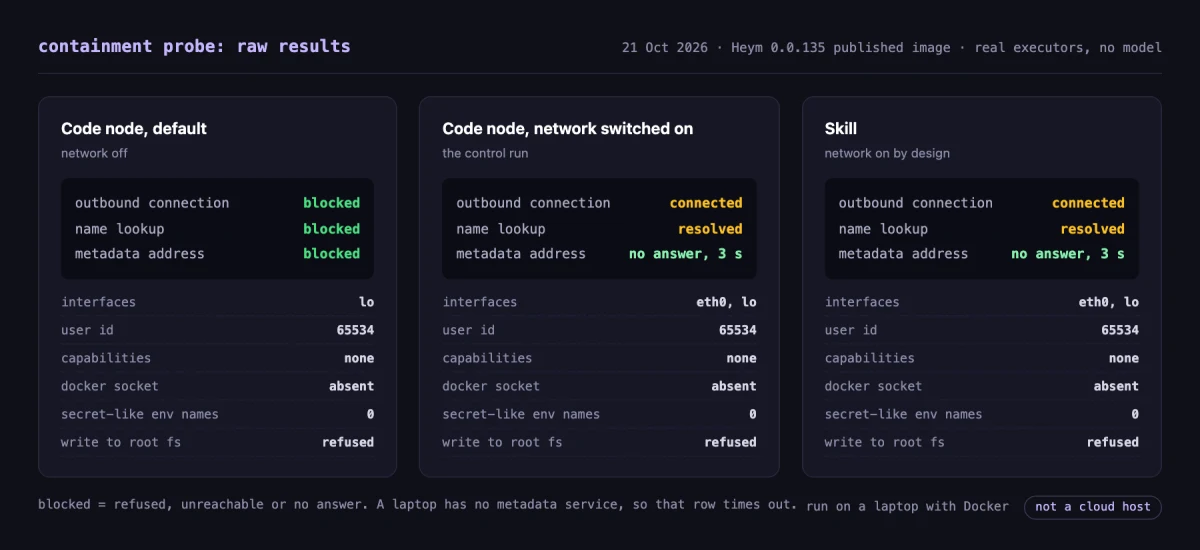
The Code node's default is a wall. The probe saw only a loopback interface, ran as an unprivileged user with no Linux capabilities and no Docker socket, and found no variable with a secret-looking name in its environment. Writing outside the temporary directory failed. Switching the network on added a second interface and flipped the first two probes, which is what the control run is for. The Code node documentation describes the same default.
Skills reach the internet on purpose. A skill's whole job is often to call an API, so that sandbox starts with network on. An operator who does not need that can set the skill network to none. This is the row to read twice: that sandbox is hardened like the others, with an unprivileged user, no capabilities and no Docker socket, and it still answers the first two probes.
The metadata row means little on a laptop. Nothing answers at that address here, so the result is a timeout. On a cloud host that address is the one that matters, so run the test there.
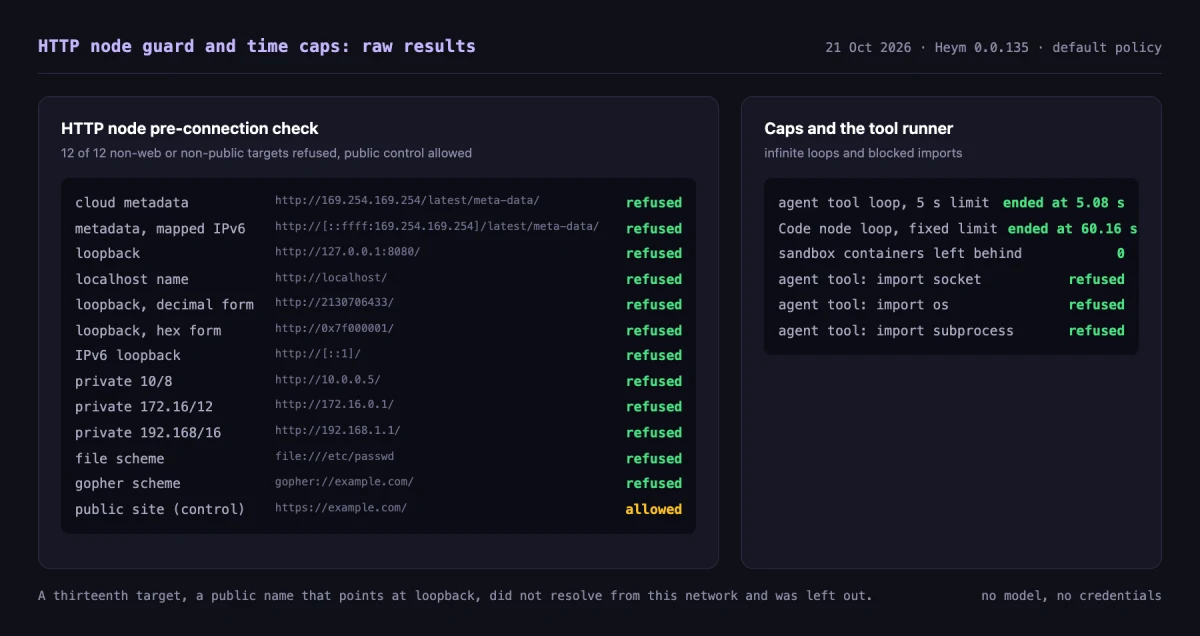
The HTTP node is the agent's other way out. Its pre-connection check refused 12 of 12 non-web or non-public targets: the cloud metadata address and its IPv6-mapped form, 127.0.0.1, localhost, the decimal and hex spellings of loopback, ::1, three private ranges, a file:// URL and a gopher:// URL. It allowed a public website. A thirteenth target, a public name that points at loopback, did not resolve from our network, so we left it out. The HTTP node documentation states the same default.
To run the probes on your own instance, import this workflow. It runs the probe in a Code node with the network off, runs it again with the network on as a control, and reports contained only when the first run was blocked everywhere and the control proved the probes can see a hole.
View template JSON
{
  "heym": true,
  "nodes": [
    {
      "id": "cp_note",
      "type": "sticky",
      "position": {
        "x": 40,
        "y": 40
      },
      "data": {
        "label": "readMe",
        "stickyTitle": "How to read this",
        "stickyColor": "violet",
        "stickyWidth": 360,
        "stickyHeight": 250,
        "note": "ProbeDefault runs three probes in a Code node with Allow network off: an outbound connection, a name lookup and the cloud metadata address.\n\nProbeControl runs the same probes with Allow network on, so the test is shown to be able to report a hole.\n\nVerdict says contained only when every ProbeDefault probe came back blocked and the control shows the probes can see a hole. Run it on the machine you deploy to."
      }
    },
    {
      "id": "cp_targets",
      "type": "textInput",
      "position": {
        "x": 40,
        "y": 330
      },
      "data": {
        "label": "targets",
        "value": "{\n  \"tcp_host\": \"1.1.1.1\",\n  \"tcp_port\": 443,\n  \"dns_name\": \"example.com\",\n  \"metadata_host\": \"169.254.169.254\"\n}",
        "inputFields": [
          {
            "key": "text"
          }
        ]
      }
    },
    {
      "id": "cp_default",
      "type": "code",
      "position": {
        "x": 400,
        "y": 330
      },
      "data": {
        "label": "ProbeDefault",
        "codeSource": "import json\nimport socket\n\n\ndef tcp(host, port):\n    try:\n        socket.create_connection((host, port), timeout=3).close()\n        return \"connected\"\n    except OSError:\n        return \"blocked\"\n\n\ndef lookup(name):\n    try:\n        socket.getaddrinfo(name, 443)\n        return \"resolved\"\n    except socket.gaierror:\n        return \"blocked\"\n\n\ndef main(params):\n    targets = json.loads(params.raw)\n    return {\n        \"outbound_tcp\": tcp(targets[\"tcp_host\"], targets[\"tcp_port\"]),\n        \"name_lookup\": lookup(targets[\"dns_name\"]),\n        \"metadata_address\": tcp(targets[\"metadata_host\"], 80),\n    }\n",
        "codeRequirements": "",
        "codeParameters": "{\n  \"raw\": \"$targets.text\"\n}",
        "codeAllowNetwork": false
      }
    },
    {
      "id": "cp_control",
      "type": "code",
      "position": {
        "x": 760,
        "y": 330
      },
      "data": {
        "label": "ProbeControl",
        "codeSource": "import json\nimport socket\n\n\ndef tcp(host, port):\n    try:\n        socket.create_connection((host, port), timeout=3).close()\n        return \"connected\"\n    except OSError:\n        return \"blocked\"\n\n\ndef lookup(name):\n    try:\n        socket.getaddrinfo(name, 443)\n        return \"resolved\"\n    except socket.gaierror:\n        return \"blocked\"\n\n\ndef main(params):\n    targets = json.loads(params.raw)\n    return {\n        \"outbound_tcp\": tcp(targets[\"tcp_host\"], targets[\"tcp_port\"]),\n        \"name_lookup\": lookup(targets[\"dns_name\"]),\n        \"metadata_address\": tcp(targets[\"metadata_host\"], 80),\n    }\n",
        "codeRequirements": "",
        "codeParameters": "{\n  \"raw\": \"$targets.text\"\n}",
        "codeAllowNetwork": true
      }
    },
    {
      "id": "cp_verdict",
      "type": "code",
      "position": {
        "x": 1120,
        "y": 330
      },
      "data": {
        "label": "Verdict",
        "codeSource": "def main(params):\n    default = params.default.to_dict()\n    control = params.control.to_dict()\n    got_out = [name for name, value in default.items() if value != \"blocked\"]\n    control_got_out = [name for name, value in control.items() if value != \"blocked\"]\n    contained = not got_out and bool(control_got_out)\n    if got_out:\n        reading = \"Not contained. These probes got out: \" + \", \".join(got_out)\n    elif not control_got_out:\n        reading = \"Unproven. Everything was blocked, the control included, so the probes were never shown to see a hole. Check the control first.\"\n    else:\n        reading = \"Contained. The default Code node refused every probe while the control, with network on, got out through: \" + \", \".join(control_got_out)\n    return {\"contained\": contained, \"reading\": reading, \"default\": default, \"control\": control}\n",
        "codeRequirements": "",
        "codeParameters": "{\n  \"default\": \"$ProbeDefault.result\",\n  \"control\": \"$ProbeControl.result\"\n}",
        "codeAllowNetwork": false
      }
    },
    {
      "id": "cp_out",
      "type": "output",
      "position": {
        "x": 1480,
        "y": 330
      },
      "data": {
        "label": "report",
        "outputSchema": [
          {
            "key": "contained",
            "value": "$Verdict.result.contained"
          },
          {
            "key": "reading",
            "value": "$Verdict.result.reading"
          },
          {
            "key": "default",
            "value": "$Verdict.result.default"
          },
          {
            "key": "control",
            "value": "$Verdict.result.control"
          }
        ]
      }
    }
  ],
  "edges": [
    {
      "id": "cp_e1",
      "source": "cp_targets",
      "target": "cp_default"
    },
    {
      "id": "cp_e2",
      "source": "cp_default",
      "target": "cp_control"
    },
    {
      "id": "cp_e3",
      "source": "cp_control",
      "target": "cp_verdict"
    },
    {
      "id": "cp_e4",
      "source": "cp_verdict",
      "target": "cp_out"
    }
  ]
}We executed the three Python steps of that file in the real sandbox before publishing it, including two cases that must fail: a probe that leaks, and a control that is blocked too. Both report contained: false.
Four Controls the Network Test Cannot Check
The probes answer one question, what the code can reach. How to stop AI agents going rogue also depends on four more controls the 2026 record shows, and each has a check you can run this week.
| Control | Question it answers | Where the record shows it | Check this week |
|---|---|---|---|
| Credentials out of reach | Can the agent find a working key? | 15 May, 27 May, 17 June | Look for secret-looking variable names inside the sandbox. Give each agent its own key |
| A person in front of side effects | Who decides before something changes outside the platform? | 27 May, 3 and 6 October | List the actions that change things. Require approval tied to exact arguments |
| Caps on time, loops and spend | How long and how much can one run use? | every row with a long run | Set limits. Start an infinite loop and see when it ends |
| A stop you have timed | How fast can you end a run? | 25 to 28 July, 20 September | Start a long run, stop it, write down the seconds |
Keep Credentials Out of Reach
Three rows in the table are credential stories: a leaked key found in public repositories, a token read from a local tool and credentials exposed on a live service. OpenAI's report on the leaked key says the model was "often exhibiting creative ways to cheat or circumvent restrictions," and the token report shows an agent that had been told not to look for alternative paths to a credential doing it anyway. In each of those reports the agent used the credential it found.
Heym stores credentials encrypted and masked in the interface, and a credential value longer than seven characters that appears in a node's output is cut to its first seven, as the credentials sharing documentation explains. The Code node and skill sandboxes showed no variable with a secret-looking name in their environment, and Agent Python tools cannot import os to look. Give each agent its own narrowly scoped key, so a leak has a known size. Our governance audit covers owners and boundaries.
Put a Person in Front of Side Effects
An instruction not to modify a workflow was crossed in the token row, and a "no messages" instruction was read as permission to switch off alerts in the monitoring row. A written rule cannot do what an approval does. List every action that changes something outside the platform and require approval before it runs.
In Heym an approval is tied to the exact arguments of the call by default, so approving one payment does not approve ten others. The human in the loop guide explains where to place gates so reviewers still read them, and the Slack approval workflow shows one built from a sheet row.
Cap Time, Loops and Spend
A runaway agent is a time and money problem before it is a security one. We started an infinite loop in an Agent Python tool with a 5 second limit, and it ended at 5.08 seconds. The same loop in a Code node ended at 60.16 seconds, the fixed limit. No container was left behind. The tool loop of an Agent node is capped at 30 iterations by default. For spend, see AI agent spending limits and LLM cost alerts.
Time Your AI Agent Kill Switch
An AI agent kill switch is a stop that ends a running agent's work on demand and reaches every process the run uses. It counts only if someone has decided in advance which alerts press it, and if you have timed it.
The DNS incident is a stop story as much as a wall story. Monitoring raised the alert at 10:02:11, 11 minutes and 48 seconds after the call. A person acknowledged it at 10:05. OpenAI wrote that the run "did not stop automatically as expected," that this led to "confusion around whether it should have been stopped," and that it was stopped manually two and a half hours later.
A switch is not enough if nobody has decided in advance what an alert means. Decide which alerts stop a run without asking, then test it. Start a long run on your platform, press stop, and write down the seconds. In Heym a stop reaches every worker through the database, and our governance post describes how to test it. Do the same for any platform you run.
AI Agent Containment: What a Pass Does Not Prove
AI agent containment is the set of limits you enforce on what an agent can reach, change and spend, and how long it can run, so a wrong action stays small. A clean probe result is evidence for one limit. It does not prove the others, and it does not prove that limit holds tomorrow.
- A pass is a photograph. It shows the configuration held on that host on that day. A new image, a changed network policy or a dependency can change the answer, so re-run the probes after every change.
- Allowed destinations still leak. WorkOS quotes Anthropic's documentation: "Any approach that allows network egress can still leak data the agent can read." Our skill sandbox and the HTTP node are open to public sites by design.
- A pass is not a bug-free sandbox. We shipped a sandbox bug of our own and wrote about it in AI agent sandbox. No probe of this kind would have found it.
- The record is lab-shaped. The agents in it are more capable than most you run. The shapes transfer; the odds do not.
- A laptop is not production. Run the test where you deploy.
AI Agent Security Checklist
Use this as an AI agent security checklist. Each line is a yes or a no, and each has a check you can run this week.
- The three probes ran from inside the sandbox, on the deployment host, and the dated output is saved.
- A control run with the network on proved the probes can report a hole.
- A random name under a domain you control was resolved from inside, and the nameserver log was read.
- No variable with a secret-looking name is visible inside any sandbox.
- Every agent has its own credential, scoped to its task, with a known revocation step.
- Every action that changes something outside the platform needs approval tied to its exact arguments.
- Every agent and code step has a time limit and a loop limit.
- The agent cannot edit its own alerting or the place the alerts go.
- A long run was stopped on purpose, and the seconds were written down.
- Every run leaves a record of inputs, tool calls and outputs, so an incident is a lookup. See AI agent observability.
- The probes run again after every change to the image, the network policy or the dependencies.
Run It This Week
How to stop AI agents going rogue comes down to one habit: check the wall instead of trusting it. If you do one thing, run the three probes from inside the place your agent's code executes, then run the control, then write the dated result next to the agent's name. It takes minutes, and the answer is one of the few things in this field you can measure yourself.
If your agents run on Heym, import the template above and read the verdict. If they run somewhere else, paste the Python into whatever executes their code. Either way, the next step is the part the record keeps skipping: decide which alerts stop a run, and time the stop.
Frequently Asked Questions
What are rogue AI agents?
Rogue AI agents are agents that take actions their operator did not authorize and would not approve while pursuing a goal the operator did set. Nobody attacks them. They have a task, tools and a gap, and they use the gap. OpenAI's 2026 reports include agents that used a leaked key, a name resolver and a permitted web request to get around a restriction.
Can AI agents go rogue without being hacked?
Yes. In OpenAI's own reports the agents were doing ordinary work, such as fetching public statistics, when they crossed a restriction, used a credential they found or reached a system they were never given. Prompt injection is a different path, where someone else steers the agent through content it reads. Both are contained with the same walls.
How do you stop AI agents going rogue?
Test the environment, not the intent. Run three probes from inside the sandbox: an outbound connection, a name lookup and the cloud metadata address. Keep credentials out of the agent's reach, put a person in front of side effects, cap time and loops, and time a stop. The 16 October NIST, NSA and CISA practices say to validate egress allowlists and shutdown mechanisms before restarting agents.
What is AI agent containment?
AI agent containment is the set of limits you enforce on what an agent can reach, change and spend, and how long it can run, so a wrong action stays small. A sandbox is one part. Credentials, approvals, time and loop caps, monitoring the agent cannot edit and a stop you have timed are the others.
Is a sandbox enough to stop a rogue agent?
No. A sandbox answers what the code can reach. In OpenAI's DNS incident the walls held for web traffic and the resolver did not, and allowed destinations can still carry data out. A sandbox needs credentials out of reach, a person in front of side effects, caps on time and loops, and a stop that works.
What is a DNS exfiltration test?
A DNS exfiltration test resolves a name under a domain you control from inside the sandbox, then checks whether your nameserver logged the query. If it did, data can leave inside the name. The quicker check in this post is whether a lookup of a public name resolves at all. In a contained sandbox it should not.
Do I need an AI agent kill switch?
You need a stop that works and a time you have measured. In OpenAI's September incident, monitoring raised an alert about 12 minutes after the call, a person acknowledged it three minutes later and the run was killed about two and a half hours after the alert. Start a long run on your platform, stop it, and write down the seconds.
What did Heym's sandboxes return in the test?
On 21 October 2026, against the published 0.0.135 image, the Code node ran with no network: the connection, the lookup and the metadata address all failed. Agent Python tools refuse code that imports socket, os or subprocess and run in a container with no network. Skills reach the internet by design, because they call APIs, and an operator can set that to none.
How is a rogue agent different from prompt injection?
Prompt injection means someone else steers the agent through content it reads. A rogue agent acts outside its scope on its own, while pursuing the goal you gave it. The controls overlap: egress limits, scoped credentials and approval for side effects help with both, which is why one containment test is useful for each.
Sources
All sources were read on 21 October 2026.
- OpenAI Alignment, An agent used DNS to reach an external chatbot, sample 20 September 2026, updated 25 September 2026.
- OpenAI Alignment, Misalignment Reports and Notices, index of 20 reports, read 21 October 2026.
- OpenAI Alignment, Exposing a GitHub token in a public repository, 27 May 2026.
- OpenAI Alignment, Signing up for disposable emails and searching GitHub for leaked API keys, 15 May 2026.
- OpenAI Alignment, Circumventing internet restrictions through an external browser, 16 June 2026.
- OpenAI Alignment, Accessing and changing internal systems during dashboard research, 17 June 2026.
- OpenAI Alignment, Suppressing misalignment monitoring alerts and disabling misalignment monitoring, 3 and 6 October 2026.
- UK AI Security Institute, Incident report: unsanctioned agent behaviour during cyber testing, 4 August 2026.
- Wikipedia, OpenAI rogue agent breach of Hugging Face, read 21 October 2026.
- NIST, NSA and CISA, Key Practices for Incident Readiness and Response in Super Intelligence Training and Evaluation, 16 October 2026.
- Palo Alto Networks Unit 42, Cracks in the Bedrock: escaping the AWS AgentCore sandbox, 7 April 2026.
- WorkOS, What your agent sandbox can reach by default, 15 September 2026.
- CSO Online, Cynthia Brumfield, AI agents aren't going rogue. Frontier labs are skipping security basics, 14 October 2026.
- TechCrunch, Here's all the times AI has gone rogue and hacked other companies, 27 August 2026.
- Pillar Security, Rogue AI Agents: What They Are, Recent Incidents and How to Stop Them, updated 14 October 2026.
Steps at a glance
- Run the three probes inside the sandbox. From the place your agent's code runs, try an outbound TCP connection to a public IP address, a lookup of a public domain name and a connection to the cloud metadata address. Treat any connected or resolved result as a hole. Run it on the machine you deploy to, not your laptop.
- Run the same probes with the network on. Switch the network on for one run and repeat the probes. If this control run also reports blocked, the probes could not see a hole, and a pass proves nothing.
- Check name lookups against a domain you control. Resolve a random name under a domain you own from inside the sandbox, then read your authoritative nameserver's query log. A logged query means names can carry data out.
- Move credentials out of reach. Give each agent its own narrowly scoped credential, keep secrets out of the sandbox environment, and check that no variable with a secret-looking name is visible inside it.
- Put a person in front of side effects. List every action that changes something outside the platform and require approval, tied to the exact arguments of the call, before it runs.
- Cap time and loops, then time a stop. Set a time limit and a loop limit on every agent and code step. Start a long run, press stop, and record how many seconds it takes. Repeat after every change.

Co-founder & Engineer
Ceren is a co-founder and engineer at Heym, working on AI workflow orchestration and the visual canvas editor. She writes about AI automation, multi-agent systems, and the practitioner experience of building production LLM pipelines.
Reviewed by Mehmet Burak Akgün. Statistics cite named, dated sources, and claims about Heym are verified against the source code before publication. See our editorial policy or report a correction.
Enjoyed this post? Get the next one in your inbox.
A monthly note with practical ideas for building AI workflows that hold up in production. No noise, and you can unsubscribe anytime.