October 11, 2026Ceren Kaya Akgün
Introducing Heym Work: AI Agents for Business Teams
Heym Work lets business teams describe a job, answer a few questions and get a tested workflow, on your own servers with roles, sign-in and approvals. →
Business teams are already building AI agents. Howdy.com surveyed more than 1,000 employees who use AI at work, and CIO reported the results on 8 October 2026: 67% use agents and 16% built one from scratch. About a quarter had to deactivate an agent entirely, and 22% of those say it never worked in the first place. The agents exist. What is missing is a place where they are tested, owned and visible.
Heym Work is our answer to that gap. It is the business interface for Heym, the self-hosted platform we build for running and governing AI agents. People describe a job in their own words, answer a few questions and get a workflow that Heym has already tested. Heym runs it on your servers, and Heym Work shows the result on pages the team works from, with roles, company sign-in and approvals.
I work on Heym's canvas and agent engine, and for a long time the canvas was the only way in. It is the right door for people who build workflows. It is the wrong one for the person who owns a contract queue or a refund process and has a job to hand over.
This post is for the people who own a team's process, such as operations, legal, finance and support leads, and for the engineer or administrator who would host Heym Work. It covers what Heym Work does, what it runs on and how to install it, with four short videos: a product film and three walkthroughs in the Legal edition. It is not a comparison with other products, and everything about Heym Work here comes from the shipped product and its source.
The short version of what you will find here:
- Heym Work is the business interface for Heym. Heym stays the engine and runs every job on your servers. Heym Work is what the team sees and works in
- A job becomes a tested workflow. Heym asks the few questions it needs, saves the workflow and test-runs it, up to five times in a turn. The Verified card appears only after the latest save passes a run
- Pages are the team's apps. Describe a page and Heym proposes up to six widgets: numbers, tables with status chips, charts, approvals and run widgets with a file drop
- Governance comes with it. Three roles, the single sign-on your Heym already uses, approvals with Approve, Request changes and Reject, and a Stop button on every running job
- Six industry editions start a team off. Legal, Education, Finance, Logistics, Energy and E-commerce open with their own pages, sample data and templates
- Four videos, about seven minutes in all. A product film of 2 minutes 56 seconds, and three walkthroughs of 94, 88 and 82 seconds for install, build and pages
The film follows one job from a spoken request on a phone to a governed desk in Heym Work. Watch it first, then use the sections below for the detail.
Table of Contents
- What Is Heym Work?
- Why AI Agents for Business Teams Need Their Own Door
- Describe a Job, Answer a Few Questions, Get a Tested Workflow
- Pages: The Apps Your Team Works From
- Approvals, Roles and Sign-In
- What Runs Underneath
- Six Industry Editions
- How to Install Heym Work
- Choose Your First Job
- Frequently Asked Questions
- Sources
What Is Heym Work?
Heym Work is the business interface for Heym. People describe a job, answer a few questions and get a tested workflow, while Heym runs every job on your own infrastructure. Pages, approvals, roles and company sign-in sit around the same workflows engineers build in Heym.
A team can work in it without opening the canvas. It helps to think of two doors into one engine. Heym is the engine and the canvas: it builds, runs and governs workflows. Heym Work is a second interface on the same database, made for the people who run a team's process rather than wire nodes.
What Heym is: Heym is a source-available, self-hosted AI workflow automation platform with a visual canvas for multi-agent pipelines, retrieval-augmented generation (RAG) and the Model Context Protocol (MCP). Everything this post says about Heym Work was checked against the product's source on 11 October 2026.
Heym Work vs Heym
| Heym | Heym Work | |
|---|---|---|
| Built for | People who build and operate workflows | People who run a team's process |
| How you build | On the visual canvas, or with the AI assistant | In Chat, by describing the job |
| What you see | The canvas and its tabs | Home, Chat, pages, Activity, Tables, Knowledge and Drive |
| Where it runs | Your servers | One container next to Heym, on the same database |
| How people sign in | Heym's own rules, including single sign-on | The same rules, with an Owner, Editor or Viewer role on top |
Both produce ordinary Heym workflows. A workflow a business team built in Chat can be opened on the canvas by an engineer who has Heym access to it, and a workflow built on the canvas appears in Home for the people it is shared with.
Choose the canvas when the job needs hand-wired nodes, a code step or a single node debugged on its own. Choose Heym Work when the person who owns the job should describe it, run it and watch it. Most teams use both.
What You See in Heym Work
The menu is short: Chat, Tables, Knowledge, Drive and Activity, plus Traces & Analytics for Editors and Owners, with Settings at the bottom. Tables hold records, Knowledge holds documents that workflows can search, Drive holds files, and Activity lists runs. Above them sit the pages a person has pinned, grouped under scenario names they type.
The logo opens Home, where a composer asks "What do you want to automate?" and the workflows a person can run are listed below it. The Quick Drawer, docked on the right edge of every page, runs any of them.
Why AI Agents for Business Teams Need Their Own Door
The CIO article makes the point from the IT side: employees are building agents whether or not the organization has approved it. Howdy.com's founder, Frank Licea, told the magazine that his own teams had to ask people to hold on until guardrails and system guides were in place.
The Howdy.com survey also shows why people give up on agents. Of the quarter who deactivated one, 58% pointed to inconsistency and 22% said it never worked. Workers spent just over a full work day, 8.4 hours, trying to make an agent work before scrapping it. And only 28% said their workplace is clear on who owns AI output.
Microsoft's 2026 Work Trend Index points the same way from the organization's side. In its survey of 20,000 knowledge workers who use AI across 10 markets, culture, manager support and talent practices account for more than twice the self-reported AI impact of individual mindset and behavior, 67% against 32%.
Those numbers describe a missing place more than a missing model. An agent built alone has no test record, no named owner and nobody who can see it run. Heym Work is built around the opposite: a workflow is only marked Verified after a test run of its latest save passes, it has an owner, and every run it makes is listed in Activity.
Describe a Job, Answer a Few Questions, Get a Tested Workflow
Business teams can build AI agents without coding in Heym Work because the build happens in a conversation. Inside Heym Work nobody opens the canvas or writes an expression. The path from a request to a working workflow has five stages, and a person stays in control around all of them.
The build video shows the path in the Legal edition. The request is "Each morning, list the contracts due this week in the Contract Inbox and flag the ones still awaiting review." Heym asks which table holds the contracts, saves the workflow, tests it and marks it Verified (build video, 0:30). Run from the AI Counsel corner of the studio, it reports 7 open contracts due this week, two of them still awaiting review (build video, 0:48).
What Verified Means
The rule is simple and it lives in the engine. Heym cannot end a build turn with a Verified card until a test run of the latest save has passed, and a turn gets at most five test runs. If the five are spent without a pass, Heym says so and no Verified card appears. Nothing is marked Verified on a hunch.
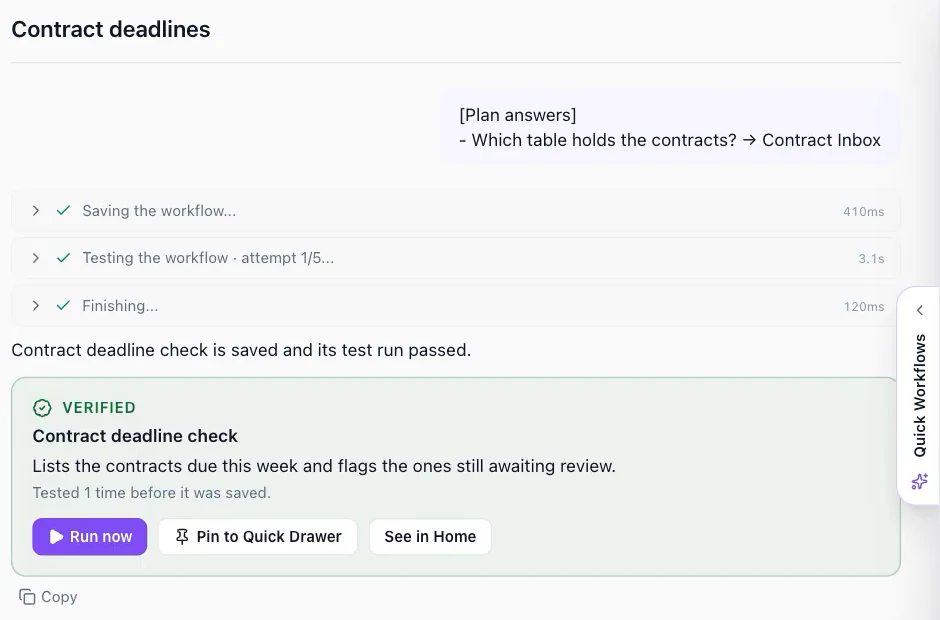
A passing run shows that the workflow ran on sample data and met the expectation Heym wrote for it. It does not replace a person for decisions that matter, which is what approvals are for. It does address one of the failures in the Howdy.com data, the 22% who said an agent never worked at all. Inconsistency, the larger reason at 58%, is why runs, traces and approvals stay in the picture.
Questions Come as Cards
Heym asks its questions as cards, not as a form to fill in. A planner card asks something like "Which inbox?". A credential card offers "Use Sales inbox or connect a new mailbox", and a secret is never shown in the chat. A new credential opens Heym's credential dialog. A table card offers an existing table or a new one with the columns it proposes.
A person can type or speak. Chat has dictation, and a full-screen voice mode reads Heym's questions aloud while the person answers out loud. A file dropped on the composer can serve as the sample input for the test runs.
Start From a Template
Editors do not have to start from a blank request. Under the composer, "Start from a template" shows up to six names that heym.run suggests and a plus button for the whole catalog. A template opens in a side panel that says what starts it, what it uses and what it gives back. "Use template" creates the workflow in Heym for that person and opens it in the Quick Drawer, ready to run.
The build video starts there, with the Contract Obligation & Deadline Extractor. The same catalog is browsable on heym.run, and our post on AI agent templates you can watch run shows how the gallery works. For describing a workflow in plain words on the canvas instead, see text to workflow.
Pages: The Apps Your Team Works From
A workflow that runs once is a tool. A workflow with a page around it is an app: the numbers it produces, the table it fills, the reviews it waits on and a button that runs it again. In Heym Work, a page is a Heym dashboard shown in Work's style and pinned into a person's menu under a scenario name they type.
Editors build pages by describing them. They give a scenario, a page name and what the page should show. Heym proposes up to six widgets with a preview of each, the person picks, and Heym creates the page and builds the chosen widgets in parallel. Each widget appears when it is ready, and one that fails can be retried on its own.
What a Page Can Hold
The widget types cover the work a team does every day:
- Numbers and charts for counts, totals and trends.
- Tables with status chips, where a column such as status shows as colored chips and a row opens a detail page for that one record.
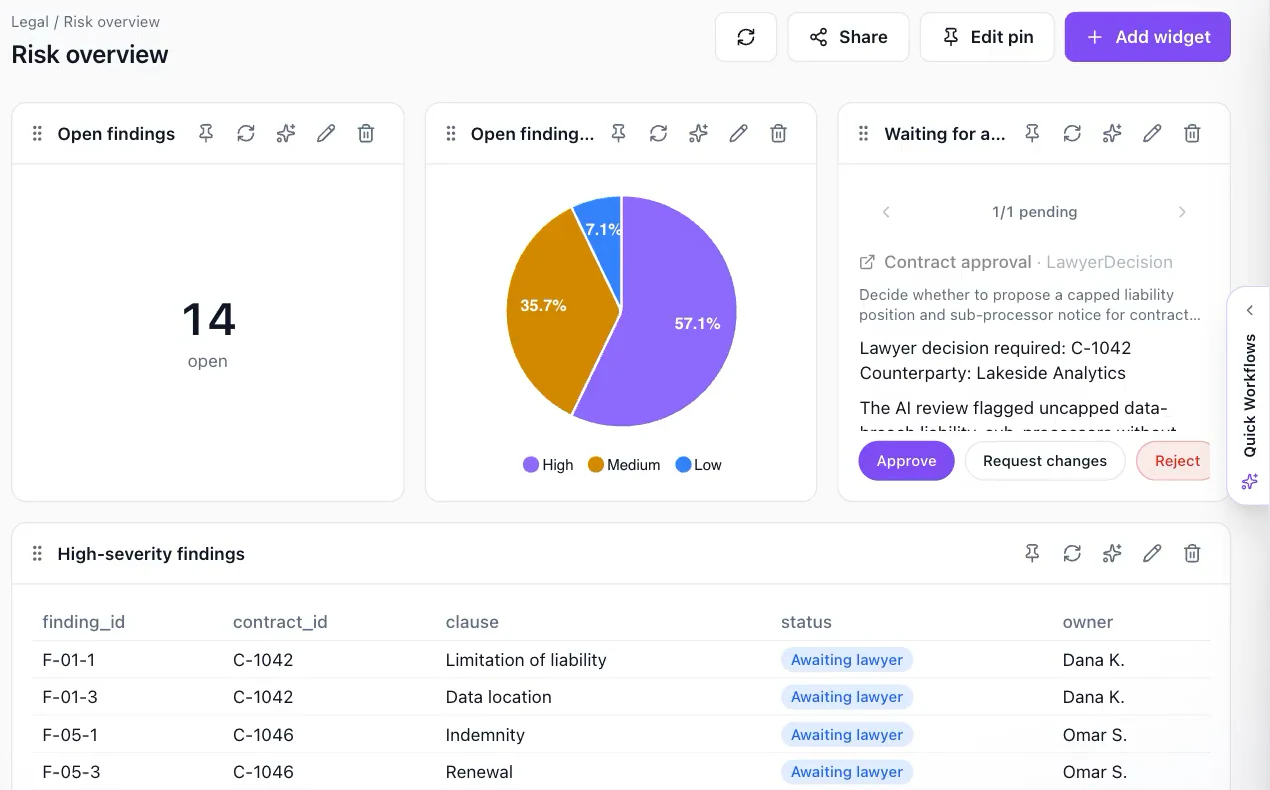
- Approvals, where a person approves, requests changes or rejects, and a badge in the menu counts the reviews waiting.
- Run widgets, which run a chosen workflow: a drop zone for a workflow that takes a file, fields for one that asks for input, or a Run button for the rest.
- Text for the notes that explain the page.
The pages video shows a run widget at work. A PII redaction workflow built in Chat is added to a page as a widget with a drop zone (pages video, 0:30). A PDF dropped on it runs the workflow, and the redacted report lands in Drive, with the original on the left and the redacted text on the right (pages video, 0:49).
Who Can Do What on a Page
Everyone who can open a page can refresh its widgets and pin the page to their own menu. Editors add, fine-tune, rename, resize and delete widgets. Widgets run with the dashboard owner's access, as they do in Heym, so a page shows what its owner may see to everyone who can open it. Share pages with that in mind. Our solution page on operational dashboards covers the Heym side of the same widgets.
Approvals, Roles and Sign-In
The OWASP Top 10 for LLM Applications names Excessive Agency as LLM06:2025. Its root causes are excessive functionality, excessive permissions and excessive autonomy, and its mitigations include limiting permissions, acting in the context of the user and requiring a human to approve high-impact actions. Heym Work is built around those three mitigations.
Limited Permissions
Heym Work reads what it shows from Heym's database with a role that holds column-level SELECT only, and it never writes Heym's tables. Every action goes to Heym over a key-protected channel, so workflow version history and Heym's audit trail apply as they do for any other client. A missing column switches off the one screen that reads it and nothing else.
The Person's Own Context
Roles in Heym Work are conveniences stored in Work, and a person's effective permission is the Work role intersected with their Heym permission. A Viewer who is not shared on a workflow does not see it, whatever the role says. The table shows what each role can do.
| Action | Viewer | Editor | Owner |
|---|---|---|---|
| Open pages, refresh widgets, pin pages | Yes | Yes | Yes |
| Ask questions and run workflows in Chat | Yes | Yes | Yes |
| Answer their own reviews | Yes | Yes | Yes |
| Build or change workflows, add widgets with AI | No | Yes | Yes |
| Change data, upload to Knowledge and Drive, share items | No | Yes | Yes |
| Traces & Analytics, credentials, MCP connections | No | Yes | Yes |
| Members and roles | No | Yes, without Owner grants | Yes |
| License and updates | No | No | Yes |
New members start as Viewers. Owners are named in the install settings, and only an Owner grants or revokes the Owner role.
Human Approval for AI Workflows
When an agent pauses for a person, the review lands where the team already works. In a pending review, the reviewer chooses Approve, Request changes or Reject, and the run continues from that decision. Reviews waiting for a person are listed first in Activity, and a badge on the menu counts them for pages that carry an approvals widget.
Anyone can decide the reviews addressed to them, including a Viewer, because the person who owns a decision should be able to make it. What to gate is a design question that our post on human in the loop AI agents takes on: gate the action, not the plan.
Single Sign-On and Activity
Heym Work uses the single sign-on configured in Heym, so people sign in with the identity provider the company already runs. Heym authenticates and Heym Work holds the session, and the browser never sees a Heym token. The setup is covered in the single sign-on guide, and our enterprise checklist explains what to ask of any platform.
Activity lists the runs a person can open, with status, workflow, trigger, start time and duration. Runs in progress and runs waiting for a review come first, and a running job has a Stop button. Every run also records the Heym instance that ran it. For the wider question of who may let an agent act alone, read AI agent governance, or the shorter governance overview.
What Runs Underneath
Heym is a platform for self-hosted AI agents, and Heym Work leaves that engine in charge. Work hands every job to Heym on your own servers. Heym's main instance takes it in, and the workers beside it share the runs, as described in the load distribution guide. The result comes back to the chat or page that asked for it.
Because Work reads from the database, Heym stays the single source of truth. The read-only role uses PostgreSQL's column-level privileges, so each screen can read only the columns it needs. Work keeps its own few tables in a heym_work schema of the same database. Tokens issued for Work are bound to Work and accepted only together with the key an admin generates in Heym.
Heym From Your AI Assistant
The film opens with a request made to Claude on a phone. That works because Heym is also a Model Context Protocol server. Under Settings, MCP, Editors and Owners get numbered steps for connecting Claude, ChatGPT, Gemini, Cursor or any MCP client, and a toggle that lets assistants talk to Heym and build workflows by chatting. The MCP tab documentation has the Heym side.
Six Industry Editions
A blank screen is the hardest place to start. Heym Work ships with six industry editions, and the WORK_INDUSTRY setting picks one. Home then opens with that industry's templates first. Each Editor gets demo pages, sample data and workflows, and can remove them in Settings, Demo content or bring them back.
| Edition | Pages it starts with | What the team gets |
|---|---|---|
| Legal | Contract operations, Counsel | Contracts triaged by risk, research and drafts grounded in your own playbooks, and lawyer decisions in one Approval Desk |
| Education | Student support, Course feedback | Student requests triaged by topic, course feedback summarized, and grade changes approved by a person |
| Finance | Invoice exceptions, Expense approvals | Invoice exceptions caught and explained, expenses taken in, and payments released after approval |
| Logistics | Shipments, Carrier invoices | Delays triaged by carrier, freight invoices audited, and carrier disputes sent once they are approved |
| Energy | Meter anomalies, Field work orders | Meter anomalies checked by region, work orders taken in, and outage notices approved before they go out |
| E-commerce | Returns, Catalog issues | Returns triaged by reason, product listings checked, and refunds approved by a person |
Home opens on Overview with the classic widgets. A World toggle opens an interactive scene of the industry's workplace, with six areas for records, workflows and run activity, and Editors can update records straight from the scene. The Legal edition is the one the videos use, and its Approval Desk already holds a lawyer decision waiting to be approved, changed or rejected (install video, 1:15).
The templates behind the edition are ordinary gallery templates. For Legal they include the Contract Risk Review Queue and the Contract Obligation & Deadline Extractor. Our post on human-reviewed operations shows the same pattern outside Heym Work.
How to Install Heym Work
A Heym Work install takes six steps, and the install video shows the whole path in 94 seconds. The first step is the only one that needs planning, because it decides what has to be reachable from where.
- Check the requirements. You need a Heym instance whose admins can open Settings, Heym Work, a network path from the Heym Work container to Heym's PostgreSQL and its https address, an https address for Heym Work, and outbound https to heym.run for license activation.
- Decide how Heym Work reads the database. The simplest route reuses Heym's connection string. For narrower access, a database administrator creates a read-only role first, and the image prints the SQL for it.
- Open the channel in Heym. As a Heym admin, open Settings, Heym Work. Enter Heym Work's address, generate a key and enable the connection. The key is shown once, so copy it (install video, 0:21).
- Start the container. One
docker runstarts the public image. The example below opens the Legal edition; leave outWORK_INDUSTRYto start without an industry edition. - Finish setup in the browser. Open the public address followed by
/setup, enter the license key, connect Heym with its address and the key from step 3, and sign in as an Owner (install video, 0:33). - Invite the team. People sign in through your single sign-on and start as Viewers. Owners and Editors change roles in Settings.
The command below is step 4 with placeholders. Generate the secret key once with openssl rand -hex 32 and back it up. Heym Work uses it to encrypt the keys and tokens it stores, so a different key cannot decrypt them.
docker run -d --name heym-work --restart unless-stopped -p 8080:8080 \
  -e DATABASE_URL='postgresql+asyncpg://<user>:<password>@<host>:5432/heym' \
  -e WORK_PUBLIC_URL='https://work.example.com' \
  -e WORK_SECRET_KEY='<your generated key>' \
  -e WORK_OWNER_EMAILS='owner@example.com' \
  -e WORK_INDUSTRY='legal' \
  ghcr.io/heymrun/heym-work:latest
Once the container is up, /healthz reports the process and /readyz reports the database and Heym. Upgrade Heym first and Heym Work second. A new Heym Work release may read columns the database role cannot see yet, and Settings, Updates lists them.
Licenses and Trials
Heym Work needs a license key. Request a trial on the Heym Work page, and the form emails you a key with the setup steps and the setup video. If a key cannot be sent right away, our team reaches out instead. A trial runs for three days, first and last day included, and reopens when the team extends it. Each installation takes one trial.
Online licenses renew through a daily sync. If the sync fails for 30 days, a 14-day grace period starts, and after it the Heym Work interface asks an Owner for a key. Heym keeps running every workflow, schedule and webhook throughout, so a lapse never stops the automations. Networks without internet access use an offline license, which you can ask for on the same page.
What to Plan For
A few facts are worth settling before the first day:
- Heym does the running. Heym Work runs nothing itself, so Heym has to be up for jobs to run. If a license lapses, only the Heym Work interface locks.
- Building needs an Editor. Viewers can ask questions and run workflows, so decide who gets which role before the team signs in.
- Demo content is sample data. Industry editions start with sample records and workflows, which you can remove in Settings, Demo content.
- Verified is a passed test, not a guarantee. Keep an approval on any step that sends, spends or changes something.
- A trial is short. It runs for three days, so line up the first job before you request it.
Choose Your First Job
In the Howdy.com survey, 71% of respondents said fewer than half of their department's agents reach long-term production. A good first job gives yours a better chance. Use this worksheet before you describe anything, with the Legal edition as the example.
| Question | Why it matters | Example |
|---|---|---|
| What does someone repeat every week? | A repeated job pays back the first run | List contracts due this week |
| Who owns it, and who only runs it? | The owner is an Editor, the rest are Viewers | A paralegal owns it, the team runs it |
| What does it read or write? | The table or inbox is the first question Heym asks | The Contract Inbox table |
| Which step needs a person to decide? | Anything with a side effect gets a review | Sending a notice to a counterparty |
| How will you know it worked? | A test run needs an expectation to check | Seven open contracts, two awaiting review |
- Describe the job in Chat and answer Heym's questions until the Verified card appears.
- Pin a page for the team and add the approvals widget if a person decides anything.
- Watch Activity for a week and ask Heym to change what the first week shows.
- Request a trial if you do not have a license yet.
That is the place the opening asked for: a workflow counts as Verified only after a test run passes, it has an owner, and every run it makes is listed in Activity. Heym Work is the business layer of a platform already built for running agents in production.
If a team of yours is working around the canvas today, request a trial, or watch the four videos in the Heym Work playlist first. To see how the builders use the same engine, start with our guide to building an AI agent.
Frequently Asked Questions
What is Heym Work?
Heym Work is the business interface for Heym. People describe a job in their own words, answer a few questions and get a workflow that Heym has already tested. Heym runs it on your own servers, and Heym Work adds pages, approvals, roles and company sign-in around it, so a team can work without opening the canvas.
What is the difference between Heym and Heym Work?
Heym is the engine and the visual canvas: it builds, runs and governs workflows. Heym Work is a second interface on the same database, made for business teams. It reads what it shows from Heym, sends every action to Heym's API, and lets people build by talking instead of wiring nodes. Both work on ordinary Heym workflows.
Can non-technical people build AI workflows with Heym Work?
Yes, with the Editor role. They describe the job in Chat, answer the questions Heym asks, and Heym saves the workflow and test-runs it, up to five times in a turn. The Verified card appears only after the latest save passes a run. Viewers can ask questions and run existing workflows, but building needs an Editor.
What does Verified mean in Heym Work?
Verified means a test run of the workflow's latest save has passed. Heym cannot end a build turn with a Verified card before that, and a turn gets at most five test runs. It shows the workflow ran on sample data and met its expectation. It does not replace a reviewer for decisions that matter.
Where does Heym Work run, and where does its data live?
Heym Work runs as one container next to your Heym, on your own infrastructure. It reads from Heym's PostgreSQL with a read-only role and keeps a few tables of its own in a separate schema of the same database. Workflow content, inputs, outputs and credentials stay on your servers.
What can each Heym Work role do?
Viewers open pages, answer their own reviews, ask questions, run workflows and read data. Editors also build workflows and widgets, change data, share items and manage traces, credentials, MCP and members. Owners also manage the license and updates. New members start as Viewers, and Owners are named at install.
How do approvals work in Heym Work?
When an agent pauses for a person, the review appears in Activity and on pages with an approvals widget. The reviewer chooses Approve, Request changes or Reject, and the run continues from that decision. Pages show a badge with the number of reviews waiting, and anyone can decide the reviews addressed to them.
Does Heym Work support single sign-on?
Yes. Heym Work signs people in through the single sign-on configured in Heym, so they use the identity provider your company already runs. Heym authenticates and Heym Work holds the session, and the browser never sees a Heym token. New members start as Viewers until an Owner or Editor changes their role.
How do I install Heym Work?
Enable the connection in Heym under Settings, Heym Work, then start the image ghcr.io/heymrun/heym-work with one docker run. Open the setup page in your browser, enter the license key, connect Heym with its address and key, and sign in as an Owner. The install video shows the whole path in 94 seconds.
Which industries does Heym Work cover?
Six editions ship with Heym Work: Legal, Education, Finance, Logistics, Energy and E-commerce. Setting WORK_INDUSTRY makes Home open with that industry's templates first, and each Editor gets demo pages, sample data and workflows they can remove in Settings, Demo content. The setting is optional.
How do I get a Heym Work trial, and what happens when a license ends?
Request a trial on the enterprise page and the form emails you a license key with the setup steps; if it cannot, our team reaches out. A trial runs for three days and reopens when the team extends it, with one trial per installation. If an online license cannot sync for 30 days, a 14-day grace period starts, and Heym keeps running every workflow throughout.
What does Heym Work send to heym.run?
Each day Heym Work sends heym.run your license ID, an installation ID, the number of active users in the last 30 days, the total number of members, the number of runs in the last 24 hours, and the Heym and Heym Work versions. Workflow content, inputs, outputs and credentials stay on your servers.
Sources
- Howdy.com, "AI Agent Statistics: 71% Say Fewer Than Half Their Department's Agents Reach Long-Term Production", howdy.com/blog/ai-agent-statistics, read 11 October 2026. A survey of more than 1,000 employees who use AI at work: 67% use agents, 16% built one from scratch, 25% deactivated one, with 58% citing inconsistency and 22% saying it never worked, 8.4 hours spent before scrapping, 28% clear on who owns AI output, and 71% saying fewer than half of their department's agents reach long-term production.
- Grant Gross, CIO, Your employees are building AI agents. Do you know what they're doing?, 8 October 2026. Employees building agents regardless of approval, and Frank Licea's account of guardrails at Howdy.com.
- Microsoft, 2026 Work Trend Index Annual Report: Agents, human agency, and the opportunity for every organization, 5 May 2026. A survey by Edelman Data x Intelligence of 20,000 knowledge workers who use AI at work across 10 markets, 18 February to 7 April 2026: organizational factors account for 67% of self-reported AI impact against 32% for individual factors.
- OWASP Gen AI Security Project, OWASP Top 10 for LLM Applications, 2025 edition, LLM06:2025 Excessive Agency. The three root causes and the mitigations on permissions, user context and human approval.
- The PostgreSQL Global Development Group, GRANT, documentation read 11 October 2026. Column-level privileges.
- Model Context Protocol, Introduction, read 11 October 2026. The protocol assistants use to reach tools.
- Heym Work, checked against its source and release notes on 11 October 2026: the roles and their limits, the five-run test budget and the rule that Verified needs a passing run of the latest save, the six-widget page plan, the license and grace behavior, and the six industry packs and their page names.
- Heym, Heym Work playlist on YouTube: the film (2 minutes 56 seconds), install (94 seconds), build (88 seconds) and pages (82 seconds) videos used above.
- Heym documentation: Single sign-on, Cluster and the MCP tab, read 11 October 2026.
Steps at a glance
- Check the requirements. You need a Heym instance whose admins see Settings, Heym Work, network access from the Heym Work container to Heym's PostgreSQL and its https address, an https address for Heym Work, and outbound https to heym.run for license activation. Networks without internet access use an offline license.
- Decide how Heym Work reads the database. Reuse Heym's connection string, or have a database administrator create a read-only role first. The Heym Work image prints the SQL for that role. The role holds column-level SELECT only, and Heym Work never writes Heym's tables.
- Open the channel in Heym. As a Heym admin, open Settings, Heym Work. Enter Heym Work's address, generate a key and enable the connection. The key is shown once, so copy it before you leave the page.
- Start the container. Run the public image ghcr.io/heymrun/heym-work with your database URL, its public address, a secret key you generated once and backed up, and the email addresses of your Owners. Set WORK_INDUSTRY to open an industry edition.
- Finish setup in the browser. Open the public address followed by /setup. Enter the license key, connect Heym with its address and the key from the third step, and sign in as an Owner.
- Invite the team. Home opens ready for the team. People sign in through your single sign-on and start as Viewers. Owners and Editors change roles in Settings, Members and roles, and Editors can start building in Chat.
Build AI workflows without writing code.
Import ready-made AI automations directly into Heym — the source-available workflow platform.

Co-founder & Engineer
Ceren is a co-founder and engineer at Heym, working on AI workflow orchestration and the visual canvas editor. She writes about AI automation, multi-agent systems, and the practitioner experience of building production LLM pipelines.
Reviewed by Mehmet Burak Akgün. Statistics cite named, dated sources, and claims about Heym are verified against the source code before publication. See our editorial policy or report a correction.
Enjoyed this post? Get the next one in your inbox.
A monthly note with practical ideas for building AI workflows that hold up in production. No noise, and you can unsubscribe anytime.