October 14, 2026Mehmet Burak Akgün
Harness Engineering: From AGENTS.md to Production
Harness engineering, measured on our public repo: AGENTS.md grew fourfold in six months and 16 of 20 changes touched tests. Plus the production harness. →
Harness engineering is the work of building everything around a model that turns it into an agent you can trust: the instructions it reads, the tools it may call, the checks it must pass and the gates that stop it. The model is the part you rent. The harness is the part you build, and on most teams it decides whether an agent ships.
The term is eight months old. Mitchell Hashimoto named it on 5 February 2026, and by September the Wikipedia article on agent harnesses drew 14,351 views a month, up from 1,369 in July. Most of what has been written since is about coding agents, including both of the top two Google results for harness engineering on 14 October 2026.
I designed and maintain the execution engine in Heym, the self-hosted runtime we build for AI agents in production. We build Heym with coding agents, so we live inside two harnesses: the one our coding agents work in, and the one our users' agents run in. This article covers both, with numbers from our public repository.
It is written for developers and operators who already run an agent and want it to fail less. You get a definition, how harness engineering differs from prompt, context and loop engineering, six months of our own AGENTS.md, the five tests that enforce it, and the production half that the coding guides leave out. It is not a ranking of coding agents or a comparison of harness products.
- Agent = model + harness. If you are not the model, you are the harness: prompts, tools, memory, sandboxes, checks and gates.
- Harness engineering is a ratchet. Hashimoto's rule: when an agent makes a mistake, change its environment so it cannot make that mistake again.
- Our AGENTS.md grew fourfold in six months. From 1,038 words and 12 rule sections on 27 April 2026 to 4,170 words and 26 sections on 14 October, across 20 changes.
- A rule without a test is a wish. 16 of those 20 changes touched a test file in the same commit, and five tests exist only to fail the build when a rule is skipped.
- Production agents need a second harness. A sandbox, an approval gate, traces, evals, windowed alerts and an audit trail sit around agents that run while nobody watches.
Table of Contents
- What Is Harness Engineering?
- Harness Engineering vs Prompt, Context and Loop Engineering
- Guides and Sensors: How an Agent Harness Steers
- Harness Engineering Examples From Our Own Repo
- The Production Agent Harness: Agents That Run Without You
- Two Harnesses, Side by Side
- Harness Engineering Best Practices
- How to Start Harness Engineering This Week
- Frequently Asked Questions
What Is Harness Engineering?
Harness engineering is the practice of designing the environment an AI agent works in, so that it gets things right more often and catches itself when it does not. It treats a repeated agent mistake as a defect in the environment, not in the model.
Hashimoto put it plainly in My AI Adoption Journey, where he wrote that he had "grown to calling this harness engineering". His definition: "anytime you find an agent makes a mistake, you take the time to engineer a solution such that the agent never makes that mistake again." He named two forms. One is better instructions in an AGENTS.md file. The other is real programmed tools, such as scripts that take screenshots or run filtered tests.
A month later Vivek Trivedy at LangChain gave the idea its formula in The Anatomy of an Agent Harness: "Agent = Model + Harness". He reports that LangChain moved its coding agent from the top 30 to the top 5 on Terminal Bench 2.0 "by only changing the harness". The model stayed the same, and the ranking moved 25 places.
What Is an Agent Harness?
An agent harness is the software around a language model that lets it act as an agent: it runs the loop, dispatches tool calls, keeps state, manages the context window and enforces limits. The Wikipedia article, last edited on 10 October 2026, also calls it agent scaffolding. These are the parts you find in almost every one:
- The loop: call the model, run the tool calls it asks for, feed the results back, and stop when it is done.
- Tools: function definitions, MCP servers and skills, each with a description the model reads.
- State and memory: files, history, a progress log or a knowledge graph that survives the run.
- Context management: what enters the window each turn and what gets compressed.
- A sandbox: a place where generated code runs without reaching the host.
- Guardrails and gates: scoped permissions, approval steps and monitoring.
A source code study of eleven coding agents, published on arXiv in July 2026 by Paul Barbaste and three coauthors, read roughly four million lines and found 29 recurring design patterns. One finding is useful for anyone choosing tools: skills now lead MCP in adoption, 9 of the 11 systems against 8.
Inner Harness and Outer Harness
Every agent you use has two layers of harness. The inner harness is what the vendor builds: the loop, the bundled tools and the permission model of Claude Code, Codex or Cursor. The outer harness is what you add on top: instruction files, MCP servers, skills, hooks and the test suite the agent runs.
Birgitta Böckeler's article on martinfowler.com, published on 2 April 2026, calls the outer layer the user harness and scopes the whole discussion to coding agents. Most of what people call harness engineering is outer harness work, because that is the layer a team controls.
Is Claude Code an Agent Harness?
Yes. Claude Code is an inner harness around Anthropic's models. The CLAUDE.md or AGENTS.md file in your repository, your hooks, your skills and your tests form the outer harness around Claude Code. Anthropic's own guide to effective harnesses for long-running agents works on that outer layer: an initializer agent sets up a progress file and a feature list, and every later session reads them first, because "each new session begins with no memory of what came before."
Harness Engineering vs Prompt, Context and Loop Engineering
Harness engineering contains the disciplines that came before it. A prompt is one part of a harness, a context policy is another, and the agent loop is something the harness runs. What harness engineering adds is time: it is the habit of changing the environment after each failure, so the environment improves even when the model does not change.
| Discipline | What it shapes | Unit of work | Typical artifact | The failure it fixes |
|---|---|---|---|---|
| Prompt engineering | One request | A message | A prompt template | The model misreads the task |
| Context engineering | What the model sees each turn | The context window | Retrieval, memory, compression | The model lacks information or drowns in it |
| Loop engineering | How the agent iterates | A run | A plan, act, check, retry cycle | The agent stops early or never stops |
| Spec driven development | What done means | A feature | A spec with acceptance criteria | The agent builds the wrong thing |
| Harness engineering | The whole environment, over time | A mistake | A rule, a test, a gate, an alert | The same mistake happens twice |
Our guide to context engineering covers the second row in depth. The agentic kanban board post is about the third: a board where columns run agents and cards carry the loop's state. Spec driven development covers the fourth, including the parts of a spec our agents skipped.
The practical difference in harness engineering vs context engineering is where you look after a failure. A context engineer asks what the model was missing. A harness engineer asks what in the environment allowed the mistake, and what would catch it next time without a person.
Guides and Sensors: How an Agent Harness Steers
Böckeler's framework is the most useful map of an agent harness I have read. It sorts every part along two axes. Guides are feedforward controls that steer the agent "before it acts". Sensors are feedback controls that observe the result and help it "self-correct". Each can be computational, meaning deterministic and fast, or inferential, meaning a model judges.
| Computational (deterministic) | Inferential (a model judges) | |
|---|---|---|
| Guide (before the agent acts) | A scaffold script, a file template, a type checker config | AGENTS.md, a skill, a system prompt |
| Sensor (after the agent acts) | Tests, a linter, a line limit, the build | An LLM as a judge, an AI code review, an eval suite |
Her warning is that one half alone fails. With only sensors the agent repeats mistakes, and with only guides it never learns whether a rule worked. I would add one preference: when a check can be computational, make it computational. A test gives the same answer every time and costs nothing to rerun, while an inferential sensor needs its own evaluation, which our post on LLM as a judge measures.
Inferential sensors still earn their place where meaning matters. An adversarial review by a second model catches design problems a linter cannot see. It is a sensor you run on purpose, not one that runs on every keystroke.
Harness Engineering Examples From Our Own Repo
Heym's repository is public on GitHub, and its AGENTS.md is the first file every coding agent reads there. The CLAUDE.md file is a 26 line pointer to it, so Claude Code and Codex follow the same rules. Two refactor pull requests on 29 June 2026 carry a [codex] prefix in their titles, which shows where an agent did the work.
The short version of what follows: in Heym's public repository, AGENTS.md grew from 1,038 words to 4,170 between 27 April and 14 October 2026, and 16 of its 20 changes after the first commit touched a test file in the same commit.
AGENTS.md: From 134 Lines to 294 in Six Months
I measured the file at six points with git on 14 October 2026. A rule section is a third level heading, one per rule.
| Date | Lines | Words | Rule sections |
|---|---|---|---|
| 27 April 2026 (first commit) | 134 | 1,038 | 12 |
| 15 June 2026 | 143 | 1,188 | 13 |
| 15 July 2026 | 164 | 1,660 | 16 |
| 15 August 2026 | 186 | 2,280 | 18 |
| 15 September 2026 | 267 | 3,596 | 23 |
| 14 October 2026 | 294 | 4,170 | 26 |
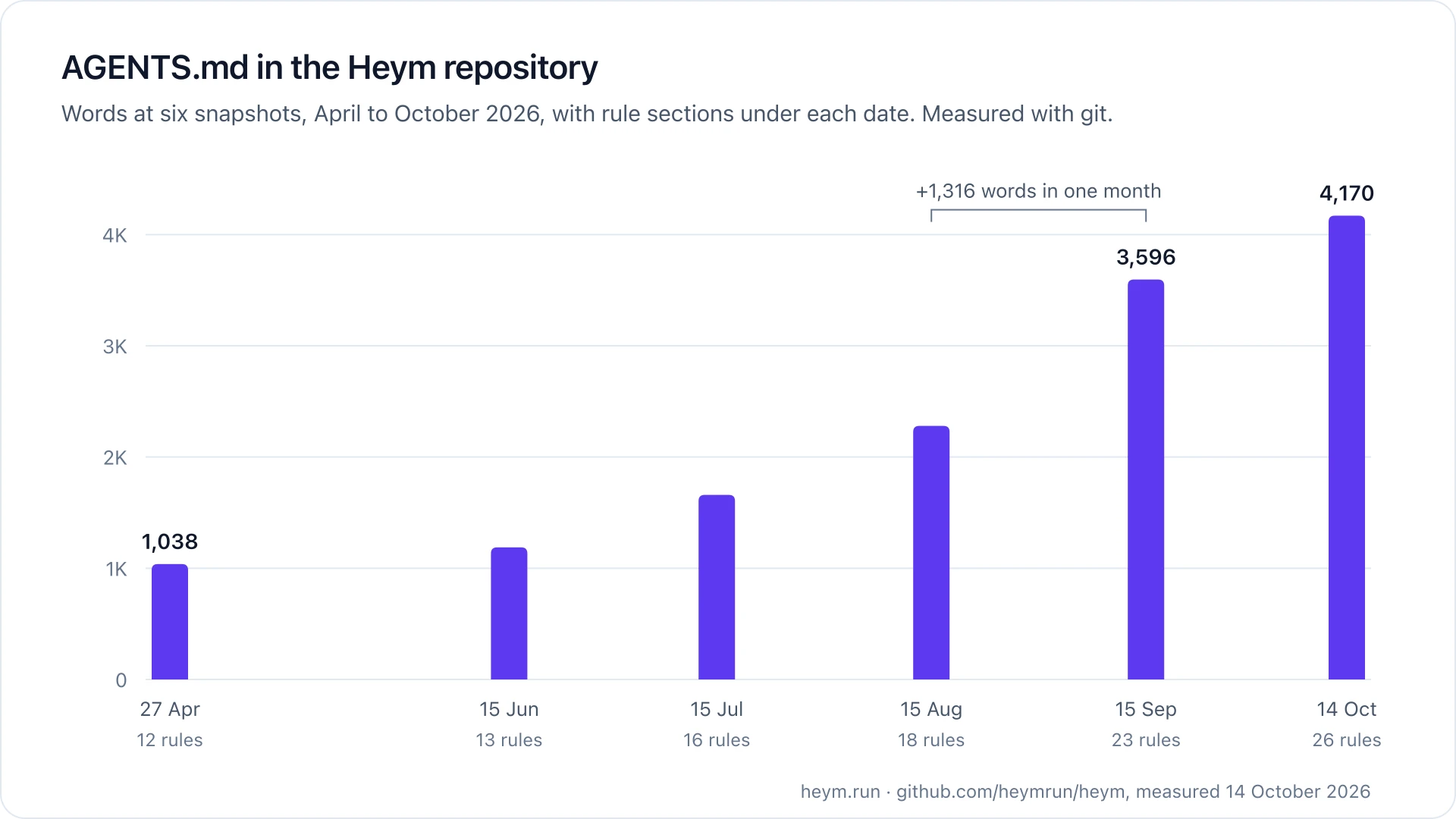
The file grew fastest between mid August and mid September, when 1,316 words arrived. That month brought the release tour, expression smoke tests, a worker mode for clusters and session headers for OpenCode. Each change added the rules a coding agent would need to keep it intact.
Addy Osmani wrote in his April 2026 essay on agent harness engineering that "every line in a good AGENTS.md should be traceable back to a specific thing that went wrong." Ours reads like that. The sections are not style advice. They say which file owns a concern, what must change together, and why.
Two AGENTS.md best practices from other people's research match what the file did on its own. Philipp Schmid's guide to writing good agent files, published on 24 February 2026, puts the "general consensus" at under 300 lines and says "prefer pointers over copies". Ours is at 294 lines and mostly points to files and tests instead of pasting code.
GitHub's analysis of over 2,500 agents.md files found that "the best agent files grow through iteration, not upfront planning", which is the curve in the table above.
Five Tests Whose Only Job Is to Fail the Build
A sentence in AGENTS.md is a guide, and an agent can skip it without anyone noticing in review. So the rules that matter most have a sensor. Of the 20 changes to AGENTS.md after the first commit, 16 also changed a test file in the same commit. Five of those tests check no behavior at all. They check coverage.
When we audited the same file in August for spec driven development, at 203 lines, the rules that held were the ones a single edit could break, and the rule that only failed in aggregate needed a machine. These tests are those machines: each one turns a rule about a whole registry into a failure on the one pull request that forgot an entry.
| Rule in AGENTS.md | Test | What fails the build |
|---|---|---|
| Every node type declares where it may run in a cluster | test_cluster_node_placement.py | A node handler in the registry with no placement entry (63 of 63 covered today) |
| Every expression method and function ships with a smoke case | test_expression_operator_smoke.py | A method or registered function with no row among the 125 cases |
| Modules that another service imports must not load settings | test_models_importable.py | Any of the 15 listed modules importing the config module |
| Shared UI components stay free of the API client, stores and router | presentationalImports.test.ts | Any of the 16 listed files reaching those imports, directly or through other modules |
| A change users can see ships with its release tour visual | releaseTourMapper.test.ts | A tour section whose visual key is not registered |
Beside them, a shell script fails both the local check and CI when any tracked source file passes 10,000 lines. The same script runs in both places, so the limit cannot drift between them.
These tests share a pattern. Each one reads the registry or list the rule is about and fails on the omission an agent tends to make: adding a new thing and forgetting the list it belongs to. They are cheap, they do not depend on timing or a network, and they fail on the exact pull request that broke the rule.
Write the Rule, Then the Test
Here is the rule for node placement, as it appears in our AGENTS.md. It names the file that owns the decision and the test that enforces it.
### Node placement in a multi-instance cluster
Every node type must declare where it may run.
`backend/app/services/cluster/node_placement.py` holds one entry per node type;
`backend/tests/test_cluster_node_placement.py` fails the build when a node
registered in `node_execution/registry.py` has no entry.
The next lines of the rule say there is no default, and that a missing entry is a build failure rather than a silent fallback. Then comes the test. Read its failure message closely.
class RegistryCoverageTests(unittest.TestCase):
    """Every executable node type must declare where it may run.

    There is no default. A new node type without an entry fails the build here,
    the same way TestExpressionOperatorCoverage guards the expression registry.
    """

    def test_every_registered_node_type_has_a_placement(self) -> None:
        missing = sorted(set(handler_module_names()) - set(NODE_PLACEMENT))
        self.assertEqual(
            missing,
            [],
            "Node types with no entry in NODE_PLACEMENT: "
            f"{missing}. Add each one to app/services/cluster/node_placement.py "
            "and read the placement rule in AGENTS.md before choosing.",
        )
The failure message is a prompt. A coding agent that adds a node and forgets its placement gets told which file to edit and which rule to read before choosing. The sensor points back to the guide, which closes the loop Böckeler describes without a person in it.
Copy the shape, not the code: a rule that names its file and its test, a test that reads the registry, and a failure message written for the agent that will read it.
These numbers describe one repository, ours, built by a small team. They show how a harness grows and what enforces it. They do not measure how much each rule reduced agent mistakes, which we have not counted.
The Production Agent Harness: Agents That Run Without You
A production agent harness is the harness around agents that run without a person watching. It keeps the guides and sensors of a coding harness and adds an approval gate before side effects, alerts over time windows and an audit trail.
Everything above runs while a developer is near a keyboard. The agents our users run in Heym are different. They start from a webhook at three in the morning, call tools with real credentials and spend real money. A production agent harness has the same guides and sensors, plus two parts a coding harness rarely needs: a gate before side effects, and a record of what happened.
Databricks lists eight building blocks a production harness needs, from system prompts to observability. Cost controls are named there but not described, and alerting is not covered. Vendors have started to ship this half. InfoQ reported that Microsoft's Agent Framework harness reached general availability on 3 August 2026 with tool approval and OpenTelemetry built in. Budgets and alerting are not part of that announcement.
This section is the production half in implementation detail, using what Heym ships today.
What Heym is: Heym is a source-available, self-hosted agent runtime for building, running and governing AI agents in production, with a visual canvas for multi-agent pipelines, RAG and MCP. Everything this article says about Heym comes from the public repository and the shipped documentation, not from a roadmap.
Guides at Run Time: Instructions, Skills and Tools
In a production agent the guides are the system prompt, the skills and the tool descriptions. In Heym a skill's content is prepended to the agent's system instruction, and a skill with Python files becomes a tool the agent can call. Tools come from MCP servers over stdio or SSE, from sub-agents, and from other workflow nodes wired to the agent.
The last kind is a constraint as much as a guide. When a node is attached as a tool, the agent fills only the fields you mark as agent provided. Every other field stays as you configured it, so an agent that sends Slack messages cannot change the channel unless you let it. Our post on agent skills covers what to put in a skill and what to leave out.
Constraints: Sandbox, Guardrails and Limits
Constraints decide what the agent cannot do, whatever the model decides. Heym runs agent Python tools in a throwaway Docker container with no Docker socket mounted. In the default mode, if Docker is unavailable, execution fails closed rather than running untrusted code without isolation. The Code node runs as a non root user with all Linux capabilities dropped and a read only root filesystem. The AI agent sandbox post explains how we chose those defaults.
Guardrails check an incoming message before it reaches the model, with their own credential and model. There are 11 blocked categories, prompt injection among them, and a blocked message throws an error that an Error Handler node can catch. Our LLM guardrails guide covers the four layers we recommend, and prompt injection covers the attack itself.
Limits keep a confused agent from running forever. Sub-agent and sub-workflow calls stop at a depth of 5. Each tool call times out after 30 seconds by default and each model response after 60, and the tool loop stops at a maximum number of iterations. If you configure a fallback credential and model, an error from the primary provider makes the agent retry on the fallback before it fails.
Context management is part of the same layer. Before each tool iteration Heym estimates the token count, and above 80 percent of the model's window it summarizes the middle of the conversation while keeping the system message, the first user message and the latest one. Every compression is recorded in the run's trace, so you can see when it happened.
Approval Gates: Human Review as a Harness Part
A coding agent's gate is the pull request. A production agent needs a gate inside the run. When human review is on, the agent gets a request_human_review tool. The run stops as pending, Heym creates a one time review link, and the reviewer chooses Accept, Edit & Continue or Refuse. The run resumes from a stored snapshot, and review links expire after 168 hours if nobody responds.
The HITL Support Reply Agent template shows the pattern end to end: an agent drafts a reply, a Slack message carries the review link, and the approved text continues. Our post on human in the loop AI agents argues for fewer, better gates, and AI agent spending limits covers the case where the side effect is a payment.
Sensors: Traces and Evals
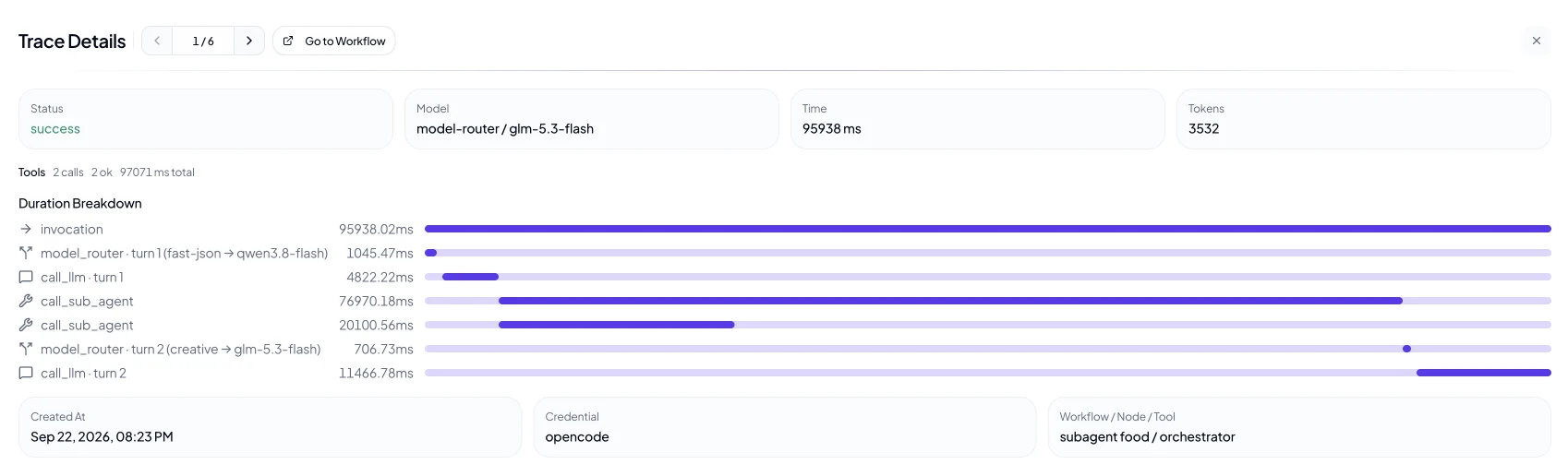
The computational sensor of a production harness is the trace. Heym records every model call and every tool call with its status, start and finish time and duration, and keeps the persisted payloads redacted and size bounded. With OpenTelemetry enabled, each run exports a workflow span, a span per node and a span per agent tool call. Our guide to AI agent observability shows what to read in a trace.
The inferential sensor is the eval suite. In the Evals tab you add test cases, ideally from real inputs, run them against one or more models, and score with Exact Match, Contains or an LLM as a judge. A model judge runs at temperature 0 so the same answer gets the same verdict. This is how you test a harness change: keep the model fixed, change the prompt or a tool, and rerun the suite, as our AI agent evaluation guide describes.
Alerts and Audit: The Sensors Nobody Asks For
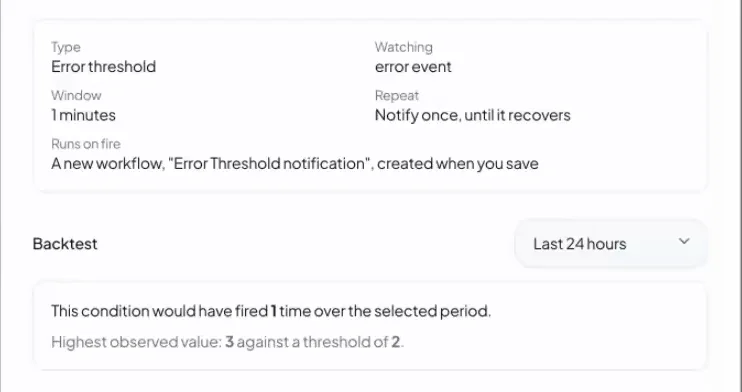
Alerts are the sensor for the runs you are not watching. Heym's Alerts tab has four types: an error threshold, workflow duration, token or USD cost, and execution count. Each one is evaluated over a time window, never on a single event, and the wizard backtests it on the last 24 hours so you see how often it would have fired before you save it. The LLM cost alerts post explains why static thresholds break.
The audit trail is the record. Heym writes one line for every security relevant action, who did it, to what and whether it succeeded, and it is always on. Fields whose names contain words such as password, secret or token are replaced with *** before the line is built. The lines live in the container's output, so ship them somewhere durable. Our AI agent governance post covers what to do with them.
Two Harnesses, Side by Side
The two harnesses use the same vocabulary. Each part has a version for the agent that writes code and a version for the agent that runs in production. The left column is our repository and the right column is the Heym runtime.
| Harness part | Coding agent (our repo) | Production agent (Heym runtime) |
|---|---|---|
| Guide | AGENTS.md, with CLAUDE.md pointing to it | System prompt, skills, tool descriptions |
| Constraint | A 10,000 line file limit, type checks, lint | Docker sandbox, guardrails, depth and time limits |
| Gate | Pull request review | Human review with Accept, Edit & Continue, Refuse |
| Computational sensor | Coverage tests and 409 backend test files | Run status, traces and windowed alerts |
| Inferential sensor | An AI review pass on each pull request | Evals with an LLM as a judge |
| Record | Git history of every rule | Traces and the audit log |
The coding harness has a person at the end of every loop, which is why its gate can be a pull request. The production harness often has nobody, which is why its gate sits inside the run and its sensors fire on windows. If you build both, the habits transfer: name the owner, make the check computational, and fail closed.
The AI agent runtime page describes the layer underneath the production column, and always-on agents shows what wakes a production agent and what each wake costs.
Harness Engineering Best Practices
These are the habits that held up across both of our harnesses. Each one is something you can check in a repository or a running workspace today.
- One mistake, one rule, with its reason. A rule without a reason gets applied in the wrong place or dropped when it is inconvenient.
- Name the file and the test in the rule. An agent that knows where a concern lives edits the right file the first time.
- Test coverage for the rules agents skip. A test that reads a registry fails on the forgotten entry. A behavior test may pass anyway.
- Write failure messages for the agent. Say what to change and where the rule lives, as our placement test does.
- No defaults for safety decisions. A missing placement fails the build, and a missing sandbox fails the run. A silent fallback hides the decision.
- Judge production on windows, not events. One failed run is noise. Twelve in ten minutes is an incident.
- Gate side effects, not everything. A gate on every step trains reviewers to click Accept.
- Change the harness, keep the model, rerun the evals. It is the only way to know which change helped.
- Keep the harness in the repository. Versioned, reviewed and diffable, like our AGENTS.md history above.
Two cases where this is more than you need. An agent that runs a few times a week with a person reading every output already has its best sensor, so a coverage test for its rules can wait. And a rule that only one person ever touches can stay a sentence until someone else, human or agent, breaks it once.
How to Start Harness Engineering This Week
You do not need a framework to start. You need the last few mistakes your agent made and a place to write rules down.
- Write down the last five mistakes your agent made. Keep the symptom, the file or tool involved, and the correct behavior.
- Turn each mistake into one rule with its reason. One section per rule in AGENTS.md.
- Give the rules that matter a test. Read the registry, fail on the omission, and put the fix in the message.
- Add sensors to production runs. Traces on every call and an eval suite from real inputs.
- Put a gate before side effects. Human review on agents that send, pay, delete or change records.
- Alert on windows and keep an audit trail. Error, cost and execution count alerts, backtested on the last 24 hours.
The term went from a blog post to a Wikipedia article in eight months, and the tools around it will keep changing. The part that stays yours is the environment. Models get better on someone else's schedule, and the harness gets better every time you fix a mistake for good. Start with the five mistakes.
Frequently Asked Questions
What is harness engineering?
Harness engineering is the practice of designing the environment an AI agent works in: its instructions, tools, sandbox, checks and approval gates. When the agent makes a mistake, you change the environment so it cannot make that mistake again, instead of hoping a better prompt or model will fix it.
What is an agent harness?
An agent harness is the software around a language model that lets it act as an agent. It runs the loop, dispatches tool calls, keeps state and memory, manages the context window, isolates code in a sandbox and enforces permissions. The short formula is agent equals model plus harness.
Who coined the term harness engineering?
Mitchell Hashimoto, cofounder of HashiCorp, used it in a blog post on 5 February 2026 for engineering a permanent fix into an agent's environment after each mistake. Vivek Trivedy at LangChain then popularized the formula agent equals model plus harness in March 2026.
What is the difference between harness engineering and context engineering?
Context engineering decides what the model sees on each turn: retrieval, memory and compression. Harness engineering covers the whole environment over time, including tools, sandboxes, tests, approval gates and alerts. Context engineering is one part of a harness, and harness engineering is how that harness changes after every failure.
Is Claude Code an agent harness?
Yes. Claude Code is an inner harness that Anthropic builds around its models: the loop, the tools, the permissions. The AGENTS.md or CLAUDE.md file, the hooks, the skills and the test suite you add in your own repository form the outer harness, which is the part you control.
What should an AGENTS.md file contain?
Rules a coding agent cannot infer from the code, each with its reason: commands to run, files that own a concern, and what must change together. The strongest rules name the file and the test that enforces them, so a skipped rule fails the build instead of waiting for a reviewer to notice.
What does a production agent harness need?
Guides such as instructions, skills and tool descriptions, constraints such as a sandbox, guardrails and time limits, a human approval gate before side effects, sensors such as traces and evals, alerts evaluated over a time window, and an audit trail. Coding agent harnesses rarely need the last three.
How do you know if a harness change worked?
Keep the model fixed, change one part of the harness and rerun the same evaluation suite. LangChain moved its coding agent from the top 30 to the top 5 on Terminal Bench 2.0 by changing only the harness. For production agents, compare error and cost alerts over the same window before and after.
Sources
- Mitchell Hashimoto, My AI Adoption Journey, 5 February 2026. The term and its two forms.
- Vivek Trivedy, LangChain, The Anatomy of an Agent Harness, 10 March 2026. The formula and the Terminal Bench 2.0 result.
- Birgitta Böckeler, Harness engineering for coding agent users, martinfowler.com, 2 April 2026. Guides and sensors, computational and inferential checks.
- Philipp Schmid, Writing good agent files, 24 February 2026. The 300 line consensus and pointers over copies.
- Matt Nigh, GitHub Blog, How to write a great agents.md: lessons from over 2,500 repositories, 19 November 2025. Files grow through iteration.
- Addy Osmani, Agent Harness Engineering, 19 April 2026. The traceability rule for AGENTS.md.
- Paul Barbaste, Tristan Darrigol, Germain Vu and Tom Wiltberger, Harness Engineering: Anatomy, Architecture, and Evolution of Coding Agents, arXiv, 15 July 2026. Eleven systems, 29 patterns, skills and MCP adoption.
- Anthropic, Effective harnesses for long-running agents, 26 November 2025. The initializer agent and the progress file.
- Wikipedia, Agent harness, last edited 10 October 2026, and its Wikimedia pageviews, read 14 October 2026.
- InfoQ, Microsoft Agent Framework Harness and Hosted Agents Reach General Availability, 3 August 2026. Tool approval and OpenTelemetry in the harness.
- Databricks, What is an AI Agent Harness?, read 14 October 2026. The eight building blocks.
- Heym repository, AGENTS.md and its commit history, measured with git on 14 October 2026: line, word and section counts at six dates, and 16 of 20 changes after the first commit touching a test file.
- Heym tests, read 14 October 2026: node placement coverage (63 of 63 node types), expression operator smoke cases (125 cases), models importable without settings (15 modules), and the file line limit script.
- Heym documentation: Agent Architecture, Human-in-the-Loop, Guardrails, Security, Alerts tab, Evals tab, Audit Logging and OpenTelemetry, read 14 October 2026.
Steps at a glance
- Write down the last five mistakes your agent made. Collect them from reviews, failed runs and traces. Keep the exact symptom, the file or tool involved, and what the correct behavior was. Five real mistakes are a better starting point than a generic template.
- Turn each mistake into one rule with its reason. Add one section per rule to AGENTS.md. Say what must happen, which file owns it, and why. A rule without a reason gets applied in the wrong places or ignored when it is inconvenient.
- Give the rules that matter a test. For each rule an agent could skip silently, write a test that reads the registry or list the rule is about and fails on the omission. Put the fix instructions in the failure message, including where the rule lives.
- Add sensors to production runs. Turn on traces for every model and tool call and build an evaluation suite from real inputs. Use deterministic checks where you can and an LLM as a judge where meaning matters.
- Put a gate before side effects. Enable human review on agents that send, pay, delete or change records. The run waits as pending, and a reviewer accepts, edits or refuses.
- Alert on windows and keep an audit trail. Create error, cost and execution count alerts over a time window, backtest them on the last 24 hours, and ship the audit log somewhere durable. Review the harness once a month and delete rules nothing breaks anymore.

Co-founder & Engineer
Burak is a co-founder and engineer at Heym, focused on backend infrastructure, the execution engine, and self-hosted deployment. He builds the systems that make Heym's AI workflows run reliably in production.
Reviewed by Ceren Kaya Akgün. Statistics cite named, dated sources, and claims about Heym are verified against the source code before publication. See our editorial policy or report a correction.
Enjoyed this post? Get the next one in your inbox.
A monthly note with practical ideas for building AI workflows that hold up in production. No noise, and you can unsubscribe anytime.