November 7, 2026Ceren Kaya Akgün
Auto Ontology: A Guide With Templates to Try
Learn what auto ontology is, how an AI agent draws the map of your business from calls and briefs, and import a sales and a marketing template to try.
Auto ontology means a machine drafts the map of your business for you. An ontology is that map: the kinds of things you talk about, such as customers, deals and campaigns, and the ways they connect. Building one by hand takes months. An AI agent can read your call notes and briefs and write a first version in minutes, which is why the term is everywhere right now.
The reason is NVIDIA's open source library of the same name, which a Hacker News post pushed to 290 points on 3 November 2026. This post is about the idea, not that library. It explains ontology for beginners, shows what an agent in Heym drew from three sales calls and three campaign updates, and gives you both as templates to import.
It is written for sales, marketing and operations leads. One section, Look Inside With SQL, is for the person who runs your database, and you can skip it. This is not a review of NVIDIA's library, and Heym is not affiliated with NVIDIA.
The short version:
- An ontology is a shared list of the kinds of things in your business and how they connect. A knowledge graph is the same list filled in with your real customers, deals and campaigns
- Auto ontology means a machine writes the first draft. People still review it, and the review is where the value is
- Heym's agent memory graph is a light version. After each run, a background model call saves the people, companies and links it read into your own database
- Two templates, both with invented sample text. A sales call memory and a campaign memory, three nodes each
- We ran both, three times each, on 7 November 2026. Three updates and a question gave 12 to 14 entities and 15 to 20 links for sales, and 14 to 16 entities and 15 to 19 links for marketing
- The graph is plain Postgres rows. Four SQL questions read it, and one found an old owner that stayed linked in all six marketing runs
- It is a draft, not a record. The memory step used 1.5 to 2.7 times the model usage (counted in tokens) of the agent's own calls
What Heym is: Heym is a source-available, self-hosted AI agent platform with a visual canvas for multi-agent pipelines, retrieval-augmented generation (RAG) and the Model Context Protocol (MCP). Everything this post says about Heym comes from its shipped source and documentation at version 0.0.148, released on 6 November 2026, and from dated runs on 7 November 2026, not from a roadmap.
Table of Contents
- What Is Auto Ontology?
- What Is an Ontology in AI?
- Why Everyone Is Talking About Auto Ontology
- How Does Automatic Ontology Generation Work?
- How Heym Builds an Auto Ontology: The Agent Memory Graph
- Sales Ontology Template: Sales Call Memory
- Marketing Ontology Template: Campaign Memory
- Look Inside With SQL
- What the Run Showed, and What It Did Not
- Seven Questions Before You Trust an Auto Ontology
- Try It: Import an Auto Ontology Template and Run It
- Where This Leaves You
- Frequently Asked Questions
- Sources
What Is Auto Ontology?
Auto ontology is the practice of letting software draft an ontology from material you already have, such as call notes, briefs, documents or database tables, instead of designing it by hand first.
An ontology is a shared vocabulary. Wikipedia describes one as a representation of "the categories, properties, and relations between the concepts, data, or entities" of a subject area. In business words, it is the nouns you use, such as account, contact and deal, and the verbs that join them, such as works for, owns and objected to.
The word comes from philosophy. Computer science took it up, and in 1993 Tom Gruber's widely cited paper defined an ontology as a specification of a conceptualization, according to the same Wikipedia article. In plain terms, it is an agreed description of the things in a field and how they relate.
Here is a sales example in one sentence. Lena Okafor works for Brightwater Foods and raised an objection about price. That sentence holds three kinds of things (a person, a company, an objection) and two kinds of links (works for, raised). Write enough sentences like it and a person or an AI agent can answer who decides, what blocks the deal and who to call first.
Auto means the first draft comes from a machine. Nobody spends three months at a whiteboard. A model reads the notes, proposes the things and the links, and keeps the list current as new notes arrive. Auto does not mean correct, which is why this post spends as much time on review as on generation.
The word has a second meaning. The EDM Council publishes an Automotive Ontology, called AUTO, for the car industry. It is unrelated to this post.
What Is an Ontology in AI?
An ontology in AI is a map of meaning that software can read: the kinds of things a business talks about, the ways they connect, and the names to use for both. Ontology for beginners comes down to three words. A thing is one real item, like Brightwater Foods. A type says what kind of thing it is, like company. A link says how two things relate, like works for.
For business users who do not work with data, an ontology is a company glossary that also records how the words connect: a contact works for an account, and an objection belongs to a deal.
People who search what is an ontology in AI are usually reacting to a buzzword. The idea became popular because of enterprise platforms. Palantir's documentation calls its Ontology "an operational layer for the organization" that connects data to "their real-world counterparts", from physical equipment to "concepts like customer orders". The same idea works at the size of one team, and it does not need a platform to start.
Why Do AI Agents Need an Ontology?
An agent that answers from raw notes starts from zero each time. It guesses what customer means, and it may call one person Lena in one answer and L. Okafor in the next. An ontology for AI agents gives it fixed names to reuse and a place to look things up, so it stops guessing what your words mean.
It also gives people something to check. A list of 14 entities and 20 links, the size of our first sales graph, is easier to read and correct than forty pages of call notes.
Ontology vs Knowledge Graph: What Is the Difference?
An ontology is the blueprint and a knowledge graph is the building. The ontology names the kinds of things and links, and the knowledge graph holds the real things and links that follow those names.
Neo4j puts it this way: an ontology "defines the semantic meanings and logical connections between entities", while a knowledge graph is "the implementation layer" that stores your instance data. Neo4j also says many knowledge graphs "start simple and add ontology only when formal semantics or interoperability become necessary".
| Ontology | Knowledge graph | |
|---|---|---|
| What it holds | The kinds of things and links | The real things and links |
| In the sales template | Contact, works for | Lena Okafor works for Brightwater Foods |
| In Heym's tables | The distinct values of entity_type and relationship_type | The rows of agent_memory_nodes and agent_memory_edges |
For a business reader, the ontology vs knowledge graph question is whether you mean the blueprint or the finished building. This post uses the two words loosely, as most teams do. What Heym stores is a simple knowledge graph with a light ontology on top: every entity has a type, and every link has a name. The types and names are free text chosen by the model, which keeps setup at zero.
What Is an Ontology Layer?
An ontology layer is the same map placed between your data and the AI, so the AI reads names and meanings instead of raw tables or loose notes. NVIDIA's library builds such a layer from database metadata. The graph in this post builds one from the text an agent reads and writes.
Why Everyone Is Talking About Auto Ontology
On 3 November 2026 a post about NVIDIA's open source auto ontology reached 290 points on Hacker News. The project's README says the library "builds that layer from enterprise metadata" and "reconciles definitions across systems", then serves it to agents through MCP, a command line tool and an API. On 7 November the repository showed 9,377 stars under the Apache 2.0 license.
The README describes three stages. The library generates an ontology, people certify it, and the agent answers questions from it. The ontology holds terms such as Customer, reviewed SQL measures such as a margin, and how tables join. It starts from database metadata: table and column names, sample values and keys.
Those three stages make a good mental model for any auto ontology, and this post borrows them: a machine drafts, people review, agents use. What differs is where the draft comes from. Here it comes from the text an agent reads and writes during its own work, not from a database catalog. Both answer the same worry, that an agent should not guess what your words mean.
How Does Automatic Ontology Generation Work?
Automatic ontology generation is a loop: text arrives, a model lists the things and links it finds, the list is merged into the map, a person corrects it, and agents use it. Then the next text arrives and the loop runs again. It works the same way wherever the text comes from.
Three choices decide whether the result is useful: where the text comes from, how a changed fact replaces an old one, and who reviews the draft. The next section shows how Heym handles each.
How Heym Builds an Auto Ontology: The Agent Memory Graph
Heym's version is called the agent memory graph. You switch on Persistent memory (graph) on an Agent node, and Heym does the rest, as the documentation describes. This is what happens, read from the source at version 0.0.148:
- After each successful run, a background job asks a model for the people, companies, topics and links in the exchange. It uses the same credential and model as the agent.
- The model sees the new text, the agent's reply and the graph so far, so it can match Lena to the Lena already stored.
- Names are matched without regard to case, and new facts are merged into the entity's properties. Each entity and link also gets a confidence number from 0 to 1.
- A new employer or home city replaces the old one. Links named works at, works for, employed by, manager of, lives in and a few similar names are single slot: a new one removes the old.
- The model can name facts that are no longer true, and Heym deletes those entities.
- Before each run, up to 100 entities and 200 links, 16,000 characters at most, are added to the agent's prompt.
- A person can add, edit and delete entities and links in the graph editor, which opens from the brain icon on the node. A graph can be shared with other agents, read only or read and write.
- The graph belongs to one agent node and sits in two Postgres tables,
agent_memory_nodesandagent_memory_edges, created by migration 053.
In Heym the things are called entities. The model writes their types and the link names. Its instructions suggest six entity types: person, product, topic, organization, preference and other. That keeps setup at zero, and it means names can vary from run to run, which is what the review step is for.
The 81 second video below shows the graph editor and how agents share a graph.
For the memory types around this feature, see our guide to AI agent memory. For the build steps of an agent, see how to build an AI agent.
Sales Ontology Template: Sales Call Memory
A sales ontology is the map of an account. It records who works there, who decides, what worries them, what a competitor is doing and what happens next. The template keeps six kinds of things:
| Kind of thing | Example in the sample |
|---|---|
| Account | Brightwater Foods |
| Contact | Lena Okafor, VP Operations |
| Deal | The pilot for the cold chain team |
| Objection | Price compared with the incumbent vendor |
| Competitor | Corvane |
| Next step | Send the security questionnaire by Tuesday |
The template has three nodes. A text input takes call notes. One Agent node writes a short account update in the six words above and has persistent memory switched on. An output returns the reply. A message that starts with QUESTION: is answered from memory.
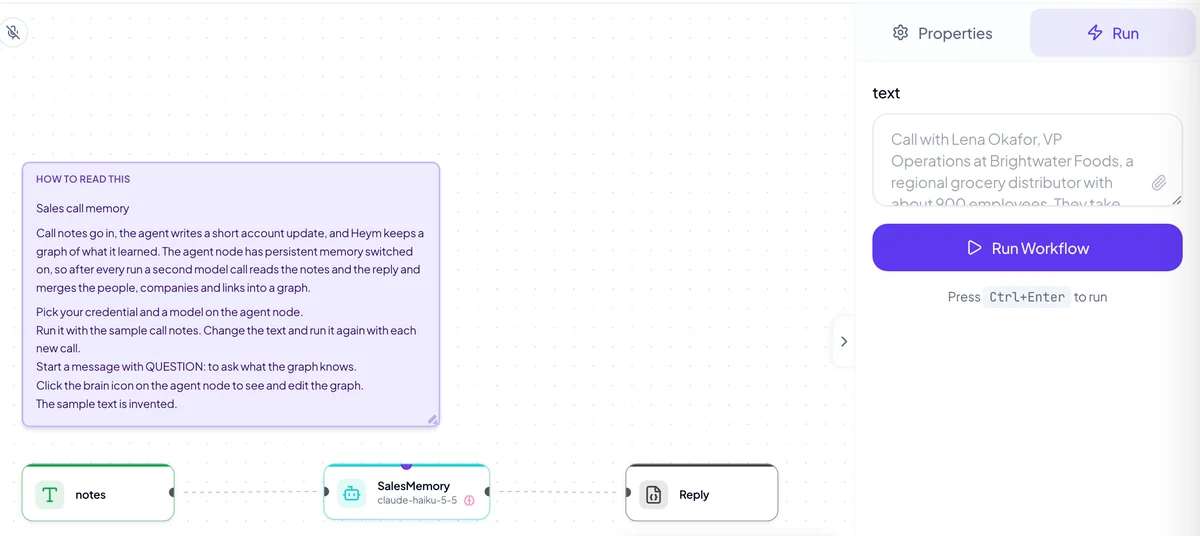
To use it, download the file from the card below and drag it onto the Workflows tab, as the import guide describes. Pick a credential and a model on the agent node. All names, companies and amounts in the sample are invented, including Brightwater Foods and Corvane.
View template JSON
{
  "name": "Sales call memory",
  "heym": true,
  "nodes": [
    {
      "id": "sm_note",
      "type": "sticky",
      "position": {
        "x": 40,
        "y": 40
      },
      "data": {
        "label": "readMe",
        "stickyTitle": "How to read this",
        "stickyColor": "violet",
        "stickyWidth": 520,
        "stickyHeight": 330,
        "note": "Sales call memory\n\nCall notes go in, the agent writes a short account update, and Heym keeps a graph of what it learned. The agent node has persistent memory switched on, so after every run a second model call reads the notes and the reply and merges the people, companies and links into a graph.\n\n1. Pick your credential and a model on the agent node.\n2. Run it with the sample call notes. Change the text and run it again with each new call.\n3. Start a message with QUESTION: to ask what the graph knows.\n4. Click the brain icon on the agent node to see and edit the graph.\n\nThe sample text is invented."
      }
    },
    {
      "id": "sm_input",
      "type": "textInput",
      "position": {
        "x": 40,
        "y": 420
      },
      "data": {
        "label": "notes",
        "inputFields": [
          {
            "key": "text",
            "defaultValue": "Call with Lena Okafor, VP Operations at Brightwater Foods, a regional grocery distributor with about 900 employees. They take orders by email and spreadsheet today. Lena wants to cut order entry time and is the person pushing this internally. Her CFO, Marc Duval, has not joined any call yet. Main worry: price compared with the incumbent vendor Corvane, whose contract renews in March. We agreed to start with a pilot for the cold-chain team. Next step: I send a pilot proposal by Friday."
          }
        ]
      }
    },
    {
      "id": "sm_agent",
      "type": "agent",
      "position": {
        "x": 420,
        "y": 420
      },
      "data": {
        "label": "SalesMemory",
        "credentialId": "",
        "model": "claude-haiku-5-5",
        "temperature": 0.2,
        "systemInstruction": "You are the account memory for a sales team. Each message is either call notes or a question.\n\nFor call notes, reply with a short account update, one line per item, using only these words for the kind of thing:\nAccount: the company\nContact: the person, their role, and who they work for\nDeal: the name, the stage and the size if known\nObjection: what worries them and who raised it\nCompetitor: the name and what they are doing\nNext step: the action, its owner and its due date\nState every link in a full sentence, for example: Lena Okafor works for Brightwater Foods. Write anything that is no longer true as: no longer true: followed by the fact.\n\nFor a message that starts with QUESTION:, answer only from the memory section of this prompt. If memory does not hold the answer, say what is missing. Never invent names, amounts or dates.",
        "userMessage": "$notes.body.text",
        "outputType": "text",
        "tools": [],
        "mcpConnections": [],
        "skills": [],
        "toolTimeoutSeconds": 30,
        "maxToolIterations": 8,
        "isReasoningModel": false,
        "persistentMemoryEnabled": true,
        "memoryShares": []
      }
    },
    {
      "id": "sm_reply",
      "type": "output",
      "position": {
        "x": 800,
        "y": 420
      },
      "data": {
        "label": "Reply",
        "outputSchema": [
          {
            "key": "reply",
            "value": "$SalesMemory.text"
          }
        ]
      }
    }
  ],
  "edges": [
    {
      "id": "sm_e1",
      "source": "sm_input",
      "target": "sm_agent"
    },
    {
      "id": "sm_e2",
      "source": "sm_agent",
      "target": "sm_reply"
    }
  ]
}What Three Calls Built
On 7 November 2026 we ran the template on a scratch Heym 0.0.148 with an empty database, using claude-haiku-5-5 through an OpenAI compatible gateway. In each run we sent three sets of call notes and one question, in order, waited for the background step after each one, and read the graph with psql. We ran it three times. This section and its drawing show the first run, and a later section gives the range across all three.
| After, first run | Entities | Links |
|---|---|---|
| Call 1 | 7 | 7 |
| Call 2 | 11 | 14 |
| Call 3 | 14 | 19 |
| The question | 14 | 20 |
Call 3 is the useful one. Lena Okafor moves to Harbor Retail Group, Priya Nair replaces her, Marc Duval now owns the decision and a competitor discount is withdrawn. The graph followed. Lena's link to Brightwater Foods was replaced by a link to Harbor Retail Group, and Priya is linked to Brightwater Foods and to Lena as her replacement. Lena's link was replaced in all six sales runs.
Then we asked who decides, what blocks the deal and who to contact first. The first run's reply began:
Who decides: Marc Duval, CFO, owns the decision at Brightwater Foods. He will not approve anything above 40,000 euros without a security review.
It ended with this line about Lena: "Lena Okafor is leaving Brightwater Foods for Harbor Retail Group, so she should not be your main contact for the deal from here." That answer uses facts from all three calls, and none of them were in the question. It also says what memory lacks: "The memory does not name a recommended first contact, so this is my suggestion."
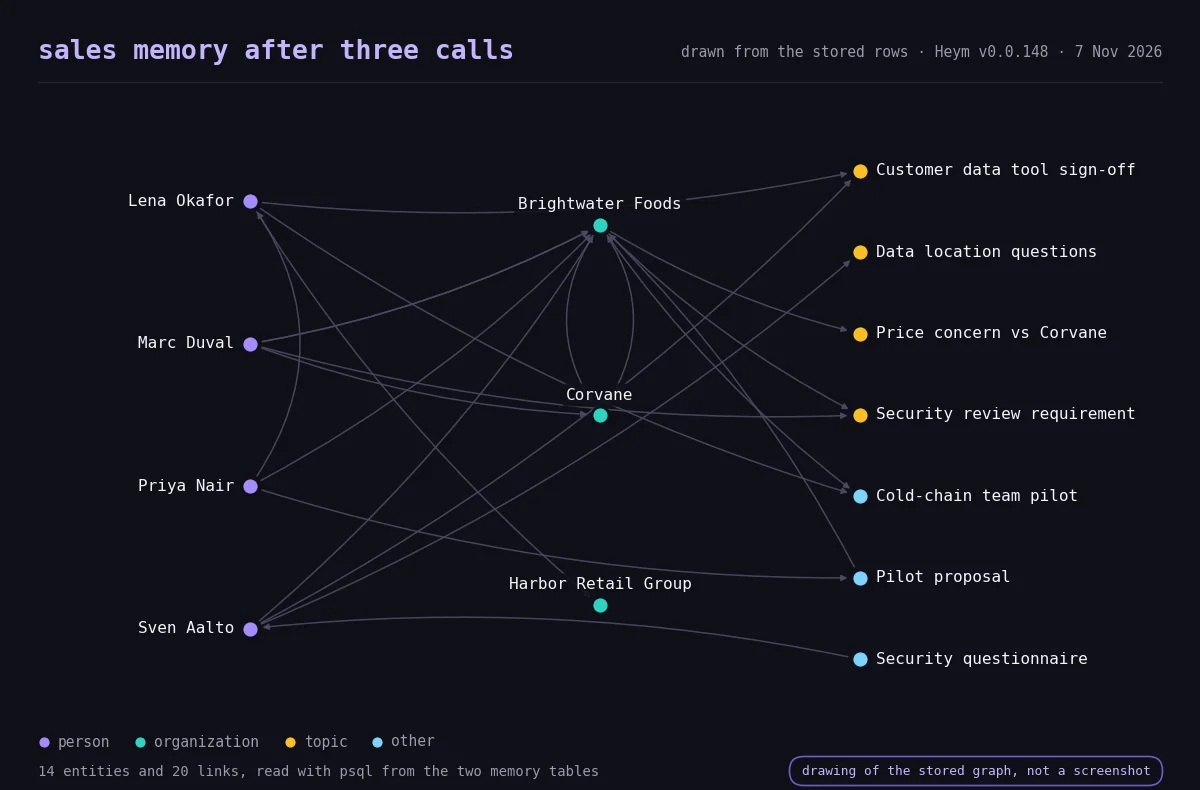
One link did not follow the news. In the first run the graph still says Corvane offered Brightwater Foods a discount, while the Corvane entity's own offer status says it was withdrawn. The property changed, and the old link stayed. An offered discount link stayed in four of the six sales runs, and in one of them nothing in the graph says the offer was withdrawn.
Marketing Ontology Template: Campaign Memory
A marketing ontology is the map of a campaign. It records who the campaign is for, where it runs, which claims it makes, what proves each claim, which assets exist and who owns them. The template keeps seven kinds of things:
| Kind of thing | Example in the sample |
|---|---|
| Campaign | Spring Cold-Chain Webinar |
| Audience | Operations leaders at regional food distributors |
| Channel | LinkedIn ads and the monthly newsletter |
| Claim | Cut order entry time, approved or paused |
| Proof | A dairy customer story, 38 percent faster order entry |
| Asset | A one page ROI calculator and its owner |
| Result | 22 registrations from LinkedIn ads |
The campaign template has the same three nodes. Its instruction asks for the status of each claim, approved or paused, and for the owner of each asset. Import it the same way, and pick a credential and a model before you run it.
View template JSON
{
  "name": "Campaign memory",
  "heym": true,
  "nodes": [
    {
      "id": "cm_note",
      "type": "sticky",
      "position": {
        "x": 40,
        "y": 40
      },
      "data": {
        "label": "readMe",
        "stickyTitle": "How to read this",
        "stickyColor": "violet",
        "stickyWidth": 520,
        "stickyHeight": 330,
        "note": "Campaign memory\n\nA brief or an update goes in, the agent writes a short campaign update, and Heym keeps a graph of what it learned. The agent node has persistent memory switched on, so after every run a second model call reads the text and the reply and merges the campaigns, claims, assets and owners into a graph.\n\n1. Pick your credential and a model on the agent node.\n2. Run it with the sample brief. Change the text and run it again with each update.\n3. Start a message with QUESTION: to ask what the graph knows.\n4. Click the brain icon on the agent node to see and edit the graph.\n\nThe sample text is invented."
      }
    },
    {
      "id": "cm_input",
      "type": "textInput",
      "position": {
        "x": 40,
        "y": 420
      },
      "data": {
        "label": "brief",
        "inputFields": [
          {
            "key": "text",
            "defaultValue": "Campaign brief: Spring Cold-Chain Webinar. Audience: operations leaders at regional food distributors with 500 to 2,000 employees. Channels: LinkedIn ads and the monthly newsletter. Claim: cut order entry time. Proof: a customer story from a dairy distributor, 38 percent faster order entry. Offer: a free workflow audit. Owner: Sofia Lindqvist. Budget: 12,000 euros. Launch: 14 April."
          }
        ]
      }
    },
    {
      "id": "cm_agent",
      "type": "agent",
      "position": {
        "x": 420,
        "y": 420
      },
      "data": {
        "label": "CampaignMemory",
        "credentialId": "",
        "model": "claude-haiku-5-5",
        "temperature": 0.2,
        "systemInstruction": "You are the campaign memory for a marketing team. Each message is either a brief, a results update or a question.\n\nFor a brief or an update, reply with a short campaign update, one line per item, using only these words for the kind of thing:\nCampaign: the name and its dates\nAudience: who it is for\nChannel: where it runs and its budget if known\nClaim: a message we make and its status (approved or paused)\nProof: the evidence behind a claim\nAsset: a piece of content, its status and its owner\nResult: a number and what it measures\nState every link in a full sentence, for example: Sofia Lindqvist owns the Spring Cold-Chain Webinar. Write anything that is no longer true as: no longer true: followed by the fact.\n\nFor a message that starts with QUESTION:, answer only from the memory section of this prompt. If memory does not hold the answer, say what is missing. Never invent names, numbers or dates.",
        "userMessage": "$brief.body.text",
        "outputType": "text",
        "tools": [],
        "mcpConnections": [],
        "skills": [],
        "toolTimeoutSeconds": 30,
        "maxToolIterations": 8,
        "isReasoningModel": false,
        "persistentMemoryEnabled": true,
        "memoryShares": []
      }
    },
    {
      "id": "cm_reply",
      "type": "output",
      "position": {
        "x": 800,
        "y": 420
      },
      "data": {
        "label": "Reply",
        "outputSchema": [
          {
            "key": "reply",
            "value": "$CampaignMemory.text"
          }
        ]
      }
    }
  ],
  "edges": [
    {
      "id": "cm_e1",
      "source": "cm_input",
      "target": "cm_agent"
    },
    {
      "id": "cm_e2",
      "source": "cm_agent",
      "target": "cm_reply"
    }
  ]
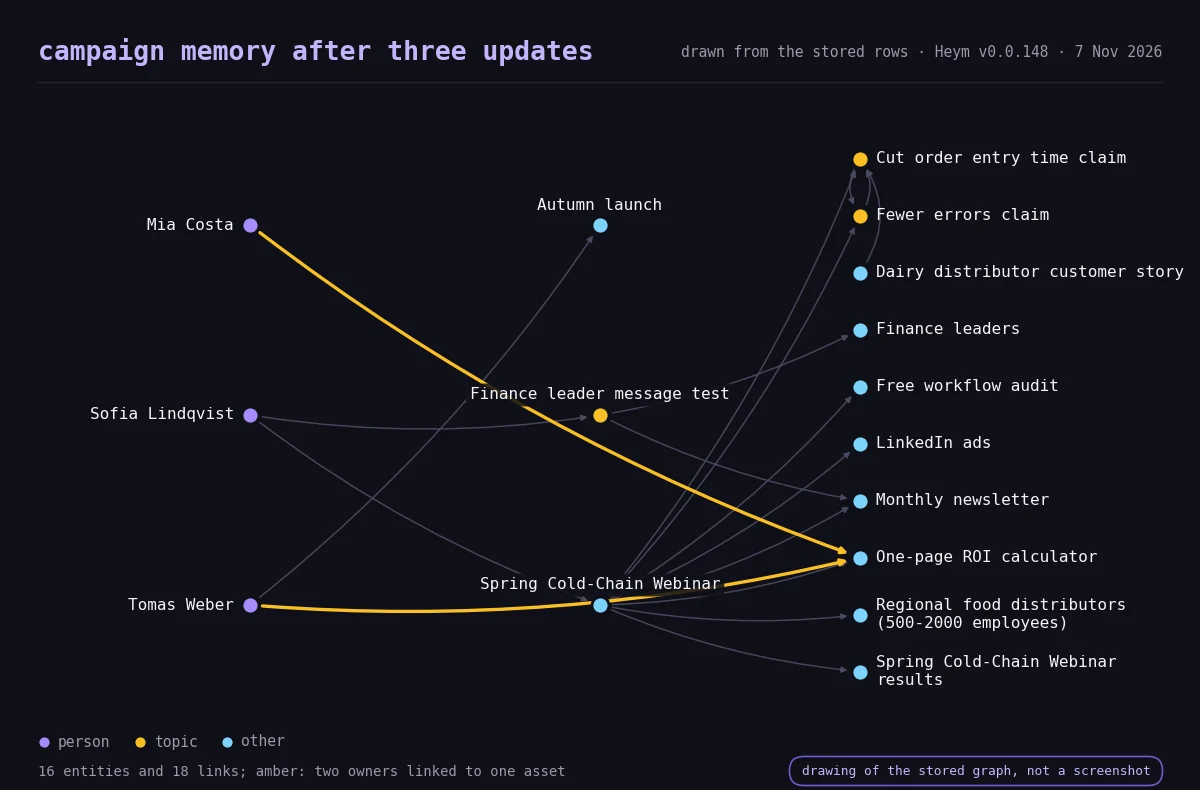
}We ran it the same way, three times. In the first run the graph grew from 8 entities and 7 links after the brief to 13 and 13 after the results update, and 16 and 18 after the change. The third update pauses the customer story behind the main claim, moves one owner to another project and hands the ROI calculator to a colleague.
The pause was recorded in five of the six marketing runs. In the first run the customer story has the status paused and the reason, distributor requested legal review, and the finance message test links to the newsletter and not to LinkedIn.
The graph also kept an old fact. Tomas Weber is still linked as an owner of the ROI calculator beside Mia Costa, and he stayed linked in all six marketing runs. Owns is not one of the link names Heym replaces on its own, so the old link stayed.
In the first run the agent noticed when we asked which claims are approved and who owns each open asset: "Memory also records Tomas Weber as its owner in one link and as its previous owner in another, so the current owner should be confirmed."
Look Inside With SQL
This section is for the person who runs your database. Everything above sits in two Postgres tables, so any SQL client can read it, and the results below come from the first run. In the default Docker setup, open psql with the command below. Your container, user and database names may differ.
docker exec -it heym-postgres psql -U postgres -d heymEvery row carries the id of its workflow, so find yours first. Replace the id in the queries below with the one you get.
SELECT id, name FROM workflows WHERE name = 'Sales call memory';The entity table holds a name, a type, a JSON column of properties and a confidence number. The link table holds the two entities it joins and the name of the link. The queries read both. In the first, ->> reads one field from the JSON column, as the PostgreSQL JSON functions describe.
Who works where, and in which role? This reads the sales graph.
SELECT p.entity_name AS person,
       p.properties->>'role' AS role,
       c.entity_name AS company
FROM agent_memory_edges e
JOIN agent_memory_nodes p ON p.id = e.source_node_id
JOIN agent_memory_nodes c ON c.id = e.target_node_id
WHERE e.workflow_id = '<workflow id>'
  AND e.relationship_type = 'works_at'
ORDER BY company, person;| person | role | company |
|---|---|---|
| Marc Duval | CFO | Brightwater Foods |
| Priya Nair | replacement for Lena Okafor at Brightwater Foods | Brightwater Foods |
| Sven Aalto | head of IT | Brightwater Foods |
| Lena Okafor | VP Operations | Harbor Retail Group |
Lena now works at Harbor Retail Group, and her role still says VP Operations, her old title. Her new title sits in another property of the same entity, so the graph holds both.
Who raised which objection? Same graph, a different link name.
SELECT p.entity_name AS person,
       o.entity_name AS objection
FROM agent_memory_edges e
JOIN agent_memory_nodes p ON p.id = e.source_node_id
JOIN agent_memory_nodes o ON o.id = e.target_node_id
WHERE e.workflow_id = '<workflow id>'
  AND e.relationship_type = 'raised_objection'
ORDER BY person, objection;| person | objection |
|---|---|
| Lena Okafor | Customer data tool sign-off |
| Marc Duval | Security review requirement |
| Sven Aalto | Data location questions |
Three people, three objections, one line each. In the raw notes the same facts were spread over three calls.
What is paused, and why? This reads the campaign graph.
SELECT entity_name,
       properties->>'status' AS status,
       properties->>'pause_reason' AS reason
FROM agent_memory_nodes
WHERE workflow_id = '<workflow id>'
AND properties->>'status' = 'paused';| entity_name | status | reason |
|---|---|---|
| Dairy distributor customer story | paused | distributor requested legal review |
Which asset has more than one owner? This is the query to keep.
SELECT a.entity_name AS asset,
       string_agg(p.entity_name, ', ' ORDER BY p.entity_name) AS owners,
       count(*) AS owner_links
FROM agent_memory_edges e
JOIN agent_memory_nodes p ON p.id = e.source_node_id
JOIN agent_memory_nodes a ON a.id = e.target_node_id
WHERE e.workflow_id = '<workflow id>'
  AND e.relationship_type = 'owns'
GROUP BY a.entity_name
HAVING count(*) > 1;| asset | owners | owner_links |
|---|---|---|
| One-page ROI calculator | Mia Costa, Tomas Weber | 2 |
It finds a fact the graph holds twice, and it found the old owner in all six marketing runs. Run it on a schedule and every double owner becomes a task for a person. The same pattern finds a person with two employers or a deal with two stages.
One more query shows how the model named the links. On the first sales graph it returned 13 names for 20 links: works_at four times, raised_objection three times, due_for and has_concern twice each, and nine names once. Names such as has_concern and raised_objection are close in meaning, and a reviewer might merge them.
SELECT relationship_type, count(*) AS links
FROM agent_memory_edges
WHERE workflow_id = '<workflow id>'
GROUP BY relationship_type
ORDER BY links DESC, relationship_type;
psql is the standard PostgreSQL command line client, and its documentation covers connecting from a terminal. Any SQL tool that connects to Postgres reads the same tables.
What the Run Showed, and What It Did Not
Each template ran in two forms, with its short vocabulary in the agent's instruction and without it, and each form ran three times. That is twelve runs with one model on invented text. The ranges show what moved from run to run, so read them as one dated observation, not a benchmark. Tokens are the pieces of text a model reads and writes, and what most providers bill by.
| Three runs each, 7 November 2026 | Sales, with vocabulary | Sales, without | Marketing, with | Marketing, without |
|---|---|---|---|---|
| Entities at the end | 12 to 14 | 9 to 12 | 14 to 16 | 11 to 16 |
| Links at the end | 15 to 20 | 14 to 15 | 15 to 19 | 11 to 19 |
| Different link names | 12 to 13 | 11 | 11 to 13 | 7 to 12 |
| Entities with a kind or nature property | 0 to 4 | 0 | 1 to 11 | 0 to 8 |
| Tokens in the agent's four calls | 8,101 to 8,453 | 4,909 to 5,378 | 8,756 to 9,985 | 4,745 to 5,656 |
| Tokens in the four memory calls | 12,740 to 14,924 | 12,216 to 13,202 | 13,700 to 14,967 | 11,556 to 13,066 |
Five things stand out:
- A short text gives a usable first draft, and its size varies. Three updates and a question ended at 9 to 16 entities and 11 to 20 links across the twelve runs. The same template on the same text ended up to 5 entities and 8 links apart between runs.
- The vocabulary made the draft a little fuller, not the names more consistent. With the vocabulary the runs ended with more entities and links on average (sales 13.0 and 17.3 against 10.0 and 14.3, marketing 15.3 and 17.3 against 13.0 and 14.7), but the ranges overlap. Entity types in all twelve graphs came from the model's own short list (person, organization, topic, product, preference and other), and none used our words as a type. The number of different link names was similar, and whether our words showed up as a kind or nature property swung from 0 to 11 entities between runs.
- Changed facts sometimes updated links and often only properties. A new employer replaced the old link in all six sales runs. The old owner stayed linked in all six marketing runs, and an offered discount link stayed in four of six sales runs. A pause was recorded in five of six marketing runs.
- A question can write to memory. In 4 of the 12 graphs the question itself added entities or links, because the agent's reply is part of the text the memory step reads. A wrong answer can therefore become a stored fact.
- The memory step costs tokens. The memory calls used 1.5 to 2.7 times the tokens of the agent's own calls: 1.5 to 1.8 with the vocabulary and 2.2 to 2.7 without, because the vocabulary makes the agent's own calls bigger, not because the memory step gets cheaper. The agent's prompt grew from 432 or 458 tokens in the first call to between 1,501 and 1,847 in the fourth as the graph was added to it, and from 234 or 238 to between 1,014 and 1,441 without the vocabulary.
We did not measure how often a model gets a fact wrong across many more runs, other models, or real notes with real names.
Seven Questions Before You Trust an Auto Ontology
Use these with any tool that builds an ontology for you, Heym included.
- Where did each fact come from? Heym keeps a run history with each run's input and reply, and a confidence number from 0 to 1 on every entity and link. Check a surprising fact against the run that produced it.
- Who can read and change it? A person edits the graph in the graph editor. Share it with other agents as read only unless an agent should add facts.
- What happens when a fact changes? Properties update, and a few link names replace the old link. Others, such as owns, keep both, so query for double owners and double employers.
- Can an agent's wrong answer become a fact? The reply is part of the text the memory step reads, so yes. Check replies that matter before the next run.
- Where does the data go? The graph sits in your own Postgres. The memory step sends the text to the model provider you chose for the agent, so it carries the same data terms as the agent call.
- What does it cost? One extra model call per run, 1.5 to 2.7 times the tokens of the agent's calls across our twelve runs, plus a prompt that grows with the graph up to 100 entities and 200 links.
- Who reviews it, and when? Pick one person and one slot. I would start with 15 minutes a week: sort the link names, run the double owner query and delete what is wrong. Our guides to human in the loop AI agents and AI agent governance cover review and ownership in more depth.
Try It: Import an Auto Ontology Template and Run It
Pick the template that matches your work. Both start with an empty graph, so what you see afterwards is what your own notes built.
| If you mostly | Start with | Why |
|---|---|---|
| keep notes from customer calls | The sales call memory | People, objections and next steps change after every call |
| plan and report on campaigns | The campaign memory | Claims, proof and owners change after every update |
| do both | Import both | Each template keeps its own graph, so nothing mixes |
Then follow the six steps.
- Import the template. Use the Download button on its card, or on its page in the template gallery (Sales Call Memory and Campaign Memory), then drag the file onto the Workflows tab in Heym, as the import guide describes. The credential field is blank, so nothing is connected yet.
- Pick a credential and a model. Click the agent node, choose a credential (a saved API key for a model provider) and a model your account can use, and save. Persistent memory (graph) is already on for this node.
- Run it on the sample. Press Run Workflow with the sample call notes or brief in the text field. When it finishes, click the brain icon on the agent node to see the first entities and links.
- Feed it the next update. Replace the text with the next sample below, or with your own notes, and run again. Wait about 10 seconds first, because the memory step finishes in the background after the run.
- Ask it a question. Start the text with QUESTION: and ask something only earlier runs can answer, such as who decides at the account or which claims are paused.
- Review the graph. Open the graph, delete or fix what is wrong, and look for two owners or two employers of the same thing. If you have database access, run the SQL checks above.
Sample Text for the Next Steps
Call 1 and the first brief are the default text in the templates. These are the rest of what we sent, in order. All of it is invented.
Sales, call 2. Follow-up with Lena Okafor. Marc Duval joined for ten minutes and said he will not approve anything above 40,000 euros without a security review. Lena confirmed the pilot would cover the cold-chain team only. Corvane offered Brightwater Foods a 15 percent discount to renew early. Lena also said Sven Aalto, head of IT, must sign off on any tool that touches customer data. Next step: send the security questionnaire to Sven by Tuesday.
Sales, call 3. Update: Lena Okafor is moving to Harbor Retail Group as Director of Operations next month. Her replacement at Brightwater Foods is Priya Nair, who has not seen the pilot proposal. Marc Duval now owns the vendor decision. Sven Aalto returned the security questionnaire with two open questions about data location. According to Marc, the 15 percent Corvane discount is no longer on the table.
Sales, question. QUESTION: Who decides at Brightwater Foods, what is blocking the deal, and who should I contact first this week?
Marketing, update 2. Results update for the Spring Cold-Chain Webinar. LinkedIn ads: 41,000 impressions, 310 clicks, 22 registrations. Newsletter: 6,800 sends, 640 opens, 58 registrations. The claim about 38 percent faster order entry earned more clicks than the claim about fewer errors. Registrants are mostly operations managers and very few finance leaders. Sofia Lindqvist wants to test a second message aimed at finance leaders. Asset in progress: a one-page ROI calculator, owner Tomas Weber.
Marketing, update 3. Change: the dairy customer story behind the 38 percent claim is paused because the distributor asked for legal review. Use the fewer errors claim until it is approved again. Tomas Weber has moved from the ROI calculator to the autumn launch, and Mia Costa takes over the ROI calculator. The finance leaders message will run in the newsletter only, not on LinkedIn.
Marketing, question. QUESTION: Which claims are approved, which are paused and why, and who owns each open asset?
Where This Leaves You
Auto ontology is a first draft written by a machine and kept honest by people. In our first run the draft was good enough to answer who decides and what blocks a deal. Across twelve runs it also kept stale links that a ten line query could find, such as the old owner in all six marketing runs.
An ontology for AI agents does not have to start as a big project. It can start as one agent with memory switched on and one person who reads the graph once a week.
This week, import the sales template, paste in three real calls with the names changed, and ask the question you ask most. If you run something else, the loop and the seven questions apply the same way. For more on memory, read AI agent memory. For an agent that works on a schedule and keeps state, read always on agents. For what goes into an agent's prompt, read context engineering. For more starting points, browse the template gallery. To run Heym on your own servers, see self-hosted AI agents.
Frequently Asked Questions
What is auto ontology?
Auto ontology means software drafts an ontology for you from material you already have, such as call notes, briefs, documents or database tables. An ontology is the list of the kinds of things in your business and the ways they connect. A person reviews the draft, because automatic does not mean correct. The term is also the name of an open source library from NVIDIA, which this post does not review.
What is an ontology in AI?
An ontology in AI is a map of meaning that software can read: the kinds of things a business talks about, the ways they connect, and the names to use for both. Ontology for beginners comes down to three words: a thing, a type and a link. An agent that has one reuses the same names instead of guessing what your words mean.
Is this the same as NVIDIA's Auto Ontology?
No. NVIDIA's library is an open source project that, according to its README, builds an ontology layer from enterprise metadata and has people certify it before agents use it. This post explains the idea in plain words and shows a different source: a graph that a Heym agent grows from the text it reads and writes. Heym is not affiliated with NVIDIA.
What is the difference between an ontology and a knowledge graph?
An ontology is the blueprint: the kinds of things and links. A knowledge graph is the building: the real customers, deals and campaigns filled in. Neo4j calls the graph the implementation layer that stores instance data. Teams use the words loosely. Heym's memory graph keeps both in one place: each entity has a type and each link has a name.
What is a sales ontology?
A sales ontology is the map of an account: who works there, who decides, what worries them, what a competitor is doing and what happens next. The sales template in this post keeps six kinds of things: account, contact, deal, objection, competitor and next step. In our runs, three sets of call notes and one question produced 12 to 14 entities and 15 to 20 links.
What is a marketing ontology?
A marketing ontology is the map of a campaign: the audience, the channels, the claims it makes, the proof behind each claim, the assets and who owns them. The campaign template keeps seven kinds of things: campaign, audience, channel, claim, proof, asset and result. In our runs, three updates and one question produced 14 to 16 entities and 15 to 19 links, and a paused claim was recorded in five of six runs.
How do you build an ontology automatically with AI?
Use a model to list the things and links in your text, merge them into one map, and have a person review it. In Heym you can do this without code: import a template, pick a credential and a model, and run it on your notes, because Persistent memory (graph) is already on for the agent node. Reading the graph with SQL is optional.
How does Heym build the graph, and where is it stored?
After each successful run, a background job asks the agent's model for the people, companies, topics and links in the exchange and merges them into the agent node's graph. The graph sits in two Postgres tables, agent_memory_nodes and agent_memory_edges. Before each run, up to 100 entities and 200 links are added to the agent's prompt.
Can an auto ontology be wrong, and how do I check it?
Yes. In our runs, the old owner stayed linked in all six marketing runs, and a competitor discount stayed as a link after it was withdrawn in four of six sales runs. Read the graph in the editor, search for double owners and double employers with SQL, and have one person review it every week. A reply that nobody checks can also be remembered.
What does the memory step cost, and where does my data go?
It is one extra model call after each run. In our twelve test runs it used 1.5 to 2.7 times the tokens of the agent's own calls, and the agent's prompt grew with the graph, up to 100 entities and 200 links. The graph is stored in your own Postgres, and the text goes to the model provider you chose for the agent.
Sources
- NVIDIA, Auto Ontology, README and repository, Apache 2.0, read on 7 November 2026. The sentence about enterprise metadata, the three stages, the three kinds of definition and the start from database metadata. The GitHub API showed 9,377 stars and 744 forks at 07:27 UTC.
- Hacker News, the post about NVIDIA's auto ontology, submitted on 3 November 2026, 290 points when read on 7 November 2026.
- Wikipedia, Ontology (information science), read on 7 November 2026. The definition.
- Palantir, Ontology overview, documentation, read on 7 November 2026. The wording "an operational layer for the organization".
- Neo4j, Taxonomy vs. ontology vs. knowledge graph, read on 7 November 2026. The blueprint and implementation layer wording, and the advice to start simple.
- EDM Council, Automotive Ontology (AUTO), read on 7 November 2026. The other meaning of auto.
- Heym source at the tag v0.0.148, released on 6 November 2026: agent_memory_service.py for the extraction prompt, the merge rules, the single slot link names and the prompt limits, and migration 053 for the two tables.
- Heym documentation: Agent persistent memory, Agent node and Download and import.
- Heym, Persistent Memory and Second Brain for AI Agents, an 81 second video, published on 5 August 2026.
- PostgreSQL 16 documentation: psql and JSON functions and operators.
- Our runs of 7 November 2026: three runs of each of four template variants on Heym 0.0.148 and a scratch database, claude-haiku-5-5 through an OpenAI compatible gateway, invented sample text, the graph rows read with psql and the token counts read from the traces table. The sample text and the template files are the ones in this post.
Steps at a glance
- Import the template. Download the sales or the campaign template from its card, then drag the file onto the Workflows tab in Heym. The credential is blank, so nothing is connected yet.
- Pick a credential and a model. Open the agent node, choose a credential and a model you have access to, and save. The agent node already has Persistent memory (graph) switched on.
- Run it on the sample. Run the workflow with the sample call notes or the sample brief. Then click the brain icon on the agent node to see the first entities and links.
- Feed it the next update. Paste the next set of notes into the text field and run again. Wait about 10 seconds after each run, because the memory step finishes in the background.
- Ask it a question. Start the text with QUESTION: and ask something only earlier runs can answer, such as who decides at the account or which claims are paused.
- Review the graph. Open the graph, then delete or fix what is wrong. Look for two owners or two employers of the same thing, and run the SQL checks if you have database access.

Co-founder & Engineer
Ceren is a co-founder and engineer at Heym, working on AI workflow orchestration and the visual canvas editor. She writes about AI automation, multi-agent systems, and the practitioner experience of building production LLM pipelines.
Reviewed by Mehmet Burak Akgün. Statistics cite named, dated sources, and claims about Heym are verified against the source code before publication. See our editorial policy or report a correction.
Enjoyed this post? Get the next one in your inbox.
A monthly note with practical ideas for building AI workflows that hold up in production. No noise, and you can unsubscribe anytime.