October 27, 2026Ceren Kaya Akgün
A2A Agent Card and Server: One Agent, Two Protocols
Heym is now an A2A server: one agent behind MCP and A2A, an A2A agent card served only while the agent answers, and a public agent you can curl today.
TL;DR: Heym is now an A2A server. The Heym Agent, the engine behind the Chat tab, answers other agents over A2A 1.0 as well as MCP clients through
heym_chat. Tick Enable A2A on any MCP server and Heym publishes an A2A agent card for it, for as long as an agent behind that card will answer. To see what a working card looks like, heym.run itself is now a public A2A server you can call with onecurl.
Key Takeaways:
- On 27 October 2026 we asked 18 organisations that announce A2A support for an agent card at the two well known paths: 36 requests, 0 agent cards
- Heym serves the Heym Agent over MCP and A2A from one engine, so both protocols build workflows, run evals and report progress the same way
- Heym serves an A2A agent card only while A2A is on for the agent behind it, so every card it publishes points at an agent that answers
- A clarifying question becomes
TASK_STATE_INPUT_REQUIREDand a missing credential becomesTASK_STATE_AUTH_REQUIRED, with the secret entered on Heym's own page- heym.run answers at
/.well-known/agent-card.jsonand/a2awith no sign-in, checked against the official A2A SDK's 1.0 types
What is Heym: Heym is a source-available, self-hosted AI agent platform with a visual canvas for multi-agent pipelines, RAG and MCP. Since version 0.0.140 its agent is also reachable over A2A.
Table of Contents
- The Promise at the End of the Last Post
- We Asked 18 Organisations for an A2A Agent Card
- What an A2A Server Has to Do
- One Agent, Two Protocols
- A Card Only While Something Answers
- An A2A Agent Card Example, Field by Field
- Tasks, Questions and Credentials
- A2A Server Authentication
- Try It: heym.run Is a Public A2A Server
- Where MCP and A2A Each Do the Work
- Frequently Asked Questions
The Promise at the End of the Last Post
In September I wrote A2A protocol vs MCP, and it ended on a promise. At the time Heym spoke MCP in both directions, and the post said that when the calculation changed, we would say so.
Heym 0.0.140 serves the Heym Agent over A2A 1.0, so this post is us saying so.
This post is for developers who connect agents across teams or companies, and for platform owners deciding how to offer A2A. It covers the A2A 1.0 server in Heym 0.0.140 over the JSON-RPC binding, and the public agent heym.run now serves.
The September post measured a gap between announced support and working support. So the first rule we set for this work came straight out of it: Heym publishes an agent card only for an agent that will answer the request the card describes. The rest of this post is how that rule shaped the A2A server, and how you can check every claim here from a terminal.
We Asked 18 Organisations for an A2A Agent Card
Discovery in the A2A protocol starts with one unauthenticated GET. A client that knows only a domain fetches the agent card from the well known path, reads it, and calls the endpoint it names. That makes discovery the one part of A2A anybody can test from a laptop.
In September we did that for twelve organisations and got nothing back. On 27 October 2026 we ran it again on a wider sample: 18 organisations that publicly announce A2A support, including the protocol's own website, and requested both the current path, /.well-known/agent-card.json, and the older /.well-known/agent.json. Each request used a browser user agent and followed redirects, and a response counted as an agent card only when it parsed as JSON with a name and an endpoint.
| Requests sent | Responses | Agent cards |
|---|---|---|
| 36, across 18 organisations | 28 x 404, 4 x 200 with an HTML page, 2 x redirect, 2 x 403 | 0 |
Four responses came back with status 200 and a web page where the JSON card belonged, which is the same secondary failure the larger study on the A2A issue tracker recorded: of 50 agents that advertised A2A support, between 0 and 4 percent served a valid agent card and none answered a correct task request.
The honest reading of our probe is narrow. Large companies host agents on product endpoints behind authentication, and a marketing domain is an odd place for one. What the probe does show is that domain level discovery, the entry point the specification defines, still worked zero times in 36 attempts, while more than 150 organisations support the protocol. Anyone who goes looking for a working A2A server example online meets that gap first. A thread on r/A2AProtocol asking for exactly that still ranks for the query.
What an A2A Server Has to Do
An A2A server is software that publishes an agent over the Agent2Agent protocol: it serves an agent card, answers JSON-RPC methods at the endpoint the card names, and tracks each piece of work as a task with a state. In version 1.0 of the specification that comes down to four jobs:
- Describe the agent. Serve an A2A agent card: name, endpoint URL, protocol version and binding, authentication schemes, capabilities and skills.
- Accept messages. Answer JSON-RPC methods such as
SendMessageandSendStreamingMessageat the endpoint the card names. - Track work as tasks. Give each piece of work a task id and a state, and let the client read it back with
GetTask, list it withListTasksand stop it withCancelTask. - Report progress. Stream status updates while a task runs, so the caller sees more than a spinner.
The A2A server endpoints are the agent card URL and the JSON-RPC URL. Everything else is behaviour behind them. That is also why a card is a cheap thing to publish and an expensive thing to honour: the card is one static file, and the four jobs above are the actual server.
One Agent, Two Protocols
Heym already had an agent that does real work: the engine behind the Chat tab. It lists and runs workflows, builds a new one and test-runs it until a run passes, runs prompt and agent eval suites, reads human review queues and reports on recent executions. MCP clients already reach it as the heym_chat tool.
For A2A we gave that engine a name, the Heym Agent, and put two thin adapters in front of it. The MCP adapter speaks tool calls. The A2A adapter speaks tasks. Neither one has its own logic about what the agent can do.
That design choice is the whole answer to MCP and A2A in Heym. A capability added to the Heym Agent appears for both protocols at once, because the agent card's skills and the heym_chat tool description are built from the same profile. The card lists nine skills: workflows, building workflows, evals, observability, human review, boards, dashboards, docs and credentials.
It also means an A2A task is a normal Chat conversation. The task's contextId is the conversation id, the user sees it in the Chat tab history, and a follow-up with the same contextId continues the same conversation.
A Card Only While Something Answers
This is the rule from the September post turned into code. Heym serves an A2A agent card only while the agent behind it will answer. An agent card is a promise that a request will be answered, and Heym makes that promise only while it can keep it.
- Each MCP server is its own A2A server. The default server and every named server have their own Heym Agent card and their own Enable A2A checkbox in the MCP / A2A tab.
- The A2A well known agent card belongs to the default server. It is served at
/.well-known/agent-card.jsonwhile at least one user has A2A on for their default server, and answers 404 otherwise. - A named server's card follows its checkbox. Its A2A agent card URL is
/api/a2a/servers/<server id>/agent-card.json, and it answers 404 while that server's A2A is off. - A2A rides on the agent. Turning the Heym Agent off for a server turns its A2A off in the same save.
The result is that the probe from the previous section, pointed at a Heym instance, gives one of two clean answers: a valid card for an agent that is on, or a 404 for one that is off. Both answers are ones a client can act on without a person reading a web page.
Clients also reach cards through registries and direct configuration. Either way they end up fetching the same URL, which the MCP / A2A tab shows with a copy button, so a registry entry pointing at Heym leads to a card that answers.
The public card carries no user data. Server names, workflow names and email addresses appear only in the extended card, which a client reads with GetExtendedAgentCard after it authenticates. On a named server the extended card adds one skill per workflow assigned to that server.
An A2A Agent Card Example, Field by Field
An A2A agent card is the JSON document an agent publishes, usually at /.well-known/agent-card.json, to say who it is, where its endpoint lives, which protocol version and authentication it accepts, and which skills it offers. Here is the public card a Heym 0.0.140 instance at heym.example.com serves, shortened in two places marked with ...:
{
  "name": "Heym Agent",
  "description": "Talk to the Heym Agent in natural language and let it act on the user's Heym account. It is the same engine that powers the Heym Chat tab ...",
  "supportedInterfaces": [
    {
      "url": "https://heym.example.com/api/a2a",
      "protocolBinding": "JSONRPC",
      "protocolVersion": "1.0"
    }
  ],
  "version": "0.0.140",
  "capabilities": {
    "streaming": true,
    "pushNotifications": false,
    "extendedAgentCard": true
  },
  "securitySchemes": {
    "heymApiKey": {
      "apiKeySecurityScheme": { "location": "header", "name": "X-MCP-Key" }
    },
    "heymOAuth": {
      "oauth2SecurityScheme": {
        "flows": {
          "authorizationCode": {
            "authorizationUrl": "https://heym.example.com/authorize",
            "tokenUrl": "https://heym.example.com/token",
            "pkceRequired": true
          }
        }
      }
    }
  },
  "skills": [
    {
      "id": "build-workflows",
      "name": "Build workflows",
      "description": "Build or change a workflow, test-run it and fix it until a run passes.",
      "examples": ["Build a workflow that posts new Google Sheets rows to Slack."]
    }
  ]
}
Read it top to bottom and it answers the questions a client has, in the order it has them:
| Field | What the client learns |
|---|---|
supportedInterfaces | Where to send requests, over which binding, in which protocol version |
version and protocolVersion | version is the agent's own release (Heym's version, 0.0.140); protocolVersion is the A2A version the endpoint speaks (1.0) |
capabilities.streaming | That SendStreamingMessage and SubscribeToTask are available |
capabilities.extendedAgentCard | That an authenticated client can read a richer card |
securitySchemes | That a key in X-MCP-Key or an OAuth token with PKCE both work |
skills | The nine things the agent does, each with an example request |
pushNotifications is false, so results arrive on the stream or through GetTask and ListTasks. The endpoint URL in the card comes from the instance's configured public address, so it always names the address users reach Heym on, whatever proxy sits in front.
Tasks, Questions and Credentials
A2A gives a task a small set of states. The interesting work in an A2A server is deciding which of its own outcomes maps to which state, because that mapping is what a calling agent programs against.
| What the Heym Agent did | Task state | What the caller does |
|---|---|---|
| Answered | TASK_STATE_COMPLETED | Reads the reply as text, plus the links to any workflow or eval suite it saved as data |
| Asked a clarifying question | TASK_STATE_INPUT_REQUIRED | Answers with the same taskId |
| Needs a credential | TASK_STATE_AUTH_REQUIRED | Passes the link in the status message to the user, then sends a message on the same task |
| Failed | TASK_STATE_FAILED | Reads the reason in the status message |
| Was canceled | TASK_STATE_CANCELED | Starts a new task in the same contextId if it still wants the work |
The credential row is the one we spent the most time on. When a workflow needs a Slack token or an OpenAI key the user has not saved yet, the agent opens Heym's credential form for that user and the task stops in TASK_STATE_AUTH_REQUIRED. The status message holds a link to that form. The user opens it in a browser where they are signed in to Heym and saves the value there. The secret goes from the user's browser straight to Heym and stays there, outside the A2A conversation. Once the form is saved, the caller sends any message on the same task and the agent picks up where it stopped. It is the same pause a human in the loop checkpoint makes inside a workflow, placed at the edge of the protocol.
The September post argued that A2A earns its place when work crosses a boundary between owners. A credential is the sharpest version of that boundary, and keeping it on Heym's side of the line is the point of the auth required state.
Progress you can read
A2A protocol streaming in Heym sends a status update for every step the agent takes, in the words the Chat tab already shows: Running workflow "Invoice Parser", or Testing the workflow · attempt 2/5. A step is described once, by the chat engine, and every surface reuses that sentence. MCP clients get the same text as notifications/progress from heym_chat, so a long build reads the same in Claude Desktop, in another agent's logs and in the Chat tab.
A stream ends with the reply as an artifact and a final status. If the connection drops, SubscribeToTask picks a working task back up, starting with its current state.
A2A Server Authentication
A2A server authentication in Heym uses the credentials the MCP side already had, so a server has one key and one sign-in story:
- The server key in the
X-MCP-Keyheader. It is the key from the MCP / A2A tab, scoped to that one server. - An OAuth bearer token from Heym's own OAuth server, through the authorization code flow with PKCE, the same flow MCP clients use.
Credentials travel in headers only, because query strings end up in access logs, proxy logs and browser history. Keys are stored as digests and compared by digest. Tasks are scoped to the user and to the server they were made on, so a task id from one server is unknown on another. A request with a missing or wrong credential gets HTTP 401 with a WWW-Authenticate header before any JSON-RPC handling starts.
Try It: heym.run Is a Public A2A Server
The A2A server in Heym needs your own instance and a key. To see the protocol without either, heym.run now serves a small public agent of its own, the Heym Site Agent. It answers from the same tools as the site's MCP endpoint, so it can search every page, template, doc and blog post and read the changelog. It is open to every client and answers each SendMessage with a message.
Fetch the card:
curl https://heym.run/.well-known/agent-card.jsonIt comes back as JSON, with the endpoint and the six skills:
{
  "name": "Heym Site Agent",
  "supportedInterfaces": [
    { "url": "https://heym.run/a2a", "protocolBinding": "JSONRPC", "protocolVersion": "1.0" }
  ],
  "capabilities": { "streaming": false, "pushNotifications": false, "extendedAgentCard": false },
  "skills": [
    { "id": "get_site_summary", "name": "Get Site Summary" },
    { "id": "search_site", "name": "Search Site" },
    { "id": "get_changelog", "name": "Get Changelog" },
    { "id": "list_recent_blog_posts", "name": "List Recent Blog Posts" },
    { "id": "find_templates", "name": "Find Templates" },
    { "id": "get_blog_post", "name": "Get Blog Post" }
  ]
}
Then send it a task. This is a complete A2A protocol example, and an A2A server example you can run against a live endpoint right now:
curl https://heym.run/a2a \
  -H "Content-Type: application/json" \
  -H "A2A-Version: 1.0" \
  -d '{"jsonrpc":"2.0","id":1,"method":"SendMessage","params":{"message":{"messageId":"m1","role":"ROLE_USER","parts":[{"text":"human in the loop"}]}}}'
The reply is a message from the agent with a text part and a data part holding the search results:
{
  "jsonrpc": "2.0",
  "id": 1,
  "result": {
    "message": {
      "role": "ROLE_AGENT",
      "parts": [
        { "text": "Search results on heym.run for \"human in the loop\"." },
        { "data": { "query": "human in the loop", "count": 10, "results": [ ... ] } }
      ]
    }
  }
}
The official A2A Inspector reads the card and the reply the same way. Point it at the site, send a message from its Chat tab, and both pass its validation:
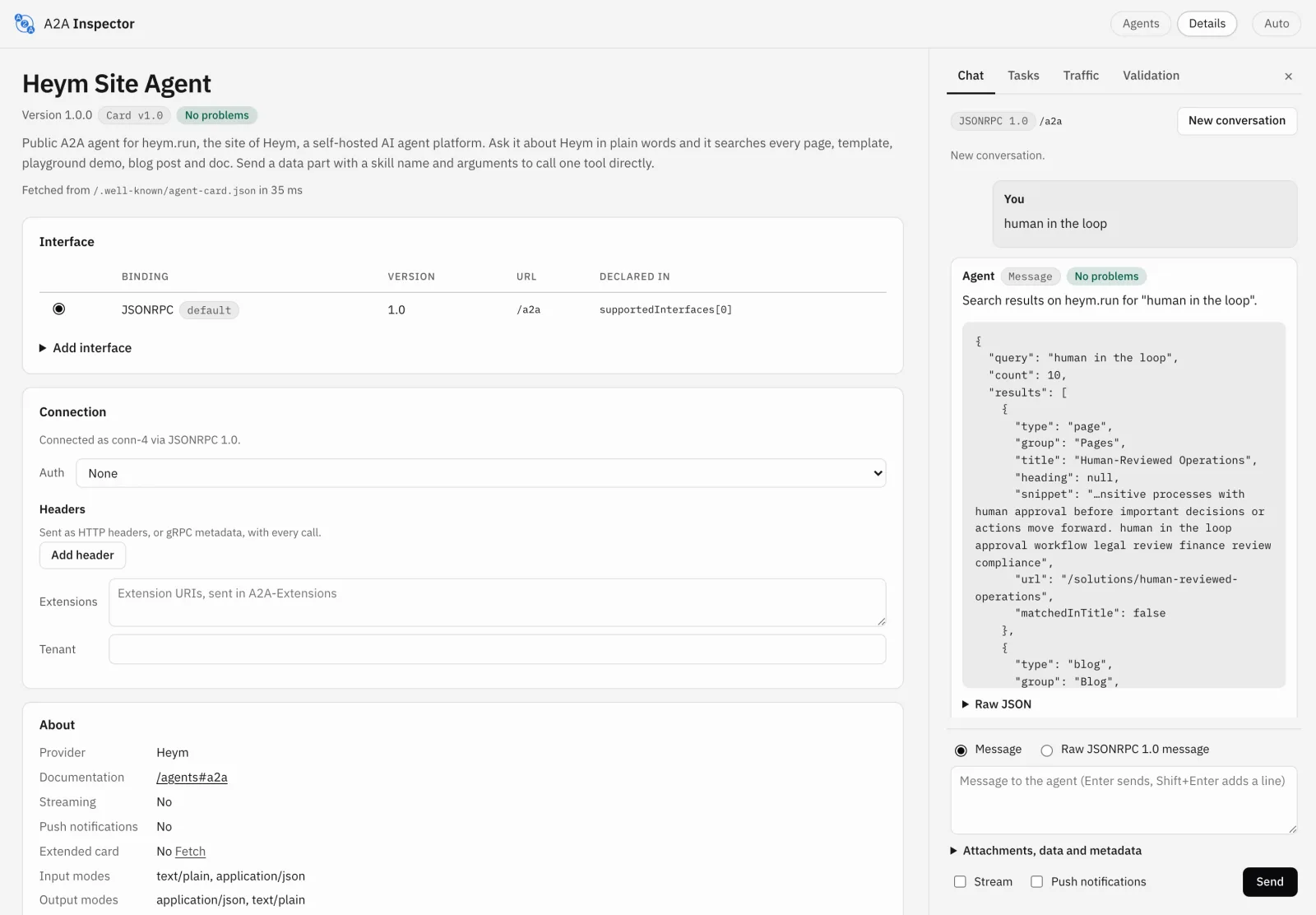
To call one skill directly, send a data part instead of text: {"data": {"skill": "get_changelog", "arguments": {"limit": 1}}} returns the latest Heym release. Before publishing we parsed the card, both kinds of reply and the ListTasks answer with the official A2A Python SDK 1.2.2 types, with unknown fields refused, and every one parsed. Heym's own A2A server runs the same check in its test suite.
You can run that check on any card, including your own, with pip install a2a-sdk and a few lines of Python:
import json
import urllib.request

from a2a.types import AgentCard
from google.protobuf import json_format

url = "https://heym.run/.well-known/agent-card.json"
card = json.load(urllib.request.urlopen(url))
json_format.ParseDict(card, AgentCard(), ignore_unknown_fields=False)
print("valid A2A 1.0 agent card:", card["name"])
A field the 1.0 schema does not define raises an error that names it, which is the fastest way to find a card written for an older version.
Then point it at your own Heym
On a self-hosted Heym 0.0.140 or newer the same two calls work against your instance:
- Open the MCP / A2A tab, switch on the Heym Agent for a server and pick its model.
- Tick Enable A2A. The card shows the agent card URL and the JSON-RPC endpoint.
- Fetch the card with
curl, then sendSendMessageto the endpoint withX-MCP-Key: <your server key>andA2A-Version: 1.0.
Ask it to List my workflows and you get a completed task with the list as its artifact. Ask it to build something and use SendStreamingMessage to watch each test run go by. The A2A reference has every method, the task states and a streamed example, and the MCP / A2A tab docs cover the switches. If your team uses Heym Work, its Settings page has the same switch from Work 0.0.7.
Where MCP and A2A Each Do the Work
Serving A2A keeps the decision rule from the September post; it gives one of its branches a working implementation. MCP is how an agent reaches its tools, and Heym's agents use it in both directions: as a client of any MCP server and as a server for assistants such as Claude and Cursor, as the MCP agent runtime page lays out. A2A is how work crosses into an agent somebody else owns.
Inside your own system, coordinating agents is still orchestration. Sub agents and sub workflows in one Heym run share state and a single trace, which a protocol hop between your own agents would cost you; the patterns are in multi agent AI systems. Reach for A2A when a partner's agent, a vendor's platform or another team's runtime needs to hand Heym a task without either side opening up its internals, the situation enterprise AI agent programmes meet first.
That is also the test for whether an A2A integration is real. Ask for the agent card, then send one task. With Heym, both calls answer for as long as A2A is on.
Frequently Asked Questions
What is an A2A server?
An A2A server is software that publishes an agent over the Agent2Agent protocol so other agents can hand it work. It serves an agent card that describes the agent and its skills, accepts JSON-RPC requests such as SendMessage, and tracks each piece of work as a task with a state. Heym is an A2A server for the Heym Agent, the engine behind its Chat tab.
What is an A2A agent card?
An A2A agent card is the JSON document an agent publishes about itself: its name, its endpoint, the protocol version and binding it speaks, how to authenticate, its capabilities and its skills. A client reads the card first and then calls the endpoint the card names. Heym publishes one per MCP server while A2A is on.
Where is the A2A agent card URL?
The A2A well known agent card path is /.well-known/agent-card.json on the agent's domain. In Heym the default server's card is at that path, and each named server has its own card at /api/a2a/servers/<server id>/agent-card.json. The MCP / A2A tab shows the exact URL with a copy button.
Does an A2A agent card prove that an agent is trustworthy?
A card is a claim an agent makes about itself. A signed card, part of A2A 1.0, proves who published it, and a request proves the endpoint works, so the practical check is to fetch the card and send one task. Heym serves its card from your own domain over HTTPS, and only while the agent behind it answers.
What happens when an A2A agent card advertises a skill the agent cannot deliver?
The client finds out on its first task, which fails or ends in TASK_STATE_FAILED. Heym builds the card's skills and the heym_chat tool description from one profile of the Heym Agent, so every skill on its card is one the agent runs, and the card is served only while A2A is on.
How does A2A server authentication work in Heym?
With the same credentials as the server's MCP endpoint: the server's key in the X-MCP-Key header, or an OAuth bearer token from Heym's own OAuth server with PKCE. Both go in headers. The card declares both schemes, so a client knows what to send before its first call.
Can I test an A2A client without running my own server?
Yes. heym.run is a public A2A server. Fetch https://heym.run/.well-known/agent-card.json, then POST a SendMessage request to https://heym.run/a2a. A text part searches the site and a data part runs one of its six skills. It answers with a message and is open to every client.
Does Heym support A2A protocol streaming?
Yes. SendStreamingMessage returns a Server-Sent Events stream with the task, a status update for every step the agent takes, the reply as an artifact and the final status. SubscribeToTask follows a task that is already working. The steps use the same words as Heym's Chat tab.
How are MCP and A2A related in Heym?
They are two doors to one agent. MCP clients such as Claude or Cursor call it as the heym_chat tool; A2A clients send it tasks. Both reach the engine behind the Chat tab, so they build and test workflows, run eval suites and answer questions about runs the same way, and both report progress with the same step text.
What happens when the agent needs a credential during an A2A task?
The task moves to TASK_STATE_AUTH_REQUIRED and its status message carries a link to Heym's credential page. The user opens it in a browser where they are signed in to Heym and saves the value there. The calling agent then sends a message on the same task and the work continues, with the secret kept inside Heym.
Which A2A version does Heym speak?
A2A 1.0 over the JSON-RPC binding. Clients send A2A-Version: 1.0 and the 1.0 method names: SendMessage, SendStreamingMessage, GetTask, ListTasks, CancelTask, SubscribeToTask and GetExtendedAgentCard. A request with an older 0.3 method name gets a version error that names 1.0.
Sources
- A2A Protocol, 2026. Agent2Agent (A2A) Protocol Specification
- A2A Protocol, 2026. Agent Discovery
- A2A Project, GitHub, April 2026. Empirical data: near zero real world A2A protocol compliance despite widespread endpoint advertisement
- The Linux Foundation, April 2026. A2A Protocol Surpasses 150 Organizations, Lands in Major Cloud Platforms, and Sees Enterprise Production Use in First Year
- A2A Project, PyPI, 2026. a2a-sdk
- r/A2AProtocol, Reddit, July 2025. Looking for an A2A server for testing. Any online or open source
- Heym, October 2026. A2A reference documentation
Steps at a glance
- Open the MCP / A2A tab. In Heym, open the MCP / A2A tab. The default server and every named server each have their own Heym Agent card.
- Turn on the Heym Agent. Switch on the Heym Agent for the server you want to publish and choose the credential and model it runs on. This is the same switch that offers heym_chat to MCP clients.
- Tick Enable A2A. Tick Enable A2A on that card. The card shows the agent card URL and the JSON-RPC endpoint, each with a copy button, and the agent card starts answering.
- Fetch the agent card. Run curl against the agent card URL. You get the A2A 1.0 card with the endpoint, the two authentication schemes and nine skills.
- Send a task with the server key. POST a SendMessage request to the endpoint with the server's key in the X-MCP-Key header and A2A-Version: 1.0. Use SendStreamingMessage to watch each step as it runs.
- Answer questions on the same task. When the task stops in input required or auth required, reply on the same taskId. For a credential, open the link in the status message, save the value in Heym, then send a message to continue.

Co-founder & Engineer
Ceren is a co-founder and engineer at Heym, working on AI workflow orchestration and the visual canvas editor. She writes about AI automation, multi-agent systems, and the practitioner experience of building production LLM pipelines.
Reviewed by Mehmet Burak Akgün. Statistics cite named, dated sources, and claims about Heym are verified against the source code before publication. See our editorial policy or report a correction.
Enjoyed this post? Get the next one in your inbox.
A monthly note with practical ideas for building AI workflows that hold up in production. No noise, and you can unsubscribe anytime.